4 Ways to Troubleshoot API Integration Issues and Resolve Data Errors
Troubleshoot API integration issues by checking formats, endpoints, credentials, and logs. Learn how transformations and selective retries resolve data errors.

A connection can appear to work and still produce a failed integration. An API failure occurs when systems cannot exchange or process the expected data. To troubleshoot API integration issues, compare the request and response formats, then verify the endpoint, credentials, and required fields.
Status codes, response bodies, and logs often reveal where an exchange breaks. Documentation and direct endpoint tests help identify request problems; data transformation can resolve mismatched structures. These practical checks cover how to find the cause and handle errors so integrations can recover from temporary failures without concealing recurring faults.
Key Takeaways
- Check endpoint compatibility, expected response formats, and required fields to find where a request or response breaks down.
- Use API documentation and direct request tests to separate integration-code problems from issues with the endpoint.
- Apply a transformation or adapter layer when connected systems use different data structures or parameter names.
- Use clear error logs and selective retries to manage temporary failures while spotting recurring instability.
Table of Contents
- 1. Incompatible data formats and protocols
- 2. API documentation and exploration tools
- 3. Data transformation and adapter patterns
- 4. Error handling and resilience
- Sydeso: API development and integration
1. Incompatible data formats and protocols
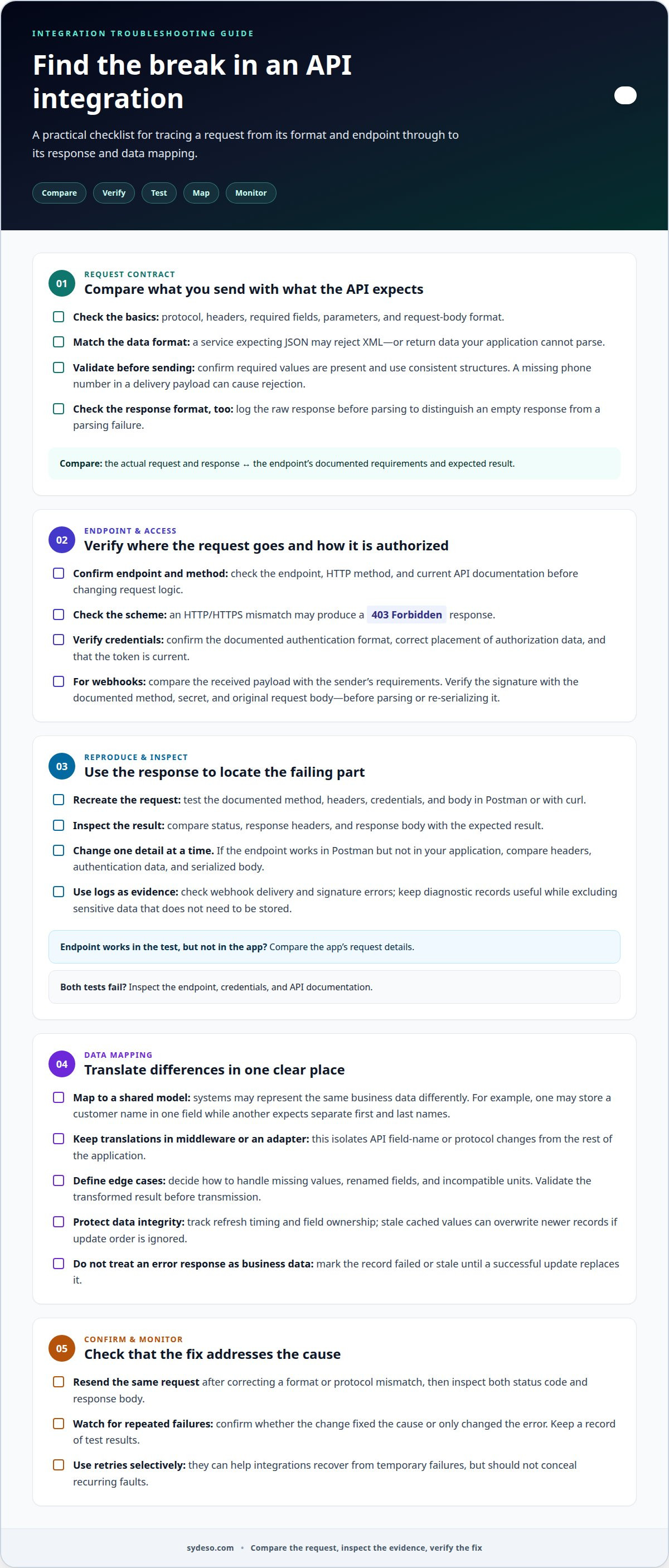
To troubleshoot API integration issues, compare the request your application sends with the endpoint’s documented requirements. Check the protocol, headers, required fields, and body format. For example, a service expecting JSON may reject XML or return data your application cannot parse.
Validate data before sending it. Confirm required values are present and use consistent formats, such as a standard address structure. A missing phone number in a delivery payload, for example, can cause the receiving system to reject the request. A validation check can catch the problem before the request leaves your system.
Keep formats consistent across connected services where practical. If one system sends dates or field names differently, map them to the agreed structure before transmission. If a response body appears to be missing, check whether the integration expects JSON or XML. Log the raw response before parsing so you can tell an empty response from a parsing failure.
The most common causes of API integration failures include mismatched formats or protocols, missing required fields, expired credentials, and endpoint changes. For example, an HTTP and HTTPS mismatch may produce a 403 Forbidden response. Check the endpoint scheme and current API documentation before changing request logic.
For webhook delivery and signature verification, inspect the delivery result and compare the received payload with the sender’s documented requirements. Verify the signature using the documented method, secret, and original request body. Parsing or re-serializing the body first can change its contents and cause verification to fail. Check webhook logs for rejected deliveries and signature errors.
OAuth 2 is an API security protocol, so check that the request follows the endpoint’s documented authentication format. Confirm the authorization data is placed correctly and that the token remains current. A valid payload cannot succeed if the receiving service rejects its credentials.
After correcting a format or protocol mismatch, send the same request again and inspect both the status code and response body. Monitor repeated failures to determine whether the change fixed the cause or merely changed the error. Keep a record of the results so you can improve the integration without masking data problems.
2. API documentation and exploration tools
Treat API documentation as the contract between your application and the service. Before changing code, locate the endpoint, HTTP method, required headers, authentication method, parameters, and expected response. A mismatch in any of these can explain why requests fail, even when the endpoint is reachable.
Create a short reference for each integration. Record where to send requests, required fields, acceptable values, and how errors appear. Include a sample request and response from the API documentation. Your team can compare its payload with the example to spot a missing parameter or incorrect field name.
Test an endpoint by reproducing the request in Postman or with curl, using the documented method, headers, credentials, and body. Compare the returned status, headers, and response body with the expected result. This helps separate endpoint behavior from problems in your application’s integration code.
Change one request detail at a time during testing. If the endpoint works in Postman but fails in your application, compare their headers, authentication data, and serialized body. If both tests fail, inspect the endpoint, credentials, and API documentation for the likely cause. Save a working request as a repeatable test.
Integration documentation should explain how connected systems exchange data, not just list endpoint names. Note which application owns each field, how values map between systems, and what happens when a request fails. Clear records help another developer reproduce the issue without guessing about past decisions.
Keep those records aligned with API changes. After an endpoint update, revise the request examples and rerun the saved test. A version change or renamed parameter can make old instructions misleading. Consistent documentation also gives teams a shared reference for monitoring failures in development and production.
When an integration needs structured implementation and maintenance, API development and integration can address request behavior, documentation, and testing as connected parts of the work.
3. Data transformation and adapter patterns
Connected systems often give the same business data different meanings or structures. A transformation layer converts each system’s fields into a shared internal model, then maps that model to the receiving API. For example, an order system might store a customer name in one field while another service expects separate first and last names. Explicit mapping prevents errors from spreading to later steps.
Keep translation logic in a middleware layer or adapter instead of scattering it across application code. An adapter isolates changes to an API’s field names or protocol from the rest of the integration. If a delivery service renames an order parameter, update the adapter mapping and test the translated request. Both systems can then communicate through a stable internal structure.
Data transformation libraries can parse and serialize formats, but they cannot determine business meaning. Define how the integration handles missing values, renamed fields, and incompatible units. Validate the transformed result before transmission. Diagnostic logs can record the original and mapped values, while excluding sensitive data that does not need to be stored.
Caching and synchronization need separate controls. A cache can reduce repeated requests, but stale values may overwrite newer records if synchronization ignores update order. Track when data was refreshed and define which system owns each field. If an API returns an error, do not store that response as valid business data. Mark the record as failed or stale until a successful update replaces it.
For timeouts, DNS, TLS, or network failures, trace the request in sequence. Check whether the hostname resolves, a secure connection is established, and the endpoint responds. Compare timestamps in the application and middleware logs to locate delays. A DNS failure points to name resolution; a TLS error occurs during secure connection setup; a timeout after connection may indicate slow processing or a network interruption.
Monitor transformation failures and synchronization conflicts as distinct error types. This helps show whether the integration needs a mapping change, a data correction, or a connection fix. Clear middleware records also help teams identify which system owns the next action.
4. Error handling and resilience
To troubleshoot API integration issues, classify failures by status code before changing software. A 400 Bad Request means the server cannot process invalid syntax or missing parameters. A 401 Unauthorized signals invalid authentication credentials, while a 404 Not Found means the requested resource doesn’t exist on the server.
For authorization errors, developers should inspect the response, then verify the credential attached to the request. Expired authentication credentials can interrupt otherwise valid API communication. If a request returns 401, check whether its token is current and whether the integration sends credentials in the required location.
Handle rate limits and temporary connection drops with controlled retries. Follow any retry timing provided in the response, then increase the wait between attempts using exponential backoff. Set a maximum number of attempts, and do not retry requests that fail because of invalid fields or credentials. The Polly library for .NET supports configurable retry and circuit-breaker policies.
Write an error-handling protocol for each integration. Define which failures can be retried, which need correction, and where unresolved requests go. A missing required field, for example, needs data correction, not repeated submission. If an error message is unhelpful, log the raw response and inspect it before parsing. Keep enough context to identify the endpoint and request while protecting sensitive data.
Monitor API logs for rising error rates and slower response times. Group failures by endpoint, status code, and time to distinguish a single bad request from a broader service interruption. If a successful rerun is followed by repeated failures, investigate endpoint instability rather than treating each run as an isolated event.
Use API logs and a dashboard to track response times and error rates. Teams can troubleshoot API integration issues by reproducing a specific failure with Postman or curl, then comparing the result with production logs. This connects an observed error to the request that caused it.
If your team needs resilient request handling built into an integration, improve your API integration with defined retry rules, useful logs, and clear failure paths.
Sydeso: API development and integration
Sydeso develops API integrations for businesses that need connected systems to exchange data reliably. This work is useful when recurring failures stem from unclear ownership, changing data structures, or error handling that needs to be built into the integration.
The work can include mapping how systems communicate, transforming data between formats, and defining how the integration handles failed requests. For broader operational needs, custom software or internal tools can support the workflows around those connections. The right scope depends on the systems involved and the specific failure points.
Bring the affected workflow, examples of failed requests, and relevant error logs to an initial discussion. That context helps define the integration problem and the work required to address it. Contact Sydeso to discuss your API integration needs.
Set a clear path for your next integration
Recurring API failures can point to a deeper issue in how connected systems support your workflow. Before changing the integration, define the operational outcome it needs to support, the systems involved, and who owns each part of the data exchange. This gives the next development step a clear purpose.
Sydeso supports this work through API development and integration. If the connection also depends on broader business software, custom software development or internal tools may address related workflow needs. For an early-stage product, MVP development can include the integration as part of the core build.
Bring the business process and the integration problem into the conversation. Sydeso can discuss a practical scope for resolving the issue and supporting the work around it. Contact Sydeso to discuss your API integration. A clear next step can put your systems on a more dependable path.
Frequently Asked Questions
What is API Failure?
An API failure is an unsuccessful exchange between an application and an API, or a failure to use the returned result. The request might be rejected, time out, or return data the application cannot use. For example, a checkout may complete locally while the inventory update fails. Track the affected business action alongside the technical error to understand the failure’s impact.
How do I troubleshoot API authentication and authorization errors?
Separate identity checks from access checks. Confirm the request uses the expected authentication method, then inspect whether its account or token has permission for that endpoint. For OAuth 2, compare the authorization format with the API’s instructions and review token age, renewal, and rotation. Avoid copying credentials into shared tickets or logs. If access recently changed, compare the endpoint’s permissions with the integration’s current role.
How can I diagnose API 400, 401, 403, 404, 429, and 5xx responses?
Use each response to choose the next diagnostic step. For 400, inspect request syntax and required values; for 401, examine credentials; for 403, check access and endpoint configuration; for 404, confirm the resource path. For 429, inspect rate-limit details before retrying. For 5xx responses, record the affected endpoint and timing, then determine whether failures recur across requests.
How do I debug incorrect API request headers, parameters, and payloads?
Capture a failing request in a controlled test, then compare it with a known working request. Check header names and values, parameter spelling, encoding, and whether the body matches the selected content type. Temporarily remove optional fields to isolate the fault. For example, if a query works without a date filter, inspect that parameter’s format and escaping before changing unrelated code.
How do I diagnose API versioning, schema, and compatibility problems?
Compare the deployed request and response schemas with the version the integration currently targets. Look for removed fields, renamed fields, new required values, and data type differences. A response can remain valid JSON while breaking application logic if a field changes from text to a nested object. Test version changes against representative records, including older records that may use earlier structures.
What security risks should I consider when troubleshooting API integrations?
Debugging can expose credentials, personal data, or confidential business records through request captures and logs. Restrict access to diagnostic material, redact secrets and unnecessary fields, and rotate exposed tokens securely. Use test data where possible, and keep production payloads out of shared channels. Review logging and retention settings before enabling detailed traces, especially when troubleshooting integrations that handle customer information.
Questions
- What is API Failure?
- An API failure is an unsuccessful exchange between an application and an API, or a failure to use the returned result. The request might be rejected, time out, or return data the application cannot use. For example, a checkout may complete locally while the inventory update fails. Track the affected business action alongside the technical error to understand the failure’s impact.
- How do I troubleshoot API authentication and authorization errors?
- Separate identity checks from access checks. Confirm the request uses the expected authentication method, then inspect whether its account or token has permission for that endpoint. For OAuth 2, compare the authorization format with the API’s instructions and review token age, renewal, and rotation. Avoid copying credentials into shared tickets or logs. If access recently changed, compare the endpoint’s permissions with the integration’s current role.
- How can I diagnose API 400, 401, 403, 404, 429, and 5xx responses?
- Use each response to choose the next diagnostic step. For 400, inspect request syntax and required values; for 401, examine credentials; for 403, check access and endpoint configuration; for 404, confirm the resource path. For 429, inspect rate-limit details before retrying. For 5xx responses, record the affected endpoint and timing, then determine whether failures recur across requests.
- How do I debug incorrect API request headers, parameters, and payloads?
- Capture a failing request in a controlled test, then compare it with a known working request. Check header names and values, parameter spelling, encoding, and whether the body matches the selected content type. Temporarily remove optional fields to isolate the fault. For example, if a query works without a date filter, inspect that parameter’s format and escaping before changing unrelated code.
- How do I diagnose API versioning, schema, and compatibility problems?
- Compare the deployed request and response schemas with the version the integration currently targets. Look for removed fields, renamed fields, new required values, and data type differences. A response can remain valid JSON while breaking application logic if a field changes from text to a nested object. Test version changes against representative records, including older records that may use earlier structures.
- What security risks should I consider when troubleshooting API integrations?
- Debugging can expose credentials, personal data, or confidential business records through request captures and logs. Restrict access to diagnostic material, redact secrets and unnecessary fields, and rotate exposed tokens securely. Use test data where possible, and keep production payloads out of shared channels. Review logging and retention settings before enabling detailed traces, especially when troubleshooting integrations that handle customer information.