AI agent solutions for customer service and enterprise workflows
Explore AI agent solutions for customer service and enterprise workflows, including automation, integrations, human oversight, and ways to measure ROI.

An AI agent platform coordinates software agents that can pursue goals through multi-step decisions, tool use, and task execution, according to the Office of the Superintendent of Financial Institutions. AI agent solutions can support customer service and business workflows, but useful results depend on clearly defined tasks, approved access, and human oversight.
That distinction matters: an agent is not simply a chatbot that returns an answer. In customer service, agents can handle routine requests around the clock, including 24/7 support, while defined escalation paths help route complex cases to people.
This guide explains what AI agent platforms do and where agents can fit into business operations. You’ll learn how they support customer conversations, automate workflows, and help measure productivity and ROI without assuming either is guaranteed. It also covers the controls, integrations, and implementation choices that shape a practical solution.
Key Takeaways
- Map customer requests by complexity so routine interactions can be handled consistently and cases needing human judgment are routed appropriately.
- Choose workflow tasks with clear inputs, decision points, and handoffs before automating them across business systems.
- Measure productivity and ROI against a defined baseline, including time saved, completion quality, and the effort required to maintain the system.
- When standard tools don’t fit the process, Sydeso can build custom software, internal tools, or an MVP to support the required workflow.
Table of Contents
- Customer service and conversational agents
- Enterprise workflow automation with AI agents
- AI agent ROI and productivity
- AI agent definition and capabilities
- Sydeso: Custom software development
Customer service and conversational agents
Customer service agents handle defined requests through chat, email, or voice. A reliable design connects each channel to shared policies and approved records, with a clear route for human escalation.
Custom Agent Development
Start with a specific support task, such as checking an order or explaining a return process. Define what information the agent can access, what actions it can take, and when it must hand a case to a person. Test each path against real customer examples before adding more request types. This keeps the agent’s role clear throughout each conversation.
Feature and Usability Comparison
There is no single best platform for every business. The right fit depends on channel coverage, connections to customer records, control over agent actions, and how easily staff can update workflows. Compare platforms using the same example, such as changing a delivery address. Check whether setup requires specialist configuration, whether staff can review responses, and how handoffs work between channels.
Privacy, Security, and Compliance
In the United States, assess how each agent handles personal and financial information before connecting it to customer conversations. Limit access to records needed for the task, separate read access from actions that change an account, and keep a review trail for sensitive requests. For example, an agent may explain a billing entry but route a payment change to an authorized employee.
Risks and Limitations
Agents can misunderstand requests, use outdated information, or take an incorrect action. Prompt injection occurs when hostile instructions embedded in a message or webpage try to override the agent’s intended task. Restrict tools and permissions, test adversarial examples, and require human review for account changes. The Ohio State University has noted that autonomous web agents could misuse financial information or spread misinformation.
Enterprise workflow automation with AI agents
Enterprise agents can move work between systems when a process requires decisions rather than a fixed trigger. For example, an agent can review an incoming invoice, compare its details with a purchase order, and route mismatches to the appropriate employee. Start with a workflow that has clear inputs, records, and approval boundaries.
Before automating, map the process from intake to completion. Mark each handoff, the system of record, and the decisions staff make. Separate predictable actions from exceptions: a standard record update may follow a defined path, while conflicting customer or supplier details need review. This map defines the agent’s scope and shows where a person remains responsible.
- For invoice intake, extract fields from submitted documents and match them against purchase-order records.
- For employee onboarding, gather approved details and prepare tasks for human review before account access changes.
- For sales operations, summarize a new lead’s records and create a follow-up task in the assigned queue.
- For IT requests, classify a ticket and direct it to the team responsible for that system.
Each use case depends on reliable access to relevant systems. API connections let an agent retrieve or update records, while permissions define which actions it can take. Keep write access narrow, and use human approval for actions affecting payments, access rights, or customer commitments.
Test the workflow with ordinary cases, missing information, and conflicting records. Record whether the agent chose the right action, stopped when required, and left a usable audit trail. If separate tools or handoffs are causing repeat work, a focused workflow automation project can connect the steps and define agent boundaries around the process.
AI agent ROI and productivity
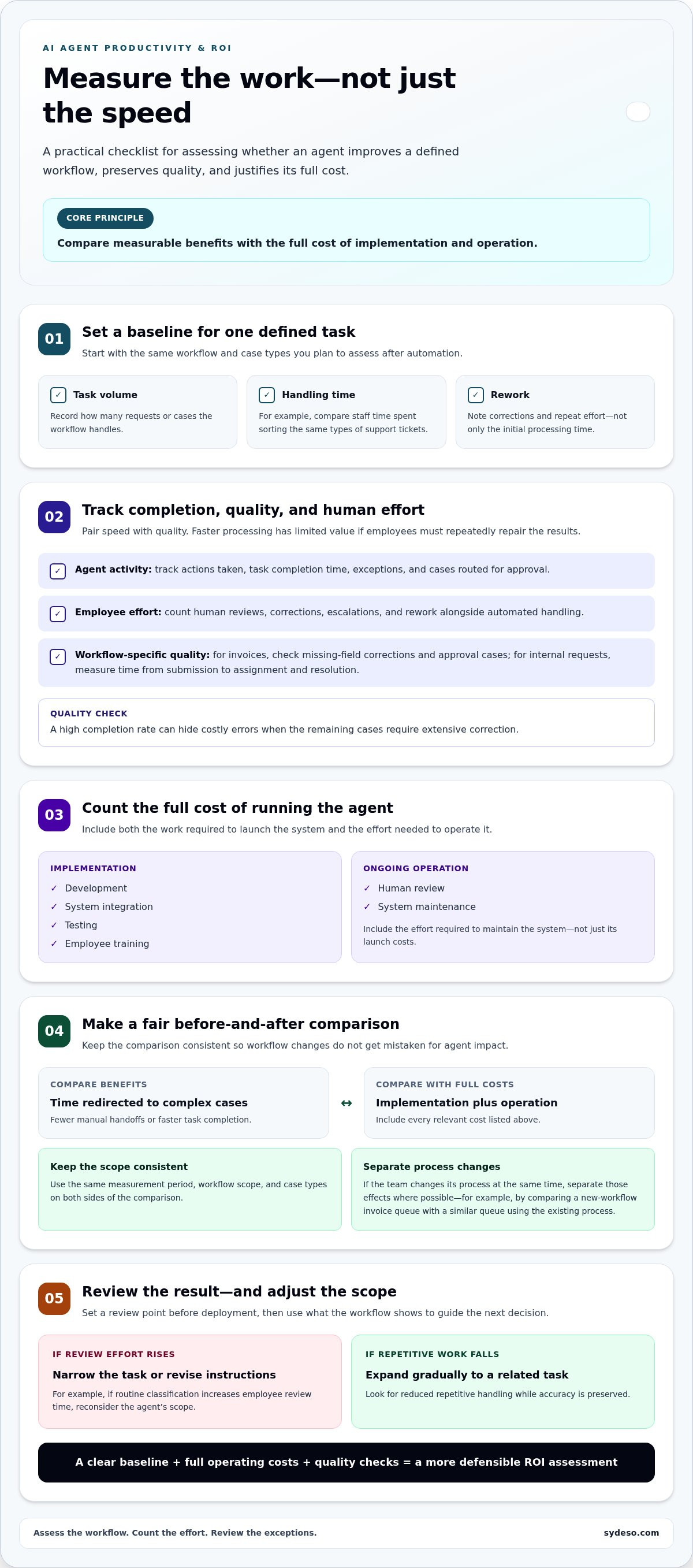
Measure an agent against a defined task, not broad claims about efficiency. For example, compare the time staff spend sorting support tickets before and after automation. Track the same ticket types and count human reviews, corrections, and escalations. This baseline shows whether the agent changes the work or simply shifts effort elsewhere.
Productivity can be measured in several practical ways. For invoice processing, record completion time, missing-field corrections, and cases routed for approval. For internal requests, measure the time from submission to assignment and resolution. Pair speed with quality: a faster process adds little value if staff repeatedly have to fix incorrect records or explain inconsistent outcomes.
- Set a baseline for task volume, handling time, and rework.
- Track agent actions, employee review, exceptions, and system maintenance.
- Compare results for the same workflow and case types.
Calculate ROI by comparing measurable benefits with the full cost of implementation and operation. Include development, system integration, testing, employee training, human review, and ongoing maintenance. Then assess value such as staff time redirected to complex cases, fewer manual handoffs, or faster completion. Use the same measurement period and workflow scope on both sides of the comparison.
Attribution matters. If the team changes its process while introducing an agent, separate the effects where possible. For example, compare an invoice queue using the new workflow with a similar queue retaining its existing process. Review exceptions as well as successful cases: a high completion rate can hide costly errors if the remaining cases need extensive correction.
Set a review point before deployment. If the agent handles routine classification but increases review time, narrow its task or revise its instructions. If it reduces repetitive handling while preserving accuracy, expand gradually to a related task. A clear baseline, full operating costs, and quality checks make productivity gains easier to assess and ROI more defensible.
AI agent definition and capabilities
According to the Office of the Superintendent of Financial Institutions, agentic AI can autonomously pursue goals through multi-step decisions, tool use, and task execution. Use an agent when a task needs those steps and can operate within defined permissions. Choose a chatbot for answering questions, fixed workflow automation for predictable rules, and human staff for judgment-heavy decisions.
The distinction is practical. A chatbot can explain an expense policy using approved documents. Fixed automation can route a form when a required field is complete. An agent can interpret a less structured request, gather information from connected tools, choose an allowed action, and report what it did. Staff remain responsible for decisions beyond the agent’s boundaries.
Consider a procurement request with an unclear description. An agent could identify missing details, search an approved catalog, compare the request with purchasing rules, and prepare a recommendation. Its capabilities depend on the tools and data it can access. A catalog connection supports product lookup; a purchasing system connection may support draft creation if permissions allow.
- Interpret: identify the goal and relevant details in a request.
- Plan: select approved steps and tools for the task.
- Act: retrieve information or prepare a permitted change.
- Report: record the result and flag unresolved exceptions.
Make the operating boundaries explicit. Define which records the agent can read, which changes it can prepare, and which actions require approval. Test incomplete requests, conflicting records, and unavailable tools before expanding its role. These checks show whether the agent can complete the intended task without making unsupported decisions.
For a process that needs coordinated decisions rather than a single response, map an agent’s tasks and boundaries before development begins.
Sydeso: Custom software development
Sydeso develops custom software for businesses that need tailored systems or integrations for agent workflows. Its AI agent development service fits when a defined task requires an agent to work within business processes, rather than a generic chatbot. Internal tools can support staff review and operational handoffs, while an MVP can test a focused use case before wider implementation.
Start by documenting the task, the systems involved, the agent’s permitted actions, and where staff approval is required. Sydeso uses these requirements to shape the software and support its launch. Your team defines the business process and decision boundaries; the software is built around them.
Visit sydeso.com to discuss custom software for your workflow.
Turn a defined use case into a practical next step
Move from exploration to a scoped decision. Choose one business task, identify who is responsible for it, and document its inputs, exceptions, and approval points. Then decide what evidence would justify expanding the work. A focused scope makes it easier to assess whether AI agent solutions fit the operation and what needs to be built around them.
Sydeso can support this work through custom software development, internal tools development, or an MVP. Each option suits a different need: tailored systems for a distinct process, staff-facing tools for operational work, or a smaller build to test a use case. Your team provides the process knowledge and priorities, and the implementation is shaped around them.
Bring a workflow example, the systems it touches, and the outcome your team needs. Contact Sydeso about AI agent solutions to discuss a practical starting point. A clear first use case gives your team a grounded basis for the next decision.
Frequently Asked Questions
What is an AI agent platform?
An AI agent platform provides components for configuring, connecting, and overseeing agents. It can bring together a language model, instructions, approved tools, and activity records. For example, a service desk platform might let an agent search an internal knowledge base and draft a ticket response. Access settings determine which records the agent can view or change.
How do AI agents work?
An AI agent receives a goal, reviews available context, and selects actions using its configured tools. For example, a travel expense agent could read a submitted receipt, identify missing information, and prepare a query for the employee. The system then returns a result or requests human input. Its actions depend on the instructions, data, and permissions it receives.
What are AI agent solutions and how do they work?
AI agent solutions combine an agent with the software, business rules, and connections needed for a defined task. A recruiting team might use one to organize incoming applications by role and prepare summaries for review. The agent works within approved data and actions in the workflow. Staff remain responsible for decisions such as selecting candidates or changing hiring status.
What are the main types of AI agents and use cases?
Common business agent types include conversational agents, workflow agents, research assistants, and agents that support software development. A conversational agent can help employees find policy information; a workflow agent can prepare a purchase request. Research agents can organize information from approved sources, while development agents can draft test cases for review. Choose based on the task, data access, and decision risk.
How do you build or deploy an AI agent step by step?
Start by selecting one task and defining its intended result. Document the allowed data, tools, actions, and escalation conditions. Build a narrow version and test it against routine requests, incomplete inputs, and exceptions. Review the output with the people who own the process. Deploy to a controlled group, monitor errors and handoffs, then adjust the scope before expanding access.
What data, tools, and integrations do AI agents need?
Agents need task-relevant information, clear instructions, and tools that support permitted actions. A returns agent may need product details, order status, and the approved returns process. Connections to an order system can provide current records, while a service interface can pass requests between systems. Limit access to necessary data and make sure records are current enough for the task.
Questions
- What is an AI agent platform?
- An AI agent platform provides components for configuring, connecting, and overseeing agents. It can bring together a language model, instructions, approved tools, and activity records. For example, a service desk platform might let an agent search an internal knowledge base and draft a ticket response. Access settings determine which records the agent can view or change.
- How do AI agents work?
- An AI agent receives a goal, reviews available context, and selects actions using its configured tools. For example, a travel expense agent could read a submitted receipt, identify missing information, and prepare a query for the employee. The system then returns a result or requests human input. Its actions depend on the instructions, data, and permissions it receives.
- What are AI agent solutions and how do they work?
- AI agent solutions combine an agent with the software, business rules, and connections needed for a defined task. A recruiting team might use one to organize incoming applications by role and prepare summaries for review. The agent works within approved data and actions in the workflow. Staff remain responsible for decisions such as selecting candidates or changing hiring status.
- What are the main types of AI agents and use cases?
- Common business agent types include conversational agents, workflow agents, research assistants, and agents that support software development. A conversational agent can help employees find policy information; a workflow agent can prepare a purchase request. Research agents can organize information from approved sources, while development agents can draft test cases for review. Choose based on the task, data access, and decision risk.
- How do you build or deploy an AI agent step by step?
- Start by selecting one task and defining its intended result. Document the allowed data, tools, actions, and escalation conditions. Build a narrow version and test it against routine requests, incomplete inputs, and exceptions. Review the output with the people who own the process. Deploy to a controlled group, monitor errors and handoffs, then adjust the scope before expanding access.
- What data, tools, and integrations do AI agents need?
- Agents need task-relevant information, clear instructions, and tools that support permitted actions. A returns agent may need product details, order status, and the approved returns process. Connections to an order system can provide current records, while a service interface can pass requests between systems. Limit access to necessary data and make sure records are current enough for the task.