B2B Customer Portal Development: A Buyer’s Guide to the Right Solution
Plan successful B2B customer portal development. Learn how to map account workflows, compare custom vs platform builds, and integrate your critical systems.

A B2B portal can create more work if it sits apart from the systems and routines customers already rely on. Effective b2b customer portal development starts with account workflows, then connects the portal to the data and processes that support them.
If customers still need email, phone calls, or staff help to place orders, check transactions, or manage account details, the need is clear. But adding features before agreeing on user roles, business priorities, and system requirements can expand scope without solving those tasks.
This guide explains how to define portal workflows and features around customer needs, compare a custom build with extending existing systems, and plan integrations with the tools that hold customer and transaction data. It also covers how to set delivery boundaries, acceptance criteria, and adoption measures before development begins. The goal is a portal that fits your operations and gives customers a practical way to complete routine work themselves.
Key Takeaways
- Define the portal around private, account-specific tasks customers need to complete, not a list of features.
- Prioritize features by customer jobs, staff workflows, and business outcomes. Separate launch essentials from later enhancements.
- Compare a custom build with extending an existing platform using workflow fit, integration complexity, change frequency, and operational ownership.
- Use a staged b2b customer portal development process to validate workflows and design before full implementation.
- Set clear delivery responsibilities, acceptance criteria, and adoption measures so the partner and internal team can assess progress together.
Table of Contents
- What B2B Customer Portal Development Should Solve for Your Business
- Translate B2B Customer Needs into Portal Features and Integrations
- Custom B2B Portal or Existing Platform: How to Compare the Options
- Plan B2B Customer Portal Delivery Around Validation and Adoption
- Choose a B2B Customer Portal Development Partner for the Full Lifecycle
What B2B Customer Portal Development Should Solve for Your Business
A B2B customer portal is a private digital workspace where business customers complete account-specific tasks. It gives each customer an authenticated place to access relevant information and get work done without relying on a public website or a chain of staff handoffs. Strong b2b customer portal development starts with the work customers need to do, not a preset feature list.
A public website presents information to a broad audience. A portal uses authentication and permissions to restrict access, then displays information based on the customer’s account and role. One user might see documents for their organization, while another might submit a service request or review a transaction. The access rules should reflect how customer accounts and responsibilities work in your business.
Tasks may include retrieving documents, submitting requests, viewing order or service status, updating account details, and finding support information. The right mix depends on your relationship with customers. For context, What is B2B? explains the business-to-business relationship; a portal should support the specific work that relationship requires.
Which customer workflows justify a portal?
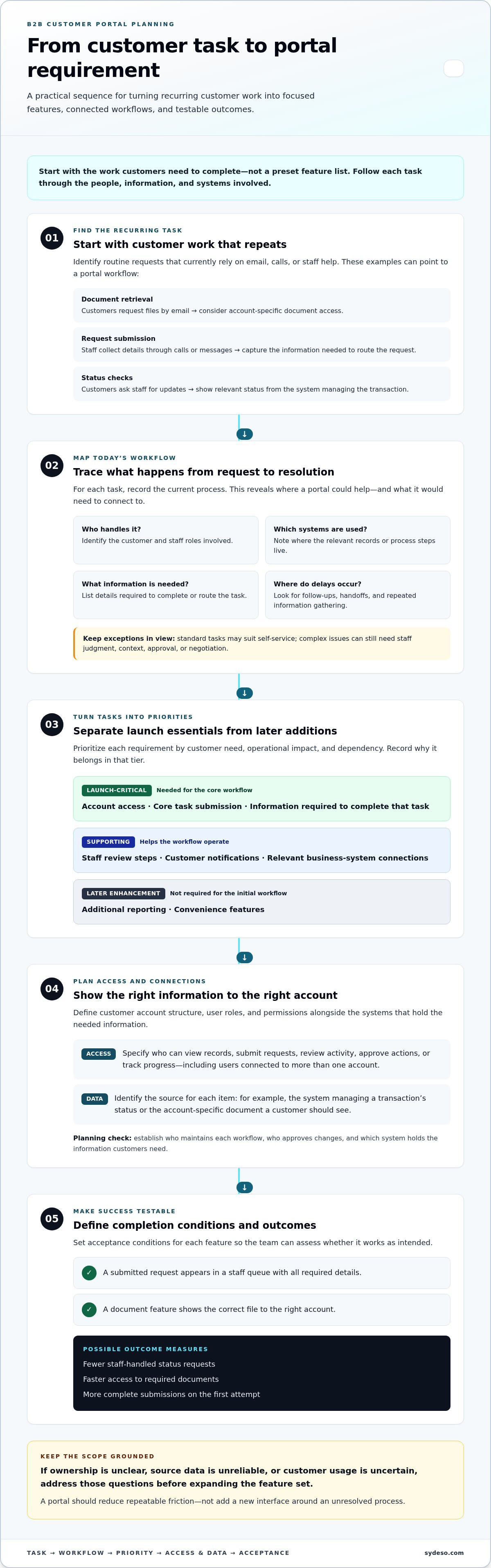
Start with recurring requests, then trace how each one moves through your organization. For each request, record who handles it, which systems they use, what information they need, and where delays or repeated follow-ups occur. This reveals which tasks a portal could simplify and which systems it would need to connect with.
- Document retrieval: Customers request files by email. A portal could provide account-specific access to the right documents.
- Request submission: Staff collect details through calls or messages. A structured form could capture the information needed to route a request.
- Status checks: Customers ask staff for transaction updates. A portal could display relevant status information from the system that manages the transaction.
Separate frequent, predictable tasks from exceptions. Customers may be able to retrieve a standard document themselves, while a complex service issue still needs staff judgment. Keep direct support available for work that depends on context, approval, or negotiation. The goal is to reduce repeatable friction, not force every interaction into self-service.
When is a portal not the first solution?
Pause if customers rarely use digital channels or no team owns the information and process behind a proposed feature. An interface cannot resolve unclear responsibility or unreliable source data. First establish who maintains each workflow, who approves changes, and which system holds the information customers need.
- If handoffs cause delays, a workflow change may clarify ownership before a portal is needed.
- If data is scattered, an integration may address the underlying issue before adding a customer-facing layer.
- If usage is uncertain, validate demand with customers and staff before committing to a broad feature set.
Define the intended result before discussing screens. A useful measure might be fewer staff-handled status requests, faster access to required documents, or more complete submissions on the first attempt. Record the current process and agree on how to assess the result. That gives the portal a clear purpose and helps distinguish necessary capabilities from features that only add scope.
Translate B2B Customer Needs into Portal Features and Integrations
Turn each verified customer task into a requirement the team can review. For every task, record who performs it, what information they need, which staff workflow it affects, and the business outcome it supports. For example, a request form may reduce incomplete submissions only if it captures the details staff need to act. A status page depends on having a reliable source for that status.
A portal feature is valuable only when it completes a verified customer task. Use that test to keep b2b customer portal development focused on useful work instead of accumulating features without a clear purpose.
Prioritize requirements by customer need, operational impact, and dependency. Mark a capability as launch-critical if customers need it to complete the core workflow or if another feature depends on it. Defer enhancements that add convenience but don't support the initial outcome. Document the reason for each priority so scope decisions remain clear as design and development progress.
- Launch-critical: Account access, core task submission, and the information needed to complete that task.
- Supporting: Staff review steps, customer notifications, and relevant connections to business systems.
- Later enhancement: Additional reporting or convenience features that aren't required for the initial workflow.
For each item, define what completion means. A request might need to appear in a staff queue with all required details, while a document feature might need to show the correct file to the right account. These acceptance conditions make priorities testable rather than subjective.
Set account access, roles, and permissions
Describe the customer account structure and the roles within it. Specify which users can view records, submit requests, review activity, approve actions, or track progress. Include sign-in and access requirements in the scope, along with rules for users connected to more than one account. Treat these decisions as operating requirements: they determine what information each person may see and what actions they may take.
Connect portal workflows to business systems
List the authoritative source for each record, such as a CRM, ERP, or service application. For every portal workflow, specify which records it reads, creates, or updates through APIs. Define acceptable data freshness, what the customer sees when a connection fails, and which system or team resolves conflicting records. Sydeso's custom portal development brings workflow and integration requirements into one implementation plan.
Make data ownership explicit before development begins. If account details differ between systems, assign a source of truth and a process for resolving the mismatch. If an update can't be completed, decide whether the portal should preserve the request, display its status, or direct the issue to staff. These rules shape the workflow, not just the interface, and give the team concrete cases to validate during testing.
Custom B2B Portal or Existing Platform: How to Compare the Options
Choosing between extending an existing platform and building a tailored portal is a decision about fit, not a contest between old and new. An existing system may already support most customer tasks. A custom portal may better fit account relationships or workflows that the current system handles awkwardly. Compare both against the same requirements, including the work customers need to complete and the systems that support it.
Assess four factors: workflow fit, integration complexity, how often requirements change, and who will own ongoing operation. Include configuration limits and maintenance effort in the review. A quick extension can still create long-term work if changes are difficult to maintain. A tailored build also needs clear scope, technical ownership, and a support plan.
| Decision factor | Extend an existing platform | Build a tailored portal |
|---|---|---|
| Workflow fit | Stronger when standard workflows closely match customer and staff needs. | Useful when account workflows require distinct steps or rules. |
| Integrations | May suit needs already supported by the platform’s existing connections. | Can be shaped around required system relationships, with integration work scoped directly. |
| Change frequency | Works well when platform configuration can accommodate expected changes. | Offers more control over changes, alongside responsibility for maintaining them. |
| Operational ownership | Depends on platform administration and its configuration boundaries. | Requires ownership of the application, integrations, and ongoing maintenance. |
When does extending an existing platform make sense?
Extending a platform is a reasonable fit when it already supports the core customer journey and only a few gaps remain. Map each gap to an actual customer outcome. Separate a missing capability from a preference about layout or terminology. Then assess whether configuration can close the gap without creating brittle custom changes or crossing important data boundaries.
When can a tailored portal be the better fit?
A tailored portal may fit better when account workflows or relationships between systems are distinctive. First confirm that the required data can move between the portal and its source systems in a way that supports the intended journey. Then compare long-term control, maintenance responsibility, and expected changes, not just the work required to deliver an initial version.
Custom development requires discipline. Set a defined first release, document what is out of scope, assign decision-makers, and agree who owns maintenance. Without those controls, changing requirements can expand the build and blur accountability. With them, the team can make deliberate trade-offs and assess the portal against agreed workflows. Sydeso's custom software development supports tailored portal work shaped around business requirements.
Plan B2B Customer Portal Delivery Around Validation and Adoption
A controlled delivery process tests the assumptions behind the portal before they become expensive to change. In b2b customer portal development, customer and staff feedback should shape the workflow before the team commits to full implementation. Use a sequence with clear outputs at each stage:
- Map workflows. Document the customer’s steps, staff handoffs, exceptions, and systems involved.
- Define requirements. Set user roles, task rules, integration needs, and the smallest useful release.
- Validate a design. Walk customers and staff through a prototype or sample workflow. Record where they hesitate, need extra information, or expect a different outcome.
- Build the agreed scope. Implement the validated tasks and system connections without adding unapproved features.
- Test end to end. Check access, task completion, data exchange, and failure handling against documented acceptance criteria.
- Launch in stages. Introduce the portal to a defined customer group or workflow, review results, then plan the next release.
Validate scope before development
Before implementation, document the roles, task flows, system dependencies, and boundaries of the first release. Review these with business stakeholders and representative customers and staff. A walkthrough can expose missing approval steps, unclear labels, or information customers need before submitting a request. Resolve those findings in the requirements or design, then record the agreed changes and decisions.
Make acceptance criteria observable. For example, confirm that users can access only the records their role permits, complete a core task, and see an accurate result from the connected system. Test expected errors too: an unavailable service, rejected update, or incomplete submission should produce a defined outcome rather than leave the user uncertain.
- Permissions: Each role can perform only its approved actions.
- Key tasks: A user can complete the workflow from start to finish.
- Integration behavior: Records are read or updated as specified.
- Error states: Failed actions are visible and have a clear next step.
Launch readiness depends on tested workflows, not feature completion alone. A feature is not ready simply because it appears on screen. The team must confirm that it works for the intended user, handles expected exceptions, and supports the underlying staff process.
Prepare for launch and measure adoption
Plan customer onboarding, internal ownership, support procedures, and responsibility for portal content before launch. After release, track task completion, repeat usage, related support contacts, and workflow exceptions. Compare these measures with the outcome set during scoping. Low use or frequent staff intervention may point to a training need, a workflow gap, or an integration issue.
Use feedback from customers and staff to choose improvements. Fix observed friction before adding features without evidence. Sydeso supports portal delivery from planning through launch and ongoing software support. Plan your customer portal project around validated workflows, clear acceptance criteria, and adoption measures.
Choose a B2B Customer Portal Development Partner for the Full Lifecycle
A portal engagement covers more than implementation. It starts with discovery and requirements, then moves through architecture, integration, testing, launch, and ongoing support. Evaluate how the partner handles each stage and how decisions move from one stage to the next. A practical guide to custom software development can also help set expectations for the wider delivery process.
For b2b customer portal development, clear ownership matters as much as technical skill. The partner documents requirements, dependencies, and implementation decisions. Your team supplies domain knowledge, timely decisions, access to relevant systems, and feedback from the people who use the workflows. Both sides need to agree on review points and who can approve scope changes.
What should a portal engagement make clear?
Before development begins, the engagement should set out priorities, dependencies, and acceptance criteria in a form both teams can review. It should connect each portal workflow to the business systems and staff processes it relies on. This keeps integration decisions grounded in operational needs rather than treating them as a separate technical exercise.
- Discovery: The partner records customer and staff needs, process constraints, and unresolved decisions.
- Requirements: Both teams agree on scope, priorities, roles, and acceptance criteria.
- Architecture and integration: The partner documents how the portal will exchange information with existing systems and how those connections support the workflow.
- Testing: The partner prepares test cases; your team provides business rules, sample scenarios, and reviewers who can validate expected outcomes.
- Launch: Both teams agree on readiness, customer communication, internal responsibilities, and how issues will be handled.
Review the plan at defined decision points. The partner should explain technical trade-offs and record changes. Your team should confirm that the proposed behavior reflects real account processes. Sydeso brings custom portal development together with API integration, workflow automation, launch assistance, and ongoing software support, connecting delivery work to the operational needs around the portal.
Plan for ownership after the first release
Set post-launch ownership before release. Decide who manages portal content, user access, and operational decisions. Identify who reviews customer feedback, approves changes, and coordinates support requests. A portal may need maintenance as connected systems and business workflows change, so include those responsibilities in the lifecycle plan rather than treating launch as the finish line.
Agree on how future changes will be assessed. A clear process records the request, its effect on existing workflows, and who approves the work. This helps separate necessary maintenance from new feature requests and keeps the product aligned with business priorities.
If you’re planning a portal, discuss the workflows, system connections, and ownership requirements with Sydeso. Explore Sydeso’s custom software development services as a next step for a practical project conversation.
Turn Your Portal Priorities into a Working Plan
Turn your portal idea into a short project brief. Record the customer task you want to improve, who owns it internally, the systems it depends on, and how you’ll recognize a useful result. Keep open decisions visible. This gives your team a practical basis for prioritizing work and deciding what belongs in a first release.
The brief can also guide a focused conversation about the build approach and the work required beyond launch. Sydeso builds tailored customer portals and web applications for business requirements, with API development, workflow automation, launch assistance, and ongoing support among its capabilities. The right starting point for b2b customer portal development is a clear account of the operational need, not a long feature wish list.
Discuss your B2B customer portal project with Sydeso and bring your priorities into focus. A well-defined first step gives the project a sound basis for decisions and delivery.
Frequently Asked Questions
Is a B2B customer portal the same as a B2B e-commerce site?
No. A B2B e-commerce site focuses on product discovery and transactions, while a customer portal can support other account tasks, such as service requests, project updates, and document access. The two can overlap when customers need to place orders and manage related account work in one place. Start by listing the tasks customers need to complete, then decide whether commerce functions belong in the portal or a connected experience.
Can a B2B customer portal support different customer account structures?
Yes, provided the design reflects how organizations and their users relate to one another. For example, a parent company may have several branches, each with users who need different access to records or actions. Document those relationships and rules before implementation. Test cases should include users linked to multiple accounts, changes in role, and attempts to access information outside a user’s permissions.
How much does B2B customer portal development cost?
There’s no reliable universal price because the investment depends on the portal’s workflows, account model, integrations, security needs, and ongoing ownership. A first release for one defined task has a different scope from a portal connecting several systems and customer journeys. For a useful estimate, agree on priorities, dependencies, and acceptance criteria first. In b2b customer portal development, a feature checklist alone doesn’t define the work.
How long does it take to develop a B2B customer portal?
There’s no single timeline that fits every portal. Delivery depends on how many workflows are included, whether connected systems are ready, how quickly stakeholders make decisions, and how much testing the project needs. A defined first release can make planning clearer. Set milestones around review and approval points, and agree on what must pass acceptance testing at each stage. This makes progress easier to assess than relying on a generic duration.
What happens if a connected business system is unavailable?
Plan system outages as a possible workflow condition, not an unexpected edge case. Decide whether the customer’s action can wait, what status message should appear, and how staff will find failed or pending updates. For example, a request could be saved for review rather than shown as complete if the system hasn’t accepted it. Test recovery and duplicate-submission scenarios so customers and staff can tell what happened.
Does a B2B customer portal need a mobile app?
No, not automatically. A responsive web portal may be enough if customers can complete their tasks through a browser on the devices they use. Start by checking where and how customers work, including whether tasks require device functions a web experience won’t support. Then compare the added customer value with the ongoing work of maintaining an app. Include the decision in scope rather than assuming an app is required.
Who manages portal content and customer data after launch?
Your team and technical support owners should have defined responsibilities before launch. Business owners can govern customer-facing information and account processes, while designated technical owners handle system operation and changes. Set out who approves content updates, grants or removes access, investigates data discrepancies, and prioritizes improvements. For example, a content correction and a failed data exchange need different owners. A simple responsibility map helps staff route each issue correctly.
Questions
- Which customer workflows justify a portal?
- Start with recurring requests, then trace how each one moves through your organization. For each request, record who handles it, which systems they use, what information they need, and where delays or repeated follow-ups occur. This reveals which tasks a portal could simplify and which systems it would need to connect with. Separate frequent, predictable tasks from exceptions. Customers may be able to retrieve a standard document themselves, while a complex service issue still needs staff judgment. Keep direct support available for work that depends on context, approval, or negotiation. The goal is to reduce repeatable friction, not force every interaction into self-service.
- When is a portal not the first solution?
- Pause if customers rarely use digital channels or no team owns the information and process behind a proposed feature. An interface cannot resolve unclear responsibility or unreliable source data. First establish who maintains each workflow, who approves changes, and which system holds the information customers need. Define the intended result before discussing screens. A useful measure might be fewer staff-handled status requests, faster access to required documents, or more complete submissions on the first attempt. Record the current process and agree on how to assess the result. That gives the portal a clear purpose and helps distinguish necessary capabilities from features that only add scope. Turn each verified customer task into a requirement the team can review. For every task, record who performs it, what information they need, which staff workflow it affects, and the business outcome it supports. For example, a request form may reduce incomplete submissions only if it captures the details staff need to act. A status page depends on having a reliable source for that status. A portal feature is valuable only when it completes a verified customer task. Use that test to keep b2b customer portal development focused on useful work instead of accumulating features without a clear purpose. Prioritize requirements by customer need, operational impact, and dependency. Mark a capability as launch-critical if customers need it to complete the core workflow or if another feature depends on it. Defer enhancements that add convenience but don't support the initial outcome. Document the reason for each priority so scope decisions remain clear as design and development progress. For each item, define what completion means. A request might need to appear in a staff queue with all required details, while a document feature might need to show the correct file to the right account. These acceptance conditions make priorities testable rather than subjective.
- When does extending an existing platform make sense?
- Extending a platform is a reasonable fit when it already supports the core customer journey and only a few gaps remain. Map each gap to an actual customer outcome. Separate a missing capability from a preference about layout or terminology. Then assess whether configuration can close the gap without creating brittle custom changes or crossing important data boundaries.
- When can a tailored portal be the better fit?
- A tailored portal may fit better when account workflows or relationships between systems are distinctive. First confirm that the required data can move between the portal and its source systems in a way that supports the intended journey. Then compare long-term control, maintenance responsibility, and expected changes, not just the work required to deliver an initial version. Custom development requires discipline. Set a defined first release, document what is out of scope, assign decision-makers, and agree who owns maintenance. Without those controls, changing requirements can expand the build and blur accountability. With them, the team can make deliberate trade-offs and assess the portal against agreed workflows. Sydeso's custom software development supports tailored portal work shaped around business requirements. A controlled delivery process tests the assumptions behind the portal before they become expensive to change. In b2b customer portal development, customer and staff feedback should shape the workflow before the team commits to full implementation. Use a sequence with clear outputs at each stage:
- What should a portal engagement make clear?
- Before development begins, the engagement should set out priorities, dependencies, and acceptance criteria in a form both teams can review. It should connect each portal workflow to the business systems and staff processes it relies on. This keeps integration decisions grounded in operational needs rather than treating them as a separate technical exercise. Review the plan at defined decision points. The partner should explain technical trade-offs and record changes. Your team should confirm that the proposed behavior reflects real account processes. Sydeso brings custom portal development together with API integration, workflow automation, launch assistance, and ongoing software support, connecting delivery work to the operational needs around the portal.
- Is a B2B customer portal the same as a B2B e-commerce site?
- No. A B2B e-commerce site focuses on product discovery and transactions, while a customer portal can support other account tasks, such as service requests, project updates, and document access. The two can overlap when customers need to place orders and manage related account work in one place. Start by listing the tasks customers need to complete, then decide whether commerce functions belong in the portal or a connected experience.
- Can a B2B customer portal support different customer account structures?
- Yes, provided the design reflects how organizations and their users relate to one another. For example, a parent company may have several branches, each with users who need different access to records or actions. Document those relationships and rules before implementation. Test cases should include users linked to multiple accounts, changes in role, and attempts to access information outside a user’s permissions.
- How much does B2B customer portal development cost?
- There’s no reliable universal price because the investment depends on the portal’s workflows, account model, integrations, security needs, and ongoing ownership. A first release for one defined task has a different scope from a portal connecting several systems and customer journeys. For a useful estimate, agree on priorities, dependencies, and acceptance criteria first. In b2b customer portal development, a feature checklist alone doesn’t define the work.
- How long does it take to develop a B2B customer portal?
- There’s no single timeline that fits every portal. Delivery depends on how many workflows are included, whether connected systems are ready, how quickly stakeholders make decisions, and how much testing the project needs. A defined first release can make planning clearer. Set milestones around review and approval points, and agree on what must pass acceptance testing at each stage. This makes progress easier to assess than relying on a generic duration.
- What happens if a connected business system is unavailable?
- Plan system outages as a possible workflow condition, not an unexpected edge case. Decide whether the customer’s action can wait, what status message should appear, and how staff will find failed or pending updates. For example, a request could be saved for review rather than shown as complete if the system hasn’t accepted it. Test recovery and duplicate-submission scenarios so customers and staff can tell what happened.
- Does a B2B customer portal need a mobile app?
- No, not automatically. A responsive web portal may be enough if customers can complete their tasks through a browser on the devices they use. Start by checking where and how customers work, including whether tasks require device functions a web experience won’t support. Then compare the added customer value with the ongoing work of maintaining an app. Include the decision in scope rather than assuming an app is required.
- Who manages portal content and customer data after launch?
- Your team and technical support owners should have defined responsibilities before launch. Business owners can govern customer-facing information and account processes, while designated technical owners handle system operation and changes. Set out who approves content updates, grants or removes access, investigates data discrepancies, and prioritizes improvements. For example, a content correction and a failed data exchange need different owners. A simple responsibility map helps staff route each issue correctly.