Business software integration: connecting legacy systems and cloud apps
Learn how business software integration connects legacy systems and cloud apps, what to test, and how to keep data accurate and end-to-end workflows reliable.

A data connection can work in isolation and still fail when a business workflow depends on it. Effective business software integration testing verifies that systems exchange the right data, handle errors, protect access, and complete end-to-end tasks as expected.
Testing matters most when legacy systems and cloud applications use different data formats, update at different times, or share responsibility for the same customer or transaction. A successful connection must do more than respond: it must preserve the meaning of data and keep routine work moving when something goes wrong.
This article explains which integration tests to run, what common integration services do, and how legacy and cloud systems can work together. Practical examples, from linking CRM and ERP tools to syncing customer and inventory records, help you assess the work against the processes your business relies on.
Key Takeaways
- Choose an integration approach that fits how your systems exchange data, from shared formats to connectors or middleware.
- Test complete workflows and failure handling, not just whether two applications can connect.
- Map how records move between legacy and cloud systems to keep updates consistent across teams.
- Identify repetitive work and disconnected records first to focus integration effort on practical business needs.
Table of Contents
- What are some common software integration services?
- Which software integration tests are worth performing?
- Connecting legacy systems with cloud applications
- Business software integration
- Sydeso: Custom software development
What are some common software integration services?
Integration services connect applications, data, processes, or user interfaces. For example, a CRM linked to an ERP can pass customer and order details between the systems.
Common Data Formats and Integration Types
Common data formats such as JSON, XML, and CSV let applications exchange information consistently. Standardizing these formats matters when one system labels a customer field differently from another.
Application integration connects tools, process integration coordinates steps such as order approval, and user interface integration brings information into a shared screen. Data integration combines records for analysis. Each approach serves a different purpose, so start by defining the outcome you need.
Software Integration and Data Integration
Software integration connects applications so they can communicate and support business processes. Data integration consolidates information from sources such as CRM and accounting systems. The distinction matters: a working connection can still leave reporting data inconsistent.
For example, a CRM may send a customer update to an ERP, while a reporting process combines sales records from both. Map fields, identifiers, and update rules to preserve consistency and give teams a clearer view of revenue or customer activity.
One-Way and Two-Way Synchronization
One-way synchronization sends updates from a source system to a receiving system; two-way synchronization lets both exchange updates. A web store sending orders to an ERP is a one-way flow, while shared customer records between a CRM and support tool may need two-way syncing.
Direction matters when teams edit the same record. Define which system owns each field, then set rules for conflicting changes, duplicate records, and failed updates. These controls help prevent inconsistent customer details or inventory figures across applications.
Platforms and Business System Connections
For a small business, the right platform depends on the applications, data flows, and monitoring needs. iPaaS offers a cloud-based way to connect applications and processes; middleware or custom APIs may suit specific system connections.
To connect CRM, ERP, accounting, and e-commerce systems, map shared records and define the order of data flow. For example, an e-commerce order can go to the ERP for operations and to accounting for billing, while CRM records support customer communication.
In the United States, security and compliance requirements depend on the data, industry, and jurisdictions involved. Limit system access, protect integration credentials, and map applicable obligations before transferring sensitive records.
Common risks include mismatched formats, duplicate records, failed transfers, and unclear ownership of updates. Test error handling and reporting as well as the normal workflow: a successful connection alone does not prove data is being exchanged accurately.
Which software integration tests are worth performing?
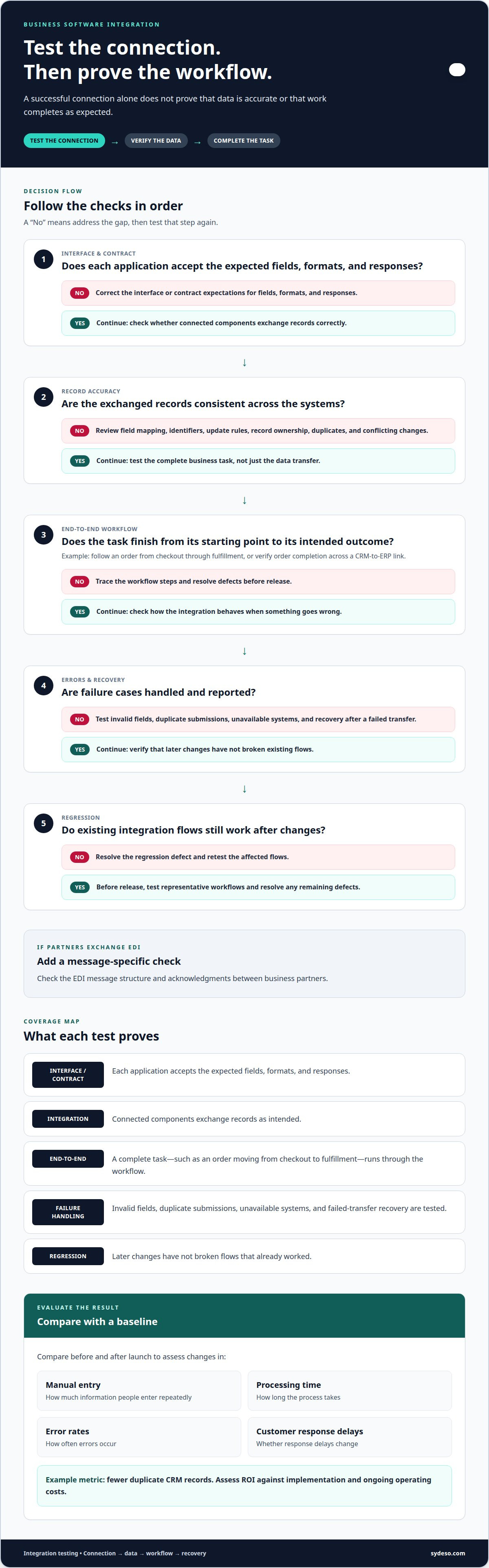
Test the connection, the data it moves, and the business process that relies on it. For a CRM-to-ERP link, verify records, error handling, and order completion.
Test the Connection and the Full Workflow
Start with interface and contract tests. Confirm each application accepts the expected fields, formats, and responses. Integration tests check how connected components exchange records, while end-to-end tests follow a complete task, such as an order moving from checkout to fulfillment.
Test invalid fields, duplicate submissions, unavailable systems, and recovery after a failed transfer. Regression tests confirm later changes have not broken existing flows. For EDI between business partners, check message structure and acknowledgments. These tests reveal failures that a successful connection alone cannot.
Benefits for Employees and Customers
Automation can eliminate repeated entry in processes such as invoicing and lead tracking. Employees spend less time moving information between sources, and customers can receive more consistent updates when support and order records stay aligned.
For B2B operations, integration can enable partners to exchange transaction data through EDI and reduce manual handling. An integration platform can also centralize monitoring across connected applications. These capabilities matter when teams rely on current order, inventory, or customer details to make decisions.
In the US, integration project cost depends on scope, system complexity, data quality, and testing needs. A written estimate should reflect these factors and the specific work required.
Plan implementation by defining the business outcome, systems involved, data ownership, and failure paths. Build the connection in stages, test representative workflows, and resolve defects before release. This keeps critical processes visible throughout delivery.
Measure success against a baseline by comparing manual entry, processing time, error rates, and customer response delays before and after launch. To assess ROI, weigh those changes against implementation and ongoing operating costs. A clear metric, such as fewer duplicate CRM records, makes results easier to evaluate.
For a tailored connection between business applications, API integration planning can help define the data flow and tests.
Connecting legacy systems with cloud applications
Legacy applications can remain useful while cloud services support newer workflows. Integration connects the two environments, allowing organizations to share records without replacing every system.
Custom API and Cloud Integrations
A custom API defines how a legacy application exchanges data with a cloud service. It can help when existing software lacks a suitable connector but still holds critical business records.
For example, an API can pass inventory changes from an on-premise ERP to a cloud storefront. The integration maps fields, validates incoming records, and reports failed transfers. This reduces duplicate data entry while preserving the role of each application.
Custom connections also let teams control which data moves and when. A customer update might sync immediately, while a large historical export runs separately to limit disruption to daily workflows.
Cloud, On-Premise, and Hybrid Integration
Cloud and on-premise integration connects hosted services with software running on local infrastructure. Hybrid integration coordinates both environments, giving teams a unified view while each system retains its role.
An integration platform can route data between a local inventory database and cloud-based sales tools. The design should account for network interruptions, access controls, and differences in data formats. Clear ownership rules help keep records consistent.
Start by mapping records and workflows across both environments. For an ERP linked to a cloud CRM, identify which system owns customer details, order status, and account updates. Then define transfer timing and how errors return to staff for resolution.
Cloud, IoT, and AI integrations add data sources and processing steps. For example, equipment sensors can send readings to a cloud service, where an AI application classifies alerts. Preserve timestamps and device identifiers so staff can connect each alert to the right asset.
As complexity grows, separate data movement from business rules. A documented interface and monitored transfer path make changes easier to manage without disrupting established applications or workflows.
Business software integration
Business software integration connects applications so a business process can move across systems without repeated handoffs. A sales order, for example, may start in an e-commerce platform, go to an ERP for fulfillment, then reach accounting for invoicing. Design around that operating sequence rather than simply connecting every available application.
Start with the business outcome and map the records needed to achieve it. For an order workflow, identify where product, customer, payment, and fulfillment details originate. Then define which system owns each field and when updates should move. This gives teams a clear basis for building and testing the connection.
Architecture affects maintenance as the number of connected systems grows. Point-to-point links connect applications directly, but complexity increases because each system needs individual connections. Point-to-point links can become harder to manage as more systems are connected. A centralized integration platform can instead provide one place to manage and monitor data flows.
- Order flow: Send checkout records from an online store to an ERP.
- Finance flow: Pass approved invoices from the ERP to accounting.
- Customer flow: Share service updates from support software with a CRM.
These software solutions need clear ownership and exception handling to support smooth operations. If an ERP rejects an order because a product code is missing, the process should record the error and route it for correction. Otherwise, staff may not know where the transaction stopped. Monitoring should show transfer status, rejected records, and manual intervention.
In enterprise environments, integration design also needs to account for data access, change control, and reporting across departments. A documented interface makes it easier to assess how a system change could affect connected workflows before release.
Plan a software integration around your applications, records, and operating requirements.
Sydeso: Custom software development
Sydeso helps businesses connect systems when existing applications cannot support a required workflow. Its API development and integration service can link legacy software with cloud applications, while custom software development can address needs that standard connections do not meet.
Turn to Sydeso when disconnected records cause repeated entry, a critical process spans several systems, or teams need an internal tool to manage handoffs. For a new product idea, MVP development can help establish and test the core workflow before broader development.
Share the systems involved, the data they need to exchange, and the business process the integration should support. Contact Sydeso to discuss your software integration needs.
Make the next integration decision with a clear scope
Choose the next step by identifying the process that causes the most friction and the systems it depends on. A focused business software integration can start with one workflow and expand as teams learn what the connection needs to support. Define the records, ownership, and expected outcome before development begins.
Sydeso offers custom software development, internal tools development, and MVP development for businesses shaping or extending their software. These services can support a tailored integration when existing applications do not fit the required workflow.
Bring the systems involved and the operational goal into the discussion. Discuss your integration needs with Sydeso and identify a practical next step. A clear scope gives your team a grounded starting point for moving forward.
Frequently Asked Questions
How do you decide between building a software integration in-house and outsourcing it to a 3rd-party?
Choose an approach based on internal capacity, familiarity with the systems, and who will maintain the connection. An in-house team may be suitable if it understands both applications and can own testing and ongoing changes. Outsourcing can fit when integration needs specialized engineering or internal staff lack time. Either way, document ownership, access, error handling, and maintenance responsibilities before work begins.
What are API integrations?
API integrations use defined software interfaces to exchange requests and data between applications. For example, a scheduling system could send appointment details to a customer portal, which displays the latest booking status. Specify the data fields, permitted actions, and response to failed requests. This helps teams understand how each application participates in the exchange.
What is business software integration?
Business software integration is the planned connection of applications used in business operations. It can link a purchasing tool with an approval system so a request moves through review without staff re-entering details. The aim is for related systems to support a defined operational process. The scope may cover one connection or a coordinated set of applications.
What are the benefits of integrating business software?
Integration can give teams more consistent records for decisions and reduce delays between departments. For example, linking purchase approvals with finance records can make it easier to see whether a request has been reviewed and recorded. Shared information can also support clearer management reporting. The value depends on choosing records and processes that affect day-to-day work.
What are common business software integration methods and platforms?
Common methods include direct application connections, APIs, middleware, connectors, and cloud integration platforms. A direct link may suit a small number of stable systems; middleware or a platform can help manage flows across a broader environment. Choose based on application support, data routing, monitoring needs, and maintenance ownership. Match the method to the operating model, not just the initial connection.
What data security and compliance requirements apply to software integrations in the US?
Requirements depend on the data, industry, and jurisdictions involved. Limit system access, protect integration credentials, and map applicable obligations before transferring sensitive records.
Questions
- How do you decide between building a software integration in-house and outsourcing it to a 3rd-party?
- Choose an approach based on internal capacity, familiarity with the systems, and who will maintain the connection. An in-house team may be suitable if it understands both applications and can own testing and ongoing changes. Outsourcing can fit when integration needs specialized engineering or internal staff lack time. Either way, document ownership, access, error handling, and maintenance responsibilities before work begins.
- What are API integrations?
- API integrations use defined software interfaces to exchange requests and data between applications. For example, a scheduling system could send appointment details to a customer portal, which displays the latest booking status. Specify the data fields, permitted actions, and response to failed requests. This helps teams understand how each application participates in the exchange.
- What is business software integration?
- Business software integration is the planned connection of applications used in business operations. It can link a purchasing tool with an approval system so a request moves through review without staff re-entering details. The aim is for related systems to support a defined operational process. The scope may cover one connection or a coordinated set of applications.
- What are the benefits of integrating business software?
- Integration can give teams more consistent records for decisions and reduce delays between departments. For example, linking purchase approvals with finance records can make it easier to see whether a request has been reviewed and recorded. Shared information can also support clearer management reporting. The value depends on choosing records and processes that affect day-to-day work.
- What are common business software integration methods and platforms?
- Common methods include direct application connections, APIs, middleware, connectors, and cloud integration platforms. A direct link may suit a small number of stable systems; middleware or a platform can help manage flows across a broader environment. Choose based on application support, data routing, monitoring needs, and maintenance ownership. Match the method to the operating model, not just the initial connection.
- What data security and compliance requirements apply to software integrations in the US?
- Requirements depend on the data, industry, and jurisdictions involved. Limit system access, protect integration credentials, and map applicable obligations before transferring sensitive records.