Business Workflow Automation Services for Connected Systems
Business workflow automation services connect ERP, CRM, and apps to streamline approvals, cut manual work, and plan integrations around your processes.

Business workflow automation services streamline routine work by routing tasks, coordinating approvals, and transferring information between ERP, CRM, and other business applications. They can reduce manual handoffs and repeated data entry while making each process step visible. The work begins with understanding how a process runs, then designing, connecting, and testing the systems that support it.
When teams rely on disconnected tools, even straightforward processes can require extra data entry and follow-up. Automation can address these friction points, but workflows and system connections must reflect how the business actually operates. This article explains what business workflow automation services include, how consulting and implementation fit together, and what to consider when planning integrations. It also covers the factors that shape project scope, helping you identify useful opportunities and a practical next step.
Key Takeaways
- Identify repeatable tasks across sales, marketing, finance, HR, and customer support that could move through a consistent automated workflow.
- Turn process goals into a practical implementation plan with clear steps for design, testing, and ongoing support.
- Use process analysis to locate handoffs, delays, and rules that need to be clear before automation begins.
- Plan ERP, CRM, and application integrations around how information should move, then consider tailored software support when existing tools do not fit the workflow.
Table of Contents
- How can workflow automation services help me?
- Automation strategy, design, and implementation
- Workflow automation consulting and process analysis
- ERP, CRM, and third-party application integration
- Sydeso: Custom software development
How can workflow automation services help me?
Workflow automation connects repeatable tasks, business rules, and systems. It can route work across departments, reduce manual entry, and improve accuracy. The right process starts with a clear task, such as sending an approved invoice for payment.
Automation Across Business Functions
Sales workflows can assign incoming leads, update CRM records, and create follow-up tasks. Marketing automation can schedule campaign steps and pass engagement details to sales. Finance workflows can route invoices for approval, while HR workflows can guide onboarding from document collection to account setup. Customer support automation can classify requests and direct them to the right queue. Review every handoff before automating it, so the workflow reflects actual team responsibilities rather than assumptions.
Business Tool and API Integrations
Integrations move information between tools such as ERP, CRM, email, and finance applications. For example, a closed sales opportunity can trigger an order-processing handoff without requiring staff to re-enter customer details. Custom APIs can connect systems when standard connectors do not fit the data or process. Define which system owns each record, which fields need to move, and how errors will be surfaced. Review role-based access, audit logs, and encryption as part of security planning, then test permissions and failed transfers before launch.
Workflow Design and Customization
Design begins by mapping the current steps, owners, approval rules, and exceptions. Then define the intended flow, build it, and test routine and unusual cases. Enterprise workflows may need separate approval paths for departments, locations, or record types. Choose a provider by reviewing its process for discovery, integration, testing, documentation, and support. To reduce risks such as incorrect routing or duplicate records, test with representative data and assign an owner to monitor exceptions. The price depends on the case and is given after a quote request; scope, integrations, customization, and support needs shape the cost.
Automation Options Compared
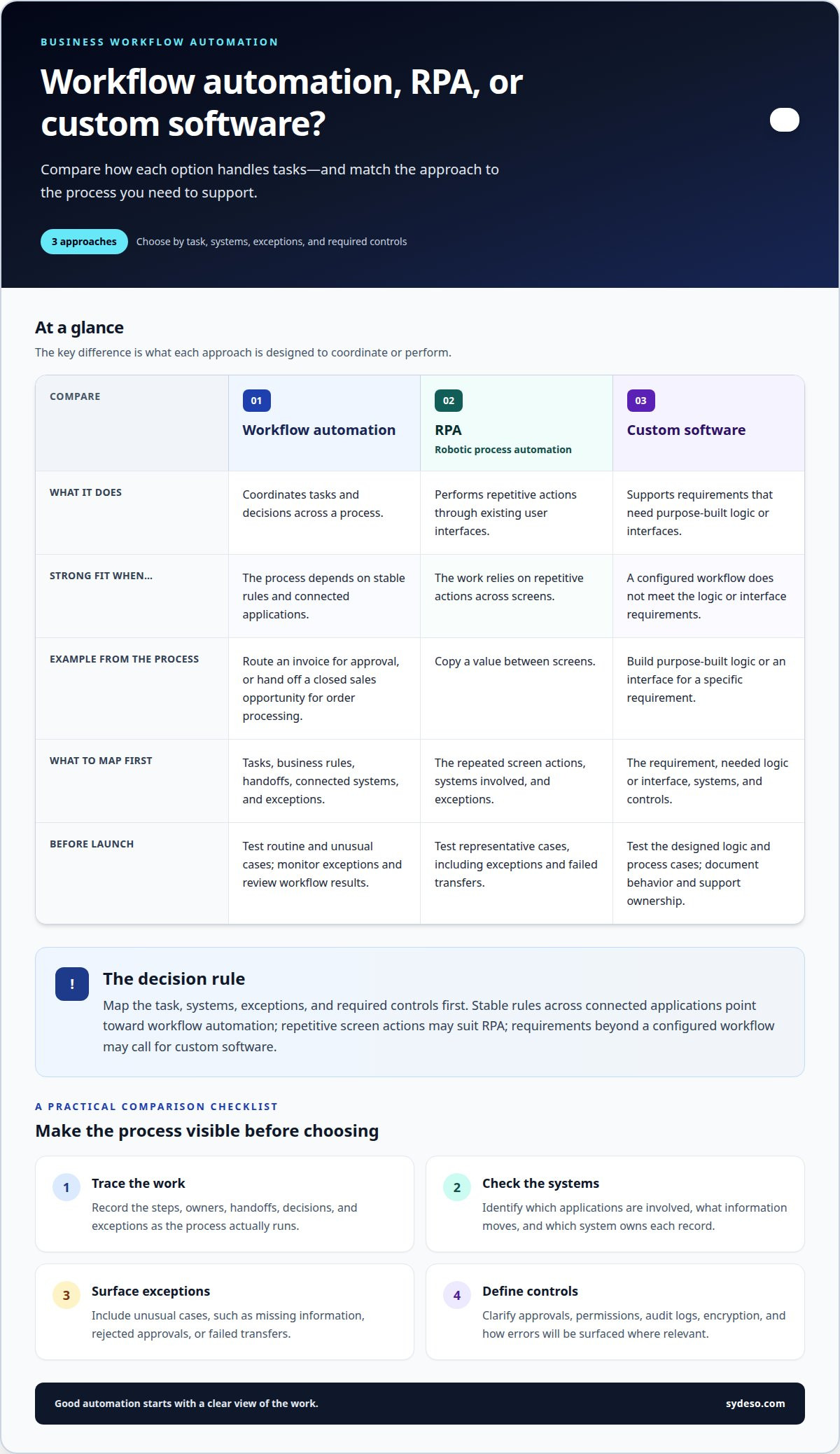
Workflow automation coordinates tasks and decisions across a process. Robotic process automation, or RPA, typically performs repetitive actions through existing user interfaces, such as copying a value between screens. Custom software suits requirements that need purpose-built logic or interfaces beyond a configured workflow. Compare the options by mapping the task, systems, exceptions, and required controls. If the process depends on stable rules and connected applications, workflow automation may fit; if it relies on repetitive screen actions, RPA may be a better fit.
Automation strategy, design, and implementation
A sound implementation starts with a defined business outcome and a mapped process. Teams then design, build, test, and support workflows against that process.
Automation Strategy and Workflow Design
Document each handoff, decision, data field, and exception in the current process. For an invoice workflow, map submission, review, approval, and payment readiness. Mark bottlenecks and identify which rules are stable enough to automate. Set a clear target, such as reducing duplicate entry, and decide how the team will assess accuracy and completion. This prevents effort going into automating steps that need redesign first.
Implementation and Ongoing Support
Implementation moves from an approved design to configuration or development, system connections, and testing. Use sample cases for normal work and exceptions, such as a missing invoice field or a rejected approval. Assign process owners to review results before launch. After deployment, document workflow behavior, monitor failed tasks, and revise rules when business procedures change. Ongoing support should clarify who handles defects, access changes, and workflow updates.
ERP implementation needs its own sequence. Map existing records and dependencies, configure the target process, then test data movement and user tasks before cutover. A recovery plan should explain how to pause the workflow, restore usable records, and reconcile transactions after a failed migration or launch. Document manual steps for essential work during recovery, and test the plan with the people who will carry it out.
For a practical review, walk through one workflow from intake to completion. Confirm who owns each approval, which system is authoritative for each field, and how exceptions reach staff. These details expose gaps before launch and give users a clear operating procedure. Sydeso connects process design with custom software development, workflow automation, and launch support.
Workflow automation consulting and process analysis
Consulting helps teams decide what to automate before changing systems. Start with one process, such as purchase approval, and trace its path from request to completion. Record the people, tools, decisions, and exceptions involved. This gives the analysis a clear boundary and keeps proposed changes tied to operational needs.
A workflow audit examines the process as it actually works, not an idealized version. Interview employees who handle each handoff, then compare their steps with existing forms, records, and system activity. For a purchase request, note where staff re-enter supplier details, wait for approval, or correct incomplete submissions. Process mapping makes these friction points visible and gives the team a shared view of the work.
Use the map to separate required controls from avoidable steps. A consultant can document who approves each request, what information they need, and what happens when details are missing. That analysis can reveal bottlenecks, duplicate reviews, or unclear ownership. For example, if two teams check the same invoice field, confirm whether both checks serve a distinct purpose before removing either one.
Process optimization should preserve necessary decisions while improving the route between them. Teams might revise an unclear form, set a consistent approval path, or define how exceptions return to the requester. Compare the proposed workflow with the original map. Then identify affected systems and roles so automation follows an agreed process instead of encoding conflicting practices.
Before implementation, document the revised steps, owners, required data, and exception handling. Review a standard request and a rejected request from start to finish. Confirm that staff understand each handoff and that the process supports the intended business outcome. This analysis gives workflow automation a defined scope and a basis for evaluating the design. With Sydeso, you approve the scope and design before code is written, then test the product before it ships.
ERP, CRM, and third-party application integration
ERP, CRM, and other business applications hold different operational records. Integration lets a workflow pass selected information between them. For example, a CRM opportunity marked closed can send customer and order details to an ERP for fulfillment. This can streamline handoffs and reduce repeated entry. The result depends on accurate field mapping and clear ownership of each record.
Trace one transaction across its systems. Identify where it starts, which application owns each field, and what event should trigger the next step. For a new customer order, document how the CRM account connects to the ERP customer record, then define which order details move. Include status changes and error handling. A missing customer identifier should create a visible exception, not a silent, incomplete transfer.
Third-party applications may offer built-in connectors, or a custom API may be needed. Choose the connection method based on the required data, available system interfaces, and workflow rules. An API can pass structured information directly between applications, while a connector may cover common actions. For either approach, specify required fields, accepted formats, and how failed requests will appear to staff. Avoid transferring data the workflow does not need.
Include access controls and monitoring in the integration design. Set permissions for the systems and roles involved, protect credentials, and keep a record of workflow activity. Test successful transfers as well as rejected or incomplete records. For example, verify that a corrected invoice updates the intended ERP entry without creating a duplicate. Assign an owner for integration changes and review the process when a connected application changes.
API development and integration can address workflows that need connections tailored to their data or rules. Define the systems, fields, triggers, and exceptions before implementation. To discuss a specific connection between your ERP, CRM, and other applications, explore API integration options.
Sydeso: Custom software development
Sydeso can help when connected systems need software tailored to your workflows. Its custom software development addresses business rules or process gaps that standard tools do not handle well. Internal tools give teams a focused way to manage tasks, records, and approvals. For an early-stage idea, MVP development can establish a working version before broader investment. You approve the scope and design before code is written, then test the product before it ships.
Bring a defined process, its users, and the systems involved. Sydeso can use those details to shape the work, then provide launch and support as the solution moves into use. This is a practical next step when automation requires tailored software rather than only changes to existing workflows.
Contact Sydeso to discuss your workflow, or visit sydeso.com.
Set the Next Workflow in Motion
Choose a process with a clear owner and a visible operational need. Define what should change, who will use the workflow, and how the team will judge whether it works. That gives business workflow automation services a practical starting point and keeps the next decision tied to your operations.
When existing systems need tailored functionality, Sydeso offers custom software development, internal tools development, and MVP development. These options can support a defined workflow, a team-specific tool, or an early product that needs a working version. Start with the process you want to improve and the systems it touches.
Contact Sydeso about workflow automation to discuss a suitable next step. A clear process brief can help turn an operational need into a focused plan. Your team can move forward with a workflow designed around how the business works.
Frequently Asked Questions
How do you handle security and access?
Protect workflow data by limiting each account to the permissions needed for its role. An employee submitting a purchase request, for example, may not need access to approval settings. Use named user accounts, secure credential storage, and activity records to support oversight. Before launch, test access with representative roles and confirm that sensitive records remain unavailable to unauthorized users.
What’s the difference between workflow automation and BPA?
Workflow automation handles the sequence of tasks, decisions, and handoffs within a process. Business process automation, or BPA, often describes a broader effort to automate an entire business process or connected processes. Automating a single expense approval is one workflow; linking submission, review, reimbursement, and reporting can form part of broader process automation. The terms often overlap in business use.
Which tools do you work with?
Workflow projects can connect the business applications a team already uses, including ERP, CRM, finance, and customer support systems. The right connection depends on available interfaces, data structure, and process needs. For example, a workflow may pass a customer identifier and order status between a CRM and an order system. Custom API development can support connections when standard interfaces do not meet requirements.
What are business workflow automation services?
Business workflow automation services help organizations design and build software-driven processes that move work between people and systems. A workflow might receive a request, apply a business rule, route it for approval, and record the outcome. The service can include process analysis, workflow development, integrations, and launch support. Scope depends on the process, its users, and the systems involved.
What business processes can workflow automation services automate?
These services can automate repeatable processes with clear steps, such as purchase approvals, employee onboarding, lead assignment, invoice routing, and customer request triage. A strong candidate has defined inputs, decision rules, and an outcome staff can verify. Processes involving frequent judgment calls or changing requirements may need human review at key points rather than full automation.
What are the best workflow automation platforms for businesses?
The right fit depends on the process, existing systems, access controls, and required customization. Compare how a platform handles exceptions, records workflow activity, supports integrations, and lets staff maintain rules. A team with a simple approval path may need different capabilities from a business coordinating records across several core applications. Assess the platform against a real process before selecting it.
Questions
- How do you handle security and access?
- Protect workflow data by limiting each account to the permissions needed for its role. An employee submitting a purchase request, for example, may not need access to approval settings. Use named user accounts, secure credential storage, and activity records to support oversight. Before launch, test access with representative roles and confirm that sensitive records remain unavailable to unauthorized users.
- What’s the difference between workflow automation and BPA?
- Workflow automation handles the sequence of tasks, decisions, and handoffs within a process. Business process automation, or BPA, often describes a broader effort to automate an entire business process or connected processes. Automating a single expense approval is one workflow; linking submission, review, reimbursement, and reporting can form part of broader process automation. The terms often overlap in business use.
- Which tools do you work with?
- Workflow projects can connect the business applications a team already uses, including ERP, CRM, finance, and customer support systems. The right connection depends on available interfaces, data structure, and process needs. For example, a workflow may pass a customer identifier and order status between a CRM and an order system. Custom API development can support connections when standard interfaces do not meet requirements.
- What are business workflow automation services?
- Business workflow automation services help organizations design and build software-driven processes that move work between people and systems. A workflow might receive a request, apply a business rule, route it for approval, and record the outcome. The service can include process analysis, workflow development, integrations, and launch support. Scope depends on the process, its users, and the systems involved.
- What business processes can workflow automation services automate?
- These services can automate repeatable processes with clear steps, such as purchase approvals, employee onboarding, lead assignment, invoice routing, and customer request triage. A strong candidate has defined inputs, decision rules, and an outcome staff can verify. Processes involving frequent judgment calls or changing requirements may need human review at key points rather than full automation.
- What are the best workflow automation platforms for businesses?
- The right fit depends on the process, existing systems, access controls, and required customization. Compare how a platform handles exceptions, records workflow activity, supports integrations, and lets staff maintain rules. A team with a simple approval path may need different capabilities from a business coordinating records across several core applications. Assess the platform against a real process before selecting it.