Compare business process automation software features
Compare software to automate business processes by workflow fit, integrations, analytics, security, and scale. See how BPA differs from RPA and choose well.

Feature count is a poor way to choose business process automation software. The right software to automate business processes should fit your workflow, connect with the systems you use, and provide the controls and reporting your team needs. Compare workflow customization, integrations, analytics, security, cloud operation, and scalability against the work you plan to automate.
Automation is most useful when it handles repeatable work without obscuring who owns each step. Business process automation coordinates tasks and decisions across a workflow; robotic process automation focuses on actions performed through software interfaces. That distinction affects which capabilities matter.
This article explains which features to assess, how BPA differs from RPA, and how to compare platforms against your processes and teams. You’ll get a practical way to weigh integrations, workflow controls, reporting, and other core capabilities, then use them to narrow your options.
Key Takeaways
- Map the steps and systems in a workflow before assessing integrations or multi-step automation.
- Distinguish process-wide coordination from software actions performed through user interfaces when weighing BPA and RPA.
- Compare platforms by how well their workflows, reporting, and integrations fit the teams that will use them.
- Include security and data-handling needs in platform selection, alongside scalability and operational fit.
Table of Contents
- What are the features of Business Process Automation Tools?
- Business process automation and robotic process automation
- Comparison of business automation software tools
- Business process automation platform selection
- Sydeso: Custom software development
What are the features of Business Process Automation Tools?
Useful automation features connect business apps, apply rules, and move work through clear steps. Processes best suited to automation are repeatable, consistent, and guided by defined decisions.
Business App Integrations and Multi-Step Workflows
Integrations pass information between business apps, while multi-step workflows use events and rules to assign the next action. For example, an invoice can move from submission to approval and then to accounting entry. Processes suited to automation repeat regularly or require consistent handling. Compare these capabilities with single-app tools by asking how well they coordinate work across systems and record each handoff.
Sales, Marketing, and Customer Service Workflows
Sales workflows can organize qualified leads and assign follow-up tasks. Marketing workflows can send tailored content based on customer behavior, while customer service workflows can tag incoming tickets and route them to agents. Unlike back-office approvals, these workflows respond to customer activity. For example, an incoming support request can be categorized and sent to the relevant team.
No-Code and Low-Code Workflow Platforms
No-code platforms let users assemble visual workflows without writing code; low-code platforms allow configuration with limited coding. Both can help teams adjust routine processes, but their suitability depends on workflow complexity and required integrations. A visual editor can clarify the sequence and ownership of each step. For example, a team might map a request, approval, and notification before configuring the workflow.
For Microsoft 365 workflow automation, map one process, such as a document approval, across its tasks and handoffs. Include the people responsible for each step; automation can change roles and shift routine work, so teams need clear ownership and communication.
Risks include incorrect data, excessive access, and unclear accountability. Set permissions, validate inputs, and preserve an audit trail. Compare options by workflow fit, integration needs, and oversight:
| Option | Work unit | Key comparison |
|---|---|---|
| Integrated workflows | Cross-app handoffs | Connections and tracking |
| Customer workflows | Leads, messages, tickets | Routing and response rules |
| No-code or low-code | Configurable tasks | Editing and complexity |
Choose the option that fits the process, its users, and the oversight it requires.
Business process automation and robotic process automation
Workflow automation, BPM, RPA, and no-code tools solve related but different problems. Workflow automation routes tasks; BPM manages process design and oversight; RPA performs repetitive actions in applications; no-code tools let users configure workflows visually.
Robotic Process Automation for Legacy Systems
RPA uses software to repeat actions through an existing application’s interface. It can help connect older systems when direct integrations are unavailable or impractical. For example, a bot can copy information from a legacy screen into another application. Unlike workflow automation, which coordinates steps and decisions, RPA focuses on carrying out interface actions. Stable screens and consistent inputs make these repetitive tasks easier to define.
Enterprise Robotic Process Automation
Enterprise RPA applies bots across teams and business processes, rather than treating each bot as an isolated task. A company can use it for repeatable work in finance, operations, or customer administration. The enterprise distinction is coordination: teams need clear ownership, consistent rules, and oversight of bot activity. For example, a shared process can define which applications a bot uses and where exceptions go for staff review.
Workflow, BPM, RPA, and No-Code Tool Differences
Workflow automation links events, rules, and tasks, such as routing a request for approval. BPM is the broader discipline of defining, managing, and improving those processes. RPA handles repetitive actions at the application interface, while no-code tools provide a visual way to configure workflows without writing code. Choose based on the main task: cross-team coordination, process management, interface actions, or user-configured automation.
RPA fits repetitive, rule-based actions; it is less suited to work that depends on judgment or frequent interface changes. For older applications that need broader change, a structured legacy modernization approach can address the system itself rather than only repeat its screen actions.
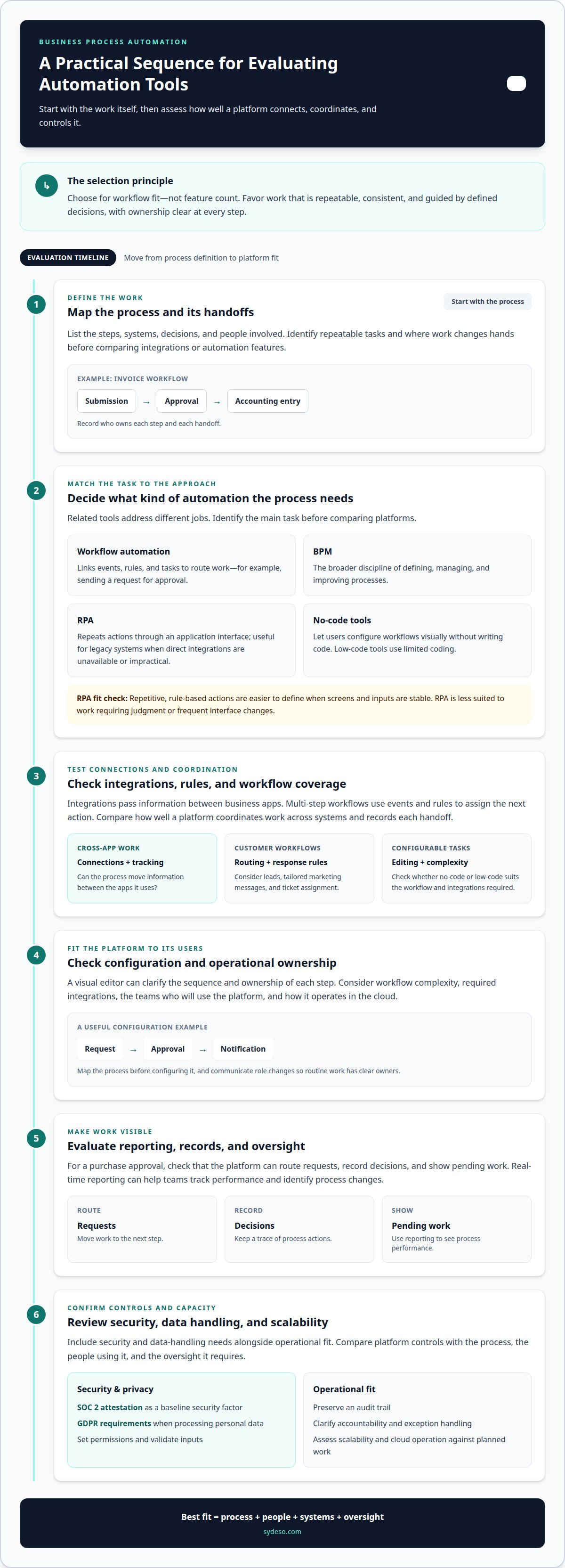
Comparison of business automation software tools
Compare automation tools against the work your organization needs to streamline. The right software to automate business processes depends on the workflow, its users, and the systems involved. A document approval process, for example, needs different controls from customer follow-up.
Automation Tool Evaluation Features
Evaluate each platform on integrations, workflow configuration, reporting, security, and scalability. For a purchase approval, confirm the tool can route requests, record decisions, and show pending work. Real-time reporting can help teams track performance and identify process changes. Consider SOC 2 attestation as a baseline security factor, and account for GDPR requirements when processing personal data.
Tools by Business Needs
Start with the process, its bottleneck, and the teams involved. A finance team handling invoice approvals may prioritize document handling and audit trails; a support team may need ticket assignment and response tracking. Then map the handoffs and systems involved. Choose software to automate business processes based on how well it supports those steps, not on feature counts that don’t affect the workflow.
Automation Tools for Small Businesses
For a small business, the best fit is the simplest tool that covers its defined process and connects the required applications. A visual workflow builder may suit a basic request-and-approval sequence. A process involving several systems may need stronger integration and reporting features. Compare setup and ongoing administration needs alongside workflow fit, so the tool doesn’t add avoidable work for a small team.
Business Automation Software Costs in the United States
In the United States, software pricing depends on factors such as user access, workflow volume, integrations, hosting, and support. Subscription platforms and custom automation projects use different pricing models, so compare the same scope and ongoing requirements. For a custom project, price depends on the case and is provided after a quote request; complexity, integrations, and support needs affect the estimate.
| Option | Best fit | Compare |
|---|---|---|
| Visual workflow platform | Defined team processes | Editing and integrations |
| Broader automation platform | Cross-team workflows | Reporting and controls |
| Custom solution | Distinct process needs | Scope and maintenance |
Choose the option that meets the process requirements with the least operational overhead.
Business process automation platform selection
Select a platform by matching its capabilities to a defined process, its users, and its systems. A request workflow, for example, needs clear ownership, useful reporting, and dependable handoffs.
Start with the current process. Record each manual step, decision, application, and exception. Then identify the main constraint: disconnected systems, slow approvals, repeated data entry, or limited visibility. This sequence keeps selection tied to an operational need instead of a feature list.
Compare shortlisted platforms against these criteria:
- Workflow control: Can teams configure steps, rules, assignments, and exceptions?
- Integrations: Can the platform exchange data with the applications involved?
- Analytics: Can reports show process status and performance for operational decisions?
- Security: Consider SOC 2 attestation as a baseline security consideration. Account for GDPR requirements when processing personal data.
- Scale: Can the platform support more workflows, users, or teams as needs change?
Test each option with one representative process, such as routing a purchase request from submission to approval. Include the staff who own its steps. Confirm that they can identify the next action, see pending work, and handle an exception without losing accountability. This practical test can reveal gaps that a product demonstration may not show.
Also assess whether the platform combines rules-based workflows with AI agents. Use automation for repeatable decisions with clear inputs; keep human review for exceptions that require judgment. Define access, data handling, and escalation paths before putting the process into operation. These controls help teams understand what the system handles and where staff remain responsible.
Choose the platform that addresses the main bottleneck with manageable integrations, clear oversight, and room to adapt. If your process needs tailored connections or coordinated workflows, plan a workflow automation project around the systems and decisions it must support.
Sydeso: Custom software development
Sydeso builds tailored software for businesses whose workflows or system connections aren’t supported by existing automation platforms. Custom software development can bring process steps into a solution shaped around your operating needs, while internal tools can support specific tasks across teams.
When a process needs validation before a broader build, MVP development can establish a focused version for practical use. Launch and support can help bring the solution into operation. A useful starting point is to define the workflow, its users, the systems it must connect, and the decisions that still need human oversight.
If your automation needs call for a tailored build, contact Sydeso to discuss the workflow and its requirements.
Turn the comparison into a clear project brief
Before choosing a platform or commissioning a build, define the work the new process must support. Write down its owner, users, system boundaries, and exceptions that need human judgment. Add the intended operational outcome so the team can assess whether the finished workflow serves its purpose. This brief provides a practical starting point and helps keep the scope tied to real work.
Software to automate business processes should fit that brief, rather than force teams to reshape sound practices around a tool. Sydeso develops custom software and internal tools for defined operational needs. If you need to test a focused first version, MVP development can provide a starting point before a wider implementation. The right path depends on the process and the change your team is ready to manage.
Contact Sydeso to discuss your automation needs and outline a suitable next step. A clear brief makes it easier to move from comparison to a project your team can put into practice.
Frequently Asked Questions
What is automation software, exactly?
Automation software performs defined tasks or routes work according to events and rules. After someone submits a purchase request, for example, the system can check required fields, send it to an approver, and record its status. A sound setup also defines exceptions, such as missing documentation, so unusual cases reach a person instead of remaining in an automated queue.
How can business automation improve customer service?
Business automation can route requests to the right team and reduce delays between customer messages and follow-up. A support workflow might tag an incoming ticket by topic, assign it to an agent, and send an automatic reply to a common question. Agents can then focus on issues that need judgment or a tailored response, while managers track ticket status across the service process.
What are the types of business automation solutions?
Common types include workflow automation, robotic process automation, document processing, and AI agent support. Workflow automation moves work through tasks and rules. RPA performs repetitive actions in existing applications. Document processing extracts information from submitted files, while AI agents can draft, sort, or summarize material for human review. A business may combine these approaches when one process spans documents, systems, and staff decisions.
What is business process automation software and how does it work?
Business process automation software applies rules and data to move a process from one step to the next. A funds-transfer workflow, for example, can receive a request, apply defined approval rules, and pass the authorized task to the appropriate system. The National Institute of Standards and Technology describes SaaS business-logic applications as supporting processes such as invoicing, funds transfers, and inventory management.
What are the best business process automation software platforms in 2026?
The best platform in 2026 depends on the process, existing applications, and people responsible for its steps. A team automating document approvals may prioritize clear routing and status visibility. A team handling repetitive screen-based tasks may need RPA capabilities. Compare platforms using a real workflow example, including exceptions and handoffs, rather than relying only on general feature lists or rankings.
What features should businesses look for in process automation software?
Look for workflow configuration, integrations, reporting, access controls, and a clear way to handle exceptions. For example, an expense process should show who submitted a claim, who must approve it, and whether a required receipt is missing. Reporting should help teams locate stalled steps. Security controls should match the sensitivity of the data and each user’s responsibilities.
Questions
- What is automation software, exactly?
- Automation software performs defined tasks or routes work according to events and rules. After someone submits a purchase request, for example, the system can check required fields, send it to an approver, and record its status. A sound setup also defines exceptions, such as missing documentation, so unusual cases reach a person instead of remaining in an automated queue.
- How can business automation improve customer service?
- Business automation can route requests to the right team and reduce delays between customer messages and follow-up. A support workflow might tag an incoming ticket by topic, assign it to an agent, and send an automatic reply to a common question. Agents can then focus on issues that need judgment or a tailored response, while managers track ticket status across the service process.
- What are the types of business automation solutions?
- Common types include workflow automation, robotic process automation, document processing, and AI agent support. Workflow automation moves work through tasks and rules. RPA performs repetitive actions in existing applications. Document processing extracts information from submitted files, while AI agents can draft, sort, or summarize material for human review. A business may combine these approaches when one process spans documents, systems, and staff decisions.
- What is business process automation software and how does it work?
- Business process automation software applies rules and data to move a process from one step to the next. A funds-transfer workflow, for example, can receive a request, apply defined approval rules, and pass the authorized task to the appropriate system. The National Institute of Standards and Technology describes SaaS business-logic applications as supporting processes such as invoicing, funds transfers, and inventory management.
- What are the best business process automation software platforms in 2026?
- The best platform in 2026 depends on the process, existing applications, and people responsible for its steps. A team automating document approvals may prioritize clear routing and status visibility. A team handling repetitive screen-based tasks may need RPA capabilities. Compare platforms using a real workflow example, including exceptions and handoffs, rather than relying only on general feature lists or rankings.
- What features should businesses look for in process automation software?
- Look for workflow configuration, integrations, reporting, access controls, and a clear way to handle exceptions. For example, an expense process should show who submitted a claim, who must approve it, and whether a required receipt is missing. Reporting should help teams locate stalled steps. Security controls should match the sensitivity of the data and each user’s responsibilities.