Connect Business Applications With APIs to Improve Workflows
Connect business applications with APIs to cut manual data entry, sync workflows, and extend existing systems. Explore API types, workflows, and access contr...

Two business applications can exchange data and still leave work fragmented. APIs give them a defined way to request and share information, helping teams connect business applications with APIs without replacing every system they already use. The integration still needs to fit the business process, data structure, and access rules.
That distinction matters when teams rely on separate tools for orders, customer records, inventory, or support. A well-planned API connection can reduce manual transfers and help information move between systems as work happens. It can also add a capability to an existing application without rebuilding the entire workflow.
This article explains how APIs work and how they support different integration models. You’ll learn the differences among public, partner, and internal APIs, where API-driven integration can improve daily operations, and what to consider when connecting systems. The goal is to show how these connections support consistent workflows and make it easier to extend business capabilities.
Key Takeaways
- Use an integration platform to coordinate API connections and keep data flows visible across systems.
- Automated transfers can reduce repetitive data entry and help teams keep business processes in sync.
- Understand how a request moves through authentication, processing, and response to design integrations with clear access controls.
- Choose between public, partner, and internal APIs based on who needs access and what the connection must enable.
Table of Contents
- What are the business benefits of API-driven integration?
- How are APIs changing the way businesses integrate technology?
- How do APIs support innovation and speed in business?
- Public, partner, and internal APIs
- Sydeso
What are the business benefits of API-driven integration?
API-driven integration connects applications so business data can move between them. An e-commerce application can send an order to a payment gateway, then share its status with finance. Teams connect business applications with APIs to reduce duplicate entry and work from consistent records. The practical gain is clearer handoffs, not simply more connections.
An integration platform can help govern connections across systems. It may provide a shared place to route API requests, manage access, and monitor usage. For example, an operations team can track whether order data reaches its inventory and billing applications. Set an owner and access rules for each connection, then review logs and usage patterns to spot failures or unusual activity.
Businesses use integration platforms, API management tools, and custom connectors to coordinate API connections. These tools serve different needs: a platform connects systems, while management tools help track performance and access. The right choice depends on the applications, data flows, and oversight the business needs.
In commerce, a Shopify store can connect with payment processing and billing applications through APIs. An order can go to a payment gateway, while relevant transaction details flow to billing. A separate connection can share stock levels with a warehouse system. This helps teams manage orders and inventory without rebuilding every supporting capability inside the storefront.
API connections also let a business extend functionality as its operations change. A company can add a customer-service application or connect a new sales channel to existing order processes. Before adding a connection, define which system owns each record and how updates should flow. Clear ownership helps prevent conflicting customer, product, or inventory data.
In the United States, the cost of API integration software and implementation depends on the systems, data mapping, security controls, testing, and platform needs. Pricing is provided after a quote request, with the project scope and requirements shaping the cost.
Monitor connections through usage records, performance signals, and error logs. Before release, test representative requests and responses, including cases where data is missing or access is denied. If a transfer fails, trace its request through the platform, inspect the returned error, and correct the mapping, access rule, or receiving system before testing again.
How are APIs changing the way businesses integrate technology?
APIs let separate software systems exchange data and trigger actions without repeated manual transfers. For example, an online order can update inventory and notify a fulfillment system.
Automated Processes and Data Transfers
API automation moves information between applications and starts the next workflow action. A sales system can pass a qualified lead to a CRM, which can assign follow-up to a representative. This reduces repeated entry and gives teams more time for decisions that need human judgment. In business-to-business commerce, APIs can also coordinate order fulfillment, repricing, and inventory updates.
REST, SOAP, and GraphQL APIs
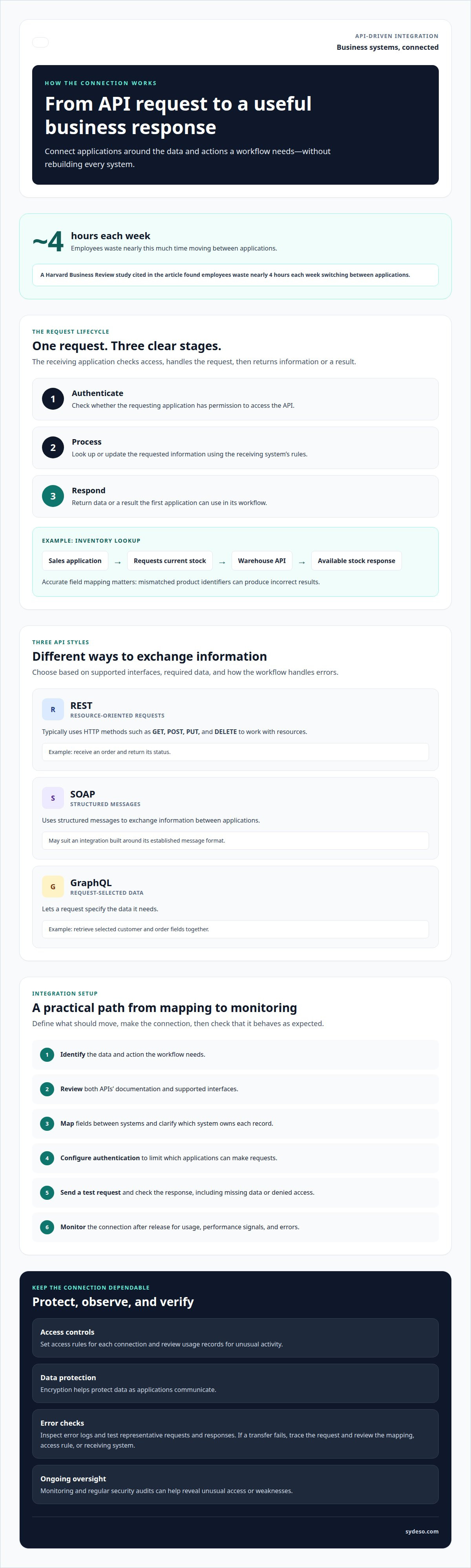
REST, SOAP, and GraphQL are different ways for applications to exchange information. RESTful APIs typically use HTTP methods such as GET, POST, PUT, and DELETE to work with resources. SOAP uses structured messages, while GraphQL lets a request specify the data it needs. The format matters because it affects how a system requests, validates, and returns information.
For a workflow with clear actions, a REST endpoint might receive an order and return its status. A GraphQL request could retrieve selected customer and order fields together. SOAP may suit an integration built around its established message format. The right choice depends on the applications’ supported interfaces, required data, and how the workflow handles errors.
Zapier can connect supported applications through configured triggers and actions. For example, a form submission can trigger a task in another application, reducing manual handoffs. More involved workflows may need custom rules for data validation, exceptions, or approval. Start with the simplest reliable path, then test how incomplete records and failed transfers affect the customer experience.
Automation can also reduce the time employees spend switching between tools. A Harvard Business Review study found employees waste nearly 4 hours each week moving between applications. Connecting a support platform with customer records, for example, can place relevant details in the agent’s workflow. That gives staff a clearer view while helping customers receive consistent responses across channels.
When an integration needs custom workflow rules or direct system connections, API integration work can help connect the applications involved.
How do APIs support innovation and speed in business?
An API request lets one application ask another to perform an action or return data. The receiving application checks access, processes the request, and sends a response the first application can use.
To connect two business applications, identify the data and action, review both APIs’ documentation, and map the fields between them. Configure authentication, send a test request, inspect the response, and monitor the connection after release.
For example, a sales application can request current inventory from a warehouse system. The warehouse API checks access, looks up the item, and returns its available stock. The sales application can display that response or use it to guide the next step. Clear field mapping matters: mismatched product identifiers can produce incorrect results.
Authentication can help limit which applications make requests. Encryption helps protect data as applications communicate, while monitoring and regular security audits can reveal unusual access or weaknesses. Limit each connection to the data and actions it needs. A support tool that reads customer records, for instance, may not need permission to change inventory.
Basic authentication uses a username and password to identify a request. It may suit a controlled on-premises integration, but credentials need protection and careful access management. OAuth 2.0 uses access tokens to grant an application defined access without sharing a user’s password with every connected service. The choice depends on the systems, access requirements, and security controls.
Common risks include exposed credentials, excessive permissions, incompatible data fields, and failed requests. An expired token can stop an order update; a mismatched product ID can return the wrong inventory record. Test these failure cases and define how the receiving application reports errors before relying on the integration.
API connections can also support new capabilities. A mobile application can retrieve customer-specific information from a backend system, while a virtual assistant can use CRM data to help prepare a support ticket during an escalation. These connections let teams add personalized functions without replacing the systems that hold their operational data.
Public, partner, and internal APIs
API access depends on who needs to interact with a company’s systems. Public, partner, and internal APIs define different boundaries for sharing data and functions. Choosing the right model affects who can build a solution, what information they can use, and how the business oversees those connections.
A public, or open, API gives external developers access to specific application data or functions while the owner retains ownership rights. For example, a company could let developers use selected service functions to build complementary applications. The API can extend customer experiences, but its published access rules should clearly define permitted use and available functions.
A partner API gives another company access to agreed data or services. A retailer might let a delivery partner retrieve shipment details and return delivery updates. This connection supports shared operations without opening the same functions to every developer. Access should match the relationship: a delivery service needs shipment information, not unrestricted access to unrelated customer records.
An internal API supports data sharing across a company’s own systems. A sales application could retrieve product availability from an inventory system, while a finance tool accesses order records. Internal APIs let departments use consistent information without giving every application direct access to every database. That separation can make system changes easier to manage.
The practical distinction is audience and control. Public APIs support external development, partner APIs support defined business relationships, and internal APIs connect company systems. A business can use more than one model, but each connection needs an owner, a purpose, and scoped permissions. For example, a marketplace partner may receive order updates while internal tools share broader operational data.
For internal API connections, discuss an API integration plan that fits your systems and access boundaries.
Sydeso
Sydeso helps businesses plan and build software connections around their existing workflows. When applications need to share data but lack a suitable integration path, Sydeso’s API development and integration connects them while respecting each system’s role and access boundaries.
The work starts with the business process: which applications exchange information, what data moves, and what should happen when a request fails. Sydeso can also develop custom software or internal tools when existing systems need a practical companion. For a new product idea, MVP development can establish the core workflow before further development. Launch and support can help bring the software into operation.
If you’re planning an application integration or need help shaping the right approach, contact Sydeso to discuss your requirements.
Make the Next Connection Deliberate
A useful API integration starts with a business decision, not a technical connection. Identify the process that needs to change, the systems involved, and who owns the data moving between them. This gives the work a clear boundary and a practical way to assess whether the connection supports daily operations.
As you plan how to connect business applications with APIs, consider whether existing tools can support the workflow or whether the process needs a new application. Sydeso offers custom software development, internal tools development, and MVP development to shape solutions around business needs.
Bring your integration goals and the systems involved into a conversation with Sydeso. Start a conversation about API integration and define a practical next step. Clear requirements give the work a sound starting point.
Frequently Asked Questions
What are APIs, and how do they work?
APIs are defined interfaces that let software request data or actions from another system. A scheduling application, for example, could request available appointment times from a booking system. The booking system returns information in an agreed format, which the scheduling application can display or use. Clear documentation helps developers understand permitted requests, required fields, and possible responses.
How are modern businesses benefiting from APIs?
APIs help businesses extend existing software without rebuilding every capability. A company can connect a reporting tool to selected operational records, giving managers a consolidated view for planning. Teams can also add a new customer-facing feature while keeping established systems in place. The benefit depends on choosing useful data flows and keeping responsibility for each record clear.
What Is an API?
An API, or application programming interface, is a documented way for one software application to use another application’s data or functions. It is not the application itself. Think of a building’s reception desk: it accepts a defined request and directs it through an approved process. In software, the interface sets the requests a system accepts and the responses it returns.
What happens when systems in a business ecosystem lack good APIs?
Without usable APIs, teams may move records through manual exports and imports. A staff member might download a spreadsheet, adjust its columns, then upload it into another system. This creates extra handling and can leave records out of date. Businesses may also rely on screen-based automation or custom connectors, which can require additional maintenance when an application changes.
What is API integration?
API integration connects applications through their interfaces so they can exchange data or trigger functions. The work includes defining the connection’s purpose, mapping fields, setting access, and handling errors. For example, an employee directory could provide approved contact details to a company intranet. The integration should specify which system owns each field and how updates are handled.
Why have APIs become so important for businesses?
APIs give businesses a structured way to add or connect capabilities as their needs change. A company can introduce a new reporting, communication, or customer-service tool without making every existing application redundant. This matters when teams depend on different systems but need to coordinate their work. APIs also give developers a defined interface to build against, rather than relying on undocumented internal behavior.
Questions
- What are APIs, and how do they work?
- APIs are defined interfaces that let software request data or actions from another system. A scheduling application, for example, could request available appointment times from a booking system. The booking system returns information in an agreed format, which the scheduling application can display or use. Clear documentation helps developers understand permitted requests, required fields, and possible responses.
- How are modern businesses benefiting from APIs?
- APIs help businesses extend existing software without rebuilding every capability. A company can connect a reporting tool to selected operational records, giving managers a consolidated view for planning. Teams can also add a new customer-facing feature while keeping established systems in place. The benefit depends on choosing useful data flows and keeping responsibility for each record clear.
- What Is an API?
- An API, or application programming interface, is a documented way for one software application to use another application’s data or functions. It is not the application itself. Think of a building’s reception desk: it accepts a defined request and directs it through an approved process. In software, the interface sets the requests a system accepts and the responses it returns.
- What happens when systems in a business ecosystem lack good APIs?
- Without usable APIs, teams may move records through manual exports and imports. A staff member might download a spreadsheet, adjust its columns, then upload it into another system. This creates extra handling and can leave records out of date. Businesses may also rely on screen-based automation or custom connectors, which can require additional maintenance when an application changes.
- What is API integration?
- API integration connects applications through their interfaces so they can exchange data or trigger functions. The work includes defining the connection’s purpose, mapping fields, setting access, and handling errors. For example, an employee directory could provide approved contact details to a company intranet. The integration should specify which system owns each field and how updates are handled.
- Why have APIs become so important for businesses?
- APIs give businesses a structured way to add or connect capabilities as their needs change. A company can introduce a new reporting, communication, or customer-service tool without making every existing application redundant. This matters when teams depend on different systems but need to coordinate their work. APIs also give developers a defined interface to build against, rather than relying on undocumented internal behavior.