Custom Application Development: What It Includes and How It Works
Explore custom application development from scoping to launch. Learn how to plan, build, and deploy software tailored precisely to your operational needs.

A custom application is more than a coding task with a launch date. Custom application development is a delivery lifecycle: decisions about business needs, scope, design, development, testing, integrations, and launch all shape the result.
The work can be difficult to explain internally. A team may know a process needs fixing but be unsure where discovery ends and development begins, or which requests belong in the first release. Without clear boundaries, a project can grow beyond its purpose and leave stakeholders uncertain about who owns each decision.
A useful scope starts with the operational need, identifies the people and systems involved, and separates essential work from later additions. This article explains the main workstreams and how they connect, from planning through design, development, validation, and deployment. You’ll also learn how an application can fit existing workflows and systems, and why launch and ongoing support should be planned as distinct parts of the lifecycle.
Key Takeaways
- Custom application development shapes software around defined users, workflows, and operational requirements. Delivery work extends beyond engineering.
- Each lifecycle stage should produce a clear output, from documented requirements and designs to tested software and release checks.
- Configuration, integration, and purpose-built applications offer different levels of control over workflows and future changes.
- Map users and workflows, define outcomes, and prioritize needs to keep the first release focused on essential work.
- Sydeso supports application needs through custom software, internal tools, web applications, customer portals, MVPs, API integration, and workflow automation.
Table of Contents
- What custom application development includes beyond writing code
- How custom application development moves from requirements to production
- Custom application development versus configuration and integration
- How to scope and validate a custom application before launch
- How Sydeso supports custom application development through the lifecycle
What custom application development includes beyond writing code
Custom application development creates software around specific users, workflows, and business requirements. The application is the tool people use; the delivery work determines what it must do, how it should work, how it is built and tested, and how it is prepared for launch.
That distinction matters. An application may include screens, data handling, user permissions, and connections to other systems. Delivering it also involves planning, design, engineering, testing, and launch preparation. Custom software describes software developed for specific users or organizations, rather than for a broad market. In practice, the scope depends on the business need and the work the application must support.
What makes an application custom?
An application is custom when its functions and rules are selected to match defined user needs, business workflows, and operational constraints. It might support an approval path, a handoff between teams, or a shared view of information staff need. Configuring an existing tool means adjusting its available settings and features. The difference is about fit, not whether every component is new.
For example, a company might need staff to review incoming requests, assign responsibility, and record decisions in a consistent sequence. An existing tool may support that process if its available options fit. Purpose-built functionality may be appropriate if the workflow depends on rules or steps the tool cannot represent. The operational requirement should guide the solution; custom does not mean rebuilding everything from scratch.
Which business needs can a custom application serve?
Different application types support different users and tasks. Internal tools help teams manage operations and collaborate around shared work or information. Customer portals and other web applications give users a way to complete tasks or access relevant information. An MVP is a focused release that tests a product concept with essential functionality, leaving nonessential ideas for later evaluation.
Custom also doesn’t mean every feature must be engineered from the ground up. Existing systems, components, and services may handle parts of the requirement. The application can provide a specific workflow while integrating with systems already in use. This keeps the scope tied to the need and avoids work that does not improve the user’s task.
Common forms include:
- Web applications that support business or customer tasks through a browser.
- Customer portals that organize user-facing processes and information.
- Internal tools that support team operations and collaboration.
- MVPs that put a limited, purposeful version of a product concept into use for validation.
The right form depends on who needs the software and what they need to accomplish. Defining those conditions gives the delivery team a practical basis for deciding what belongs in the application and what work is needed to deliver it.
How custom application development moves from requirements to production
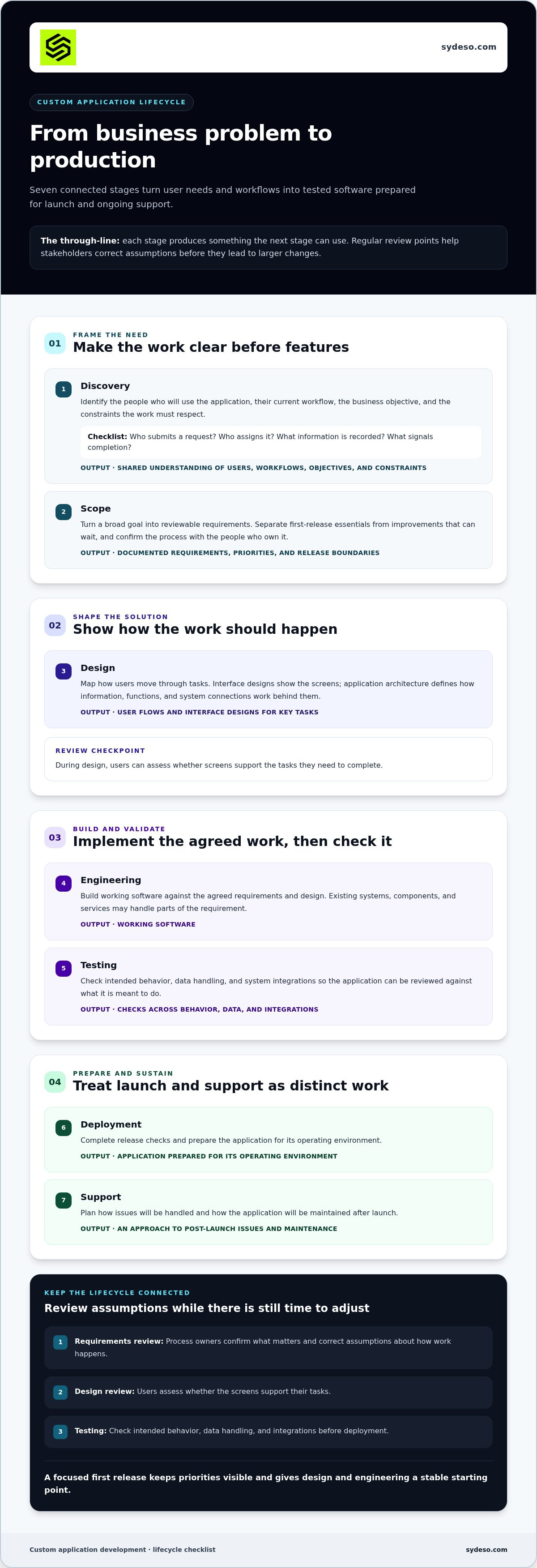
Custom application development moves through connected stages, each producing something the next stage can use. Regular review points help stakeholders correct assumptions before they lead to larger changes. The lifecycle coordinates business, design, engineering, and operational work; it is more than a handoff from a brief to a development team.
From business problem to testable requirements
Start by identifying the people who will use the application, the workflow they follow now, the business objective, and the constraints the work must respect. A broad goal such as “make request handling easier” needs to become reviewable requirements: who submits a request, who assigns it, what information is recorded, and what signals completion. Stakeholders can then confirm what matters before features are selected.
Separate first-release requirements from improvements that can wait. This keeps priorities visible and gives design and engineering a stable starting point. Review the requirements with the people who own the process, then revise assumptions that don’t reflect how work happens in practice.
From design and engineering to launch
Interface designs show how users move through tasks. Application architecture defines how information, functions, and system connections work behind those screens. Together, they guide implementation and give stakeholders concrete references to review before release.
- Discovery: A shared understanding of users, current workflows, objectives, and constraints.
- Scope: Documented requirements, priorities, and boundaries for the planned release.
- Design: User flows and interface designs that show how key tasks should work.
- Engineering: Working software built against the agreed requirements and design.
- Testing: Checks of intended behavior, data handling, and system integrations.
- Deployment: Release checks and an application prepared for its operating environment.
- Support: An approach to handling issues and maintaining the application after launch.
These stages don’t mean feedback should wait until the end. At requirements review, stakeholders can correct the process description. During design, users can assess whether screens support their tasks. During testing, the team can compare actual behavior with agreed requirements. Each review makes decisions and remaining assumptions visible, so changes can be assessed against the scope.
Testing should cover more than whether individual screens load. It checks whether users can complete intended tasks and whether connected systems exchange the expected information. Release checks confirm that deployment preparations are in place. Support carries the work into operation, where teams can address issues and plan maintenance. Delivery timing depends on project requirements and constraints, so establish it through planning rather than assuming it upfront.
Sydeso’s custom software development work can connect planning, implementation, deployment assistance, and ongoing support across the application lifecycle.
Custom application development versus configuration and integration
Choosing an approach isn’t a binary decision between using an existing tool and building an entire application from scratch. Configuration adjusts what an application already does. Integration connects separate systems. Custom application development creates purpose-built functionality for requirements those approaches don’t cover cleanly. These options can also work together.
| Approach | Control over workflows | Fit with existing systems | Responsibility for future changes |
|---|---|---|---|
| Configuration | Uses workflows and settings available in an existing application. | Works within that application’s supported functions. | Changes depend on the application’s configuration options and product updates. |
| Integration | Connects processes across systems but doesn’t necessarily change how each system works. | Links systems and exchanges data through APIs or other supported connections. | Connections need maintenance as systems, data, or APIs change. |
| Purpose-built development | Can support workflows and user needs defined for the application. | Can be designed to work with existing systems and integrations. | The organization must plan for ongoing ownership, maintenance, and future changes. |
The table describes typical distinctions, not fixed rules. An application may use configured tools for standard tasks, APIs to share information, and custom functionality for a process that needs a closer fit. The decision depends on the problem, the systems already in place, and who will maintain the resulting setup.
When configuration or integration may be enough
Configuration may suit a process that already fits an application’s available settings. A team might adjust task fields or approval steps without changing the underlying software. Integration addresses a different need: moving or synchronizing information between systems. For example, a form submission could create a record in a separate tracking system through an API. These approaches can reduce duplicated work when existing tools already support the necessary process.
They also have limits. Configuration can’t add every missing behavior, and integration doesn’t automatically resolve a mismatch between the workflow and the connected systems. Identify the specific gap first. If the problem is information moving between tools, integration may address it. If the workflow has requirements neither tool supports, another layer may be needed.
When purpose-built application work may fit
Custom work may suit recurring workflow gaps that staff repeatedly handle outside their main systems, or a distinct experience for customers or employees. Consider how often the gap occurs, which users it affects, and whether a purpose-built function can operate alongside existing software. The goal is to address the defined need, not replace systems that already do their jobs well.
Future ownership is part of the decision. A custom application needs maintenance and planned changes as business processes and connected systems evolve. Configuration and integrations also require oversight, especially when the underlying software changes. Compare what each option solves with the ongoing responsibility it creates. A mixed approach can preserve existing tools while adding only the functionality the workflow requires.
How to scope and validate a custom application before launch
A useful scope defines the change the business needs, who will use the application, and what must be true for the first release to count as successful. In custom application development, that definition helps teams assess new requests against the original need instead of adding features by default.
Turn the business problem into a bounded first release
Document the current process from the user’s point of view. Note each handoff, repeated task, delay, and workaround. Name the people involved and describe the operational change the application should support. For example, the goal might be to give staff one consistent way to review and assign requests, rather than simply to “digitize” the process.
Next, identify what the application must work with before implementation begins. Map the data it receives and produces, the systems it needs to connect to, the access different users require, and any operational constraints. These details can affect scope and design. Surface them early, while there is still room to compare options.
Use a simple priority structure to define a minimum useful release:
- Required: Functions without which the intended workflow cannot be completed.
- Dependent: Work needed to support a required function, such as a necessary system connection.
- Deferred: Improvements that may help later but aren’t needed to meet the first-release objective.
Rank requirements by business necessity and dependency, not by how easy they are to describe. Keep deferred items in a separate, visible list. This gives stakeholders a place to record useful ideas without quietly expanding the initial scope. A minimum useful release isn’t incomplete by definition. It is a bounded release that supports a specific purpose and leaves room to learn before adding more.
Validate requirements through review and testing
Agree on acceptance criteria before reviewing development work. They should describe observable behavior, such as which user can complete a task, what information is recorded, or what response should follow an action. Explicit acceptance criteria make delivery decisions reviewable through checks, not subjective impressions.
Test assumptions early. A prototype can help users review a task sequence before it is fully built. Working increments can then show whether the software behaves as expected, including its data flows and integrations. Ask intended users to assess the workflow, not only the screens. Record findings, decisions, and approved changes in one shared place so the team can distinguish agreed scope from new requests.
Before launch, review each acceptance criterion against the release and document unresolved items. If the workflow, users, or constraints have changed, assess that change against the objective and update the scope deliberately. Sydeso can help turn operational requirements into a focused custom software application scope and a practical validation plan.
How Sydeso supports custom application development through the lifecycle
Custom application development works best when the application and delivery work match the operational need. Sydeso builds and manages tailored software for businesses, including internal tools, web applications, customer portals, and MVPs. The right starting point depends on who needs the application and what task or process it must support.
Match the engagement to the application need
Internal tools support team workflows and day-to-day operations. They can bring task-specific functions into an application designed around how staff work. Customer portals and web applications serve external users or provide a purpose-built interface for a particular business process. Their requirements depend on users’ tasks, the information they need, and how the application fits existing operations.
An MVP provides a focused release for a product concept. It centers on the core functionality needed to put that concept into use and assess it, rather than treating every proposed feature as essential to the first release. Sydeso’s custom software development can also bring distinct needs together in one application when business requirements call for it.
Some applications need to exchange information with systems already in use. Sydeso provides API development and integration to connect software and support data exchange between systems. Workflow automation can support repeatable business processes by defining how work moves between tasks or systems. Identify the specific handoffs and information involved so integrations and automation serve the workflow rather than add complexity without a clear purpose.
If an existing application no longer fits operational needs, legacy modernization can address the software already in place. Depending on the requirement, this may involve refactoring or architectural updates. Align the modernization work with the business need and the application’s role, rather than assuming every older system must be replaced.
Plan for launch and continued operation
Development is one part of delivery. Sydeso’s deployment assistance supports bringing software into production, while launch and ongoing support extend the work into the application’s operational life. Launch planning includes preparing the release and accounting for how the application will be used after it goes live.
Operational needs can change as processes, users, and connected systems evolve. Ongoing support and lifecycle management give the application a path for addressing those changes over time. Define what is included in delivery, what responsibilities continue after launch, and how future work will be handled. That distinction helps stakeholders plan for the application as a working business tool, not just a completed build.
Sydeso’s services span tailored software, integrations, workflow automation, modernization, deployment assistance, and lifecycle support. Explore how Sydeso’s application development and support can fit your business needs.
Turn the application need into a practical next step
Before planning a build, capture the operational problem in a short decision brief. State who needs the application, what work it should support, and what the first release must make possible. This gives stakeholders a shared starting point and a practical way to assess new requests as priorities develop.
Use the brief to guide the next conversation about custom application development. Focus on the business requirement, the people who own the process, and the decisions needed to move forward. A clear starting point helps keep the work connected to real operations.
Sydeso develops custom software tailored to business requirements, with development, launch assistance, and ongoing lifecycle support. Explore Sydeso’s custom application development services to discuss how this work can support your application needs.
A well-defined first step can turn a broad idea into work your team can assess and act on. Start with the need, then build from there.
Frequently Asked Questions
How much does custom application development cost?
There’s no reliable price without understanding the application’s scope. Costs depend on the functions required, integrations, technical constraints, and support needed after release. Start by defining the business problem and the work the first release must cover, then compare the expected build with ongoing ownership needs. Avoid treating a general industry average as a project estimate. For a fuller breakdown of cost factors, see the separate custom software development cost guide.
How long does custom application development take?
There’s no single timeline for every application. The work depends on factors such as user roles, integration needs, review cycles, and release expectations. A focused first release may involve different work from a broader application with more workflows or system connections. Set out delivery stages, review points, and decisions that could affect progress. Update the plan as the team validates requirements and uncovers dependencies.
Who owns a custom application after it is built?
Ownership is determined by the agreements and project arrangements, not by the word “custom.” Before work begins, document who owns or controls the source code, project data, accounts, third-party services, and access credentials. Define who can approve changes and who will handle future maintenance. This record helps business and technical owners understand their responsibilities, including any terms that apply if the relationship or operating arrangements change.
Does custom application development always mean building from scratch?
No. A custom application can combine purpose-built functions with suitable existing components, services, and APIs. For example, an application may need a tailored approval workflow while using an existing service for a standard function. The key is whether the complete setup meets the intended user and business requirements. Reuse can avoid unnecessary engineering, while custom work can address gaps that settings or existing tools don’t cover.
Can an existing application be modernized instead of replaced?
Yes, modernization may be an option when an existing system still serves an important operational role. The right approach depends on its architecture, dependencies, security needs, and how the business relies on it. Work might involve updating selected components, improving system connections, or changing the architecture. Assess the system’s role and constraints first, then connect technical changes to business needs and continuity requirements.
What should a custom application development brief include?
A useful brief names the business problem, intended users, current process, desired outcome, known constraints, and required system connections. It should also distinguish first-release essentials from requests that can wait. Add examples of expected behavior, such as what should happen when a user submits or approves a record. These details help stakeholders review proposed work while leaving technical choices open for assessment during planning.
Does custom application development include security and testing?
Security and testing should be planned as part of the work, with specific checks shaped by the application’s data, integrations, users, and operating environment. For instance, the team may need to verify that different user roles can access only the functions assigned to them and that connected systems handle expected data. Define these expectations before release review. “Custom” alone doesn’t establish a security standard or prove that testing has covered every risk.
Questions
- What makes an application custom?
- An application is custom when its functions and rules are selected to match defined user needs, business workflows, and operational constraints. It might support an approval path, a handoff between teams, or a shared view of information staff need. Configuring an existing tool means adjusting its available settings and features. The difference is about fit, not whether every component is new. For example, a company might need staff to review incoming requests, assign responsibility, and record decisions in a consistent sequence. An existing tool may support that process if its available options fit. Purpose-built functionality may be appropriate if the workflow depends on rules or steps the tool cannot represent. The operational requirement should guide the solution; custom does not mean rebuilding everything from scratch.
- Which business needs can a custom application serve?
- Different application types support different users and tasks. Internal tools help teams manage operations and collaborate around shared work or information. Customer portals and other web applications give users a way to complete tasks or access relevant information. An MVP is a focused release that tests a product concept with essential functionality, leaving nonessential ideas for later evaluation. Custom also doesn’t mean every feature must be engineered from the ground up. Existing systems, components, and services may handle parts of the requirement. The application can provide a specific workflow while integrating with systems already in use. This keeps the scope tied to the need and avoids work that does not improve the user’s task. Common forms include: The right form depends on who needs the software and what they need to accomplish. Defining those conditions gives the delivery team a practical basis for deciding what belongs in the application and what work is needed to deliver it. Custom application development moves through connected stages, each producing something the next stage can use. Regular review points help stakeholders correct assumptions before they lead to larger changes. The lifecycle coordinates business, design, engineering, and operational work; it is more than a handoff from a brief to a development team.
- How much does custom application development cost?
- There’s no reliable price without understanding the application’s scope. Costs depend on the functions required, integrations, technical constraints, and support needed after release. Start by defining the business problem and the work the first release must cover, then compare the expected build with ongoing ownership needs. Avoid treating a general industry average as a project estimate. For a fuller breakdown of cost factors, see the separate custom software development cost guide.
- How long does custom application development take?
- There’s no single timeline for every application. The work depends on factors such as user roles, integration needs, review cycles, and release expectations. A focused first release may involve different work from a broader application with more workflows or system connections. Set out delivery stages, review points, and decisions that could affect progress. Update the plan as the team validates requirements and uncovers dependencies.
- Who owns a custom application after it is built?
- Ownership is determined by the agreements and project arrangements, not by the word “custom.” Before work begins, document who owns or controls the source code, project data, accounts, third-party services, and access credentials. Define who can approve changes and who will handle future maintenance. This record helps business and technical owners understand their responsibilities, including any terms that apply if the relationship or operating arrangements change.
- Does custom application development always mean building from scratch?
- No. A custom application can combine purpose-built functions with suitable existing components, services, and APIs. For example, an application may need a tailored approval workflow while using an existing service for a standard function. The key is whether the complete setup meets the intended user and business requirements. Reuse can avoid unnecessary engineering, while custom work can address gaps that settings or existing tools don’t cover.
- Can an existing application be modernized instead of replaced?
- Yes, modernization may be an option when an existing system still serves an important operational role. The right approach depends on its architecture, dependencies, security needs, and how the business relies on it. Work might involve updating selected components, improving system connections, or changing the architecture. Assess the system’s role and constraints first, then connect technical changes to business needs and continuity requirements.
- What should a custom application development brief include?
- A useful brief names the business problem, intended users, current process, desired outcome, known constraints, and required system connections. It should also distinguish first-release essentials from requests that can wait. Add examples of expected behavior, such as what should happen when a user submits or approves a record. These details help stakeholders review proposed work while leaving technical choices open for assessment during planning.
- Does custom application development include security and testing?
- Security and testing should be planned as part of the work, with specific checks shaped by the application’s data, integrations, users, and operating environment. For instance, the team may need to verify that different user roles can access only the functions assigned to them and that connected systems handle expected data. Define these expectations before release review. “Custom” alone doesn’t establish a security standard or prove that testing has covered every risk.