Custom Software Development: A Practical Guide for 2026
Master custom software development in 2026. Learn how to define requirements, build maintainable architecture, and align software engineering with your goals.

A software project can meet its technical specifications and still fail the business that funded it. Custom software development works when every decision, from requirements through release, supports the way people need to work.
Planning the process can be difficult. Project stages may feel unclear, technical choices can seem remote from daily operations, and changing requirements or integrations can raise concerns about cost, timing, and upkeep. Make the work, responsibilities, and review points clear from the start to keep those concerns manageable.
This guide explains how a business need becomes a working, maintainable system. You’ll learn how to define and validate requirements, plan functionality and integrations, build and test software, and assess readiness for launch. It also covers deployment, support, and ongoing management. Sydeso builds and manages tailored software through these connected stages, keeping engineering decisions tied to the business operations the system needs to support.
Key Takeaways
- Separate the business need from the requirements and features intended to address it.
- Use the custom software development lifecycle to clarify what each stage should deliver, from discovery through ongoing support.
- Understand how architecture, APIs, and legacy modernization affect how software connects and changes over time.
- Keep delivery verifiable by reviewing requirements, testing working software, and assigning feedback for resolution.
- Match the solution to the work it needs to support, whether that means a web application, customer portal, internal tool, or MVP.
Table of Contents
- What Custom Software Development Means for a Business
- How the Custom Software Development Lifecycle Moves from Requirements to Release
- How Architecture, APIs, and Security Shape Custom Software
- How to Keep Custom Software Development Aligned and Verifiable
- How Sydeso Delivers and Manages Custom Software
What Custom Software Development Means for a Business
Custom software is designed around an organization’s requirements and operations. Custom software development turns a defined business need into a system that supports particular users, tasks, and rules. Unlike a general-purpose product, its functions are planned around how the organization needs work to get done.
Three terms help keep planning clear. A business need describes the operational problem or desired outcome. A requirement states what the system must do to address it. A feature is a function users can interact with. For example, a business need might be to reduce delays in processing service requests. A requirement could be to route each request to the right team. A feature might let staff assign and track requests in a shared work queue.
This distinction keeps teams from treating a long feature list as the project goal. Each feature should support a requirement, and each requirement should connect to a business need. The custom software overview provides additional context on the category and its common uses. The practical test is whether the system fits the work it is meant to support.
How custom software connects to day-to-day operations
Consider a workflow where a customer submits information through a portal, an employee reviews it in an internal tool, and another system stores the resulting record. Staff may otherwise copy details between screens or follow up to fill gaps. Requirements should spell out what users need at each handoff, which business rules guide decisions, and who owns the next action.
Gather those requirements from the people who use the process, the process owners responsible for its performance, and the business rules that set its boundaries. For each step, document the expected input, decision, and outcome. This gives the team a practical basis for deciding which functions matter and how to test them.
Which business needs can custom software address?
The right form depends on who will use the system and what work it must support:
- Internal tools can organize work specific to an organization, such as reviewing requests, coordinating tasks, or managing internal records.
- Customer portals give customers a way to complete defined interactions with a business. Web applications support tasks people perform through a browser, whether the users are customers or staff.
- MVP development suits a team that needs an initial release to test a product concept. Focus the first version on the core use case, then use what the team learns to guide future scope.
These categories can overlap. A web application, for example, may include both an internal interface and a customer portal. Start by defining the users, operational need, and outcome the software must support. Add features only when they serve that purpose.
How the Custom Software Development Lifecycle Moves from Requirements to Release
A clear lifecycle gives business stakeholders planned opportunities to review the work before release. In custom software development, each stage should produce a decision or artifact the next stage can use, not just a status update.
From business need to a testable scope
Translate user needs and operational constraints into functional requirements. Separate what the first release must do from enhancements that can wait. A shared scope records expected behavior, boundaries, and acceptance conditions, giving the team a consistent definition of “ready” to build and review against.
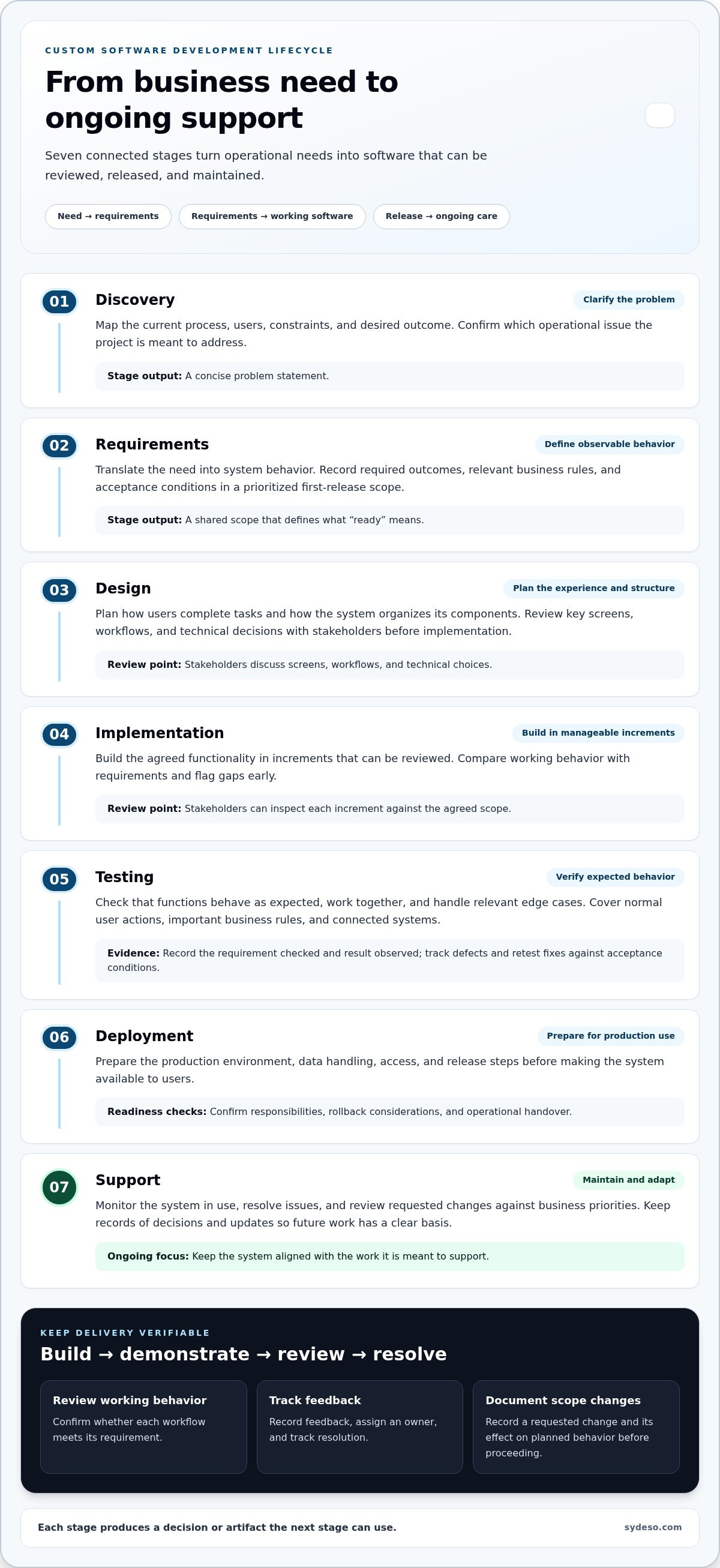
- Discovery: Map the current process, users, constraints, and desired outcome. Produce a concise problem statement and confirm which operational issue the project addresses.
- Requirements: Turn that need into observable system behavior. Record required outcomes, relevant business rules, and acceptance conditions in a prioritized scope for the first release.
- Design: Plan how users will complete tasks and how the system will organize its components. Review key screens, workflows, and technical decisions with stakeholders before implementation begins.
- Implementation: Build the agreed functionality in manageable increments. Make each increment reviewable so stakeholders can compare working behavior with requirements and flag gaps early.
- Testing: Check that functions behave as expected, work together, and handle relevant edge cases. Record defects and retest fixes against the acceptance conditions.
- Deployment: Prepare the production environment, data handling, access, and release steps. Confirm responsibilities, rollback considerations, and operational handover before making the system available to users.
- Support: Monitor the system in use, resolve issues, and review requested changes against business priorities. Keep records of decisions and updates so future work has a clear basis.
From implementation to deployment
Development works best as a repeated cycle of building, demonstrating, and reviewing functionality. Stakeholders can confirm whether a workflow meets its requirement, while the delivery team records feedback, assigns an owner, and tracks resolution. If a request changes the agreed scope, document the change and its effect on planned behavior before proceeding.
Testing provides evidence that the software meets defined expectations before production use. Cover normal user actions, important business rules, and interactions with connected systems. A useful test record identifies the requirement checked and the result observed, not just a pass indicator.
Before deployment, confirm that release decisions, access, data handling, user guidance, and support ownership are understood. The handover should reflect the system and the people responsible for operating it. Sydeso connects development, launch, and ongoing support through its custom software development work.
Validate throughout development, not only at the end. Early reviews can catch mismatches while the team can still address them within the agreed scope.
How Architecture, APIs, and Security Shape Custom Software
Architecture is the system’s structure: its parts, how they interact, and where data moves. In custom software development, that structure should reflect the system’s role in the business rather than follow a technical trend by default. Architecture affects how teams maintain software and accommodate future changes, though it cannot guarantee either outcome on its own.
Choosing a structure that fits the system's role
Start with the users, workflows, information, and operating constraints. A staff tool used by one team has different needs from a customer-facing application connected to several business systems. Design decisions should account for expected use, data ownership, connection points, and who will manage the system. Documenting the structure also helps teams understand where a change belongs and what else it may affect.
There’s no useful architecture choice without project context. Ask whether the proposed structure supports the required work and can be maintained by the people responsible for it. Record key components, their responsibilities, and important dependencies. This gives stakeholders a practical basis for reviewing trade-offs without needing to select a programming language or framework themselves.
Connecting systems and protecting information
An API is a defined way for software systems to exchange information. A business might use one to send approved customer details from a portal to an internal system, or to let a new application work with an existing service. Integration planning should specify what each system sends and receives, how fields correspond, and what happens if information is missing or an exchange fails.
| Capability | Purpose | Practical focus |
|---|---|---|
| API development | Creates a defined interface for a system to share or receive information. | Specify available actions, required data, and expected responses. |
| API integration | Connects systems through existing or newly developed interfaces. | Map data, manage errors, and check that records remain consistent. |
| Legacy modernization | Updates or adapts older software to meet current operational needs. | Understand existing behavior and dependencies before changing them. |
Build security into design and implementation. Requirements should identify the information the system handles, who needs access, and which actions each role can perform. For example, a user who reviews a record may not need the same permissions as someone who changes it. Clear access rules reduce unnecessary exposure and make responsibilities easier to review.
Set security expectations at system boundaries, including connected services and data exchanges. Review how information enters, moves through, and leaves the software. Include access checks and relevant security tests in the acceptance criteria, then document decisions and dependencies. This makes security a verifiable part of the system’s intended behavior, not a final check added at the end.
How to Keep Custom Software Development Aligned and Verifiable
Clear requirements set direction, but regular reviews show whether the software is following it. In custom software development, alignment depends on visible progress, recorded decisions, and clear ownership. A shared checklist helps business and engineering teams catch gaps before release.
- Review requirements: Confirm that each requirement still reflects a real user need or business rule. Check that acceptance conditions describe an observable result.
- See working software: Review demonstrations at agreed checkpoints. Compare actual workflows with the requirements, not just screen designs or progress reports.
- Check test results: Confirm that important user actions, business rules, integrations, and reported fixes have been tested. Track unresolved issues and their impact.
- Confirm release readiness: Review deployment steps, access, data handling, user guidance, and operational ownership before production use.
Validating progress while the project is underway
Set checkpoints around meaningful functions or workflows. At each review, users can show whether the work supports their needs, while process owners confirm that business rules are represented correctly. Record feedback alongside the relevant requirement, an assigned owner, and a status. This keeps decisions accessible and reduces repeated discussion about what was agreed.
Not every request belongs in the current release. Assess a proposed change against the agreed scope, dependencies, and testing needs before implementation. The business owner decides whether the new need takes priority; the engineering team explains the technical work and effects on connected functions. Record the decision so everyone understands what changes and what remains unchanged.
A useful release-readiness check confirms that agreed requirements have been tested, known issues are understood, and operational ownership is clear. It supports a reasoned release decision without implying that software can be guaranteed defect-free.
Preparing for launch and ongoing management
Readiness involves more than a successful test run. Confirm who approves deployment, who manages access, where operating instructions are stored, and who handles issues after launch. The engineering team prepares and validates the release; business stakeholders confirm user needs, priorities, and operational responsibilities. A clear handover gives the people running the system the information they need to use and manage it.
Plan for maintenance before the first release. Software may need updates as business processes, connected systems, or user requirements change. Document current system behavior and key decisions, then review new requests against that baseline. Sydeso’s launch and support work connects release planning with ongoing software management. Discuss your software project with Sydeso to plan how delivery and ongoing management fit together.
How Sydeso Delivers and Manages Custom Software
Sydeso builds and manages tailored software for business requirements. The work starts with the operational need and connects it to the right system and capabilities. A project may involve a customer-facing application, an internal workflow, or both. The goal is to keep development decisions tied to how people will use and manage the software.
Matching Sydeso's services to the project need
Different requirements call for different solutions. A business process that doesn’t fit existing tools may call for custom software development. A team coordinating organization-specific tasks may need an internal tool. A product team validating a concept may begin with an MVP focused on its core use case. Define the scope around the work, users, and outcomes the software must support.
- Web applications and customer portals support defined interactions for customers or staff, such as completing a task or accessing a business service.
- Internal tools organize operational processes around how a team handles records, reviews requests, or coordinates work.
- Workflow automation supports repetitive steps where a process needs to move information or tasks between stages.
- API development and integration connects systems when information needs to move between them, with attention to the data and behavior each connection requires.
- Legacy modernization updates or adapts older software when current requirements call for change. Replacement isn’t automatically the right answer; the work should account for existing system behavior and dependencies.
AI agents can also be useful when a project needs software to carry out specific tasks. They aren’t a default feature. Apply the same requirement-led approach: identify the work to support, define what the system should do, and include the capability when it serves that purpose.
Carrying the work through launch and support
Building software is one part of the lifecycle. Sydeso also provides launch and support, linking release preparation with ongoing management. Before launch, create a clear handover so the people responsible for using and managing the system understand its intended role and operating requirements.
Operational needs can change after release. Teams may adjust a process, rely on different information, or need the software to work with another system. Ongoing management gives those changes a place in the software’s lifecycle. Assess updates against current requirements and existing system behavior rather than treating them as isolated additions.
Sydeso connects tailored development, integration, launch, and ongoing support around business needs. If you’re planning a system or reviewing an existing one, explore Sydeso's software development services to see how the work can fit your requirements.
Turn the Operational Need into a Clear Next Step
Before starting custom software development, capture one real point of friction in the work. Identify who encounters it, what happens today, and what a better outcome would look like in observable terms. Note constraints that shape a workable solution, such as systems that must remain in use or teams that need to approve a change. Choose a simple signal that could show whether the change helped, such as fewer handoffs or clearer ownership when that measure fits the process. This short brief gives decision-makers a shared starting point without locking them into a feature list too early.
Use the brief to test whether software is the right response and identify what needs further discussion. Keep the first conversation focused on the process and the people it affects. Technical choices can follow once the business problem is clear.
Sydeso works with businesses to build and manage tailored software. If you’re ready to explore how a project could address your operational needs, explore Sydeso's custom software development services.
A well-defined starting point makes the next decision easier. Begin with the work that needs to change, then shape the software around it.
Frequently Asked Questions
What is custom software development?
Custom software development is the work of planning, building, and maintaining software for an organization’s specific needs. The term can refer to both the tailored software and the process used to create it. For example, a business may need a system that reflects its own approval rules or record structure. Development turns those needs into defined behavior, then checks that the resulting system supports its intended use.
How does the custom software development process work?
The process moves from understanding the business problem to defining what the software must do, shaping the solution, building it, checking its behavior, and preparing it for use. Each stage should leave a decision or record that helps the next one proceed. For example, documented acceptance conditions give testers and business reviewers a shared way to assess a feature, while release notes help users understand what has changed.
When should a business consider custom software?
Consider custom software when an important business process has requirements that existing tools don’t handle well, or repeated workarounds create confusion, duplication, or unclear ownership. First identify who does the work, where the current process breaks down, and what outcome would improve it. If the need is occasional or poorly understood, clarify the process before defining a system. A specific, recurring need gives a project a stronger basis.
Can custom software integrate with existing business systems?
Yes, custom software can connect with existing systems when they provide a suitable way to exchange information. APIs define how software requests and shares data. Integration planning should establish which system owns each record, how fields correspond, and what happens when a connection fails or data is incomplete. A practical early step is to map the information flow and identify the decisions or records that must stay consistent.
How is custom software tested before launch?
Teams test software by checking whether it meets agreed requirements under representative conditions. A test might confirm that a submitted request reaches the correct review stage, then check how the system handles missing information or an invalid action. Record the expected result, actual result, and any defect found. After a fix, retest the affected behavior. Testing provides evidence for release decisions, but it can’t establish that no defect will ever occur.
What happens after custom software is launched?
After launch, the system enters ongoing use and management. Teams address reported issues, maintain the software, and review updates as business processes or connected systems change. Keep a record of current behavior, dependencies, and requested changes so future work doesn’t rely on informal knowledge. When a process changes, assess which users, data, and system functions are affected before updating the software. This keeps maintenance tied to operational needs.
Questions
- Which business needs can custom software address?
- The right form depends on who will use the system and what work it must support: These categories can overlap. A web application, for example, may include both an internal interface and a customer portal. Start by defining the users, operational need, and outcome the software must support. Add features only when they serve that purpose. A clear lifecycle gives business stakeholders planned opportunities to review the work before release. In custom software development, each stage should produce a decision or artifact the next stage can use, not just a status update.
- What is custom software development?
- Custom software development is the work of planning, building, and maintaining software for an organization’s specific needs. The term can refer to both the tailored software and the process used to create it. For example, a business may need a system that reflects its own approval rules or record structure. Development turns those needs into defined behavior, then checks that the resulting system supports its intended use.
- How does the custom software development process work?
- The process moves from understanding the business problem to defining what the software must do, shaping the solution, building it, checking its behavior, and preparing it for use. Each stage should leave a decision or record that helps the next one proceed. For example, documented acceptance conditions give testers and business reviewers a shared way to assess a feature, while release notes help users understand what has changed.
- When should a business consider custom software?
- Consider custom software when an important business process has requirements that existing tools don’t handle well, or repeated workarounds create confusion, duplication, or unclear ownership. First identify who does the work, where the current process breaks down, and what outcome would improve it. If the need is occasional or poorly understood, clarify the process before defining a system. A specific, recurring need gives a project a stronger basis.
- Can custom software integrate with existing business systems?
- Yes, custom software can connect with existing systems when they provide a suitable way to exchange information. APIs define how software requests and shares data. Integration planning should establish which system owns each record, how fields correspond, and what happens when a connection fails or data is incomplete. A practical early step is to map the information flow and identify the decisions or records that must stay consistent.
- How is custom software tested before launch?
- Teams test software by checking whether it meets agreed requirements under representative conditions. A test might confirm that a submitted request reaches the correct review stage, then check how the system handles missing information or an invalid action. Record the expected result, actual result, and any defect found. After a fix, retest the affected behavior. Testing provides evidence for release decisions, but it can’t establish that no defect will ever occur.
- What happens after custom software is launched?
- After launch, the system enters ongoing use and management. Teams address reported issues, maintain the software, and review updates as business processes or connected systems change. Keep a record of current behavior, dependencies, and requested changes so future work doesn’t rely on informal knowledge. When a process changes, assess which users, data, and system functions are affected before updating the software. This keeps maintenance tied to operational needs.