Custom Software vs. Off-the-Shelf Software: How to Choose in 2026
Deciding on custom software vs off the shelf in 2026? Discover how to evaluate workflow fit, total cost, integrations, and ongoing maintenance for your team.

The fastest software decision can become the most expensive one to undo. In the custom software vs off the shelf decision, a ready-to-use tool may still leave teams working around missing features or disconnected systems. Custom software can fit a workflow more closely, but it also brings delivery, ownership, and change-management responsibilities.
This isn’t just a comparison of subscription fees and development costs. It’s a decision about how well a solution supports the work your team needs to do and what it will take to operate and adapt over time. Some businesses can adjust their processes to a standard product. Others have a critical workflow that existing tools can’t support effectively.
This guide compares the trade-offs in 2026, including implementation, integrations, ongoing maintenance, and the work involved in changing systems. You’ll learn how to identify when a standard product is sufficient, when tailored software may be justified, and how to test the case before committing to a larger build. The goal is to choose the smallest solution that meets today’s needs without closing off tomorrow’s options.
Key Takeaways
- Compare custom software vs off the shelf by workflow fit, integrations, change control, and responsibility for ongoing maintenance.
- Separate a product’s capabilities from the work needed to configure it, migrate data, connect systems, and train users.
- Assess total effort over your expected time horizon, including subscriptions, implementation, training, and maintenance.
- Rank requirements as essential, useful, or optional before comparing solutions. This keeps the decision focused on operational needs.
- Validate your choice against real tasks, user needs, constraints, and acceptance criteria before committing to a wider rollout or build.
Table of Contents
- Custom software vs. off-the-shelf: define the decision before comparing
- How custom and off-the-shelf software differ in fit and ownership
- Compare total effort, delivery time, risk, and long-term value
- Use this decision framework to choose build, buy, or combine
- Plan the next step: validate the choice before committing
Custom software vs. off-the-shelf: define the decision before comparing
The best starting point for custom software vs off the shelf is the work the system must support. One option gives you a shared product with set capabilities; the other shapes an application around your organization’s requirements. Neither category is automatically better. The decision depends on workflow fit, who controls changes, and which limits your team can accept.
What counts as off-the-shelf software?
Off-the-shelf software is a prebuilt product that a vendor develops and maintains for multiple organizations with similar needs. Accounting platforms, customer relationship management (CRM) systems, and project-management tools are common examples. They offer a shared set of features rather than a separate application for each customer.
Configuration can adjust settings, fields, permissions, or workflow options that the product supports. It doesn’t usually change the underlying product. The distinction matters: a setting can adapt how a feature works, but it can’t add a capability the product doesn’t have.
What makes software custom-built?
Custom software is designed around a particular organization’s requirements. Those requirements shape the application’s workflows, rules, and integrations. The Custom software overview describes this purpose-built approach and its contrast with packaged software. In practical terms, the key difference is whether the application’s behavior is designed for your process or selected from a shared product’s existing options.
Custom scope can be narrow or broad. It might cover one focused internal tool or a larger application with several user groups and connected systems. Configuring a subscription product remains configuration, even when the setup is extensive. Building a separate application around defined requirements is custom development.
Example: A distribution team needs to review orders, check inventory in two systems, and route exceptions for approval. A project-management product might handle approvals if its existing workflow options fit. If staff must repeatedly move data between systems or apply rules the product doesn’t support, a purpose-built tool or integration could address that specific gap.
This is why the choice isn’t always all-or-nothing. An organization might keep its accounting or CRM product and build a focused tool for one workflow the existing system doesn’t support well. That can preserve familiar systems while addressing a defined operational constraint.
Before comparing options, describe the process in plain terms: who does each step, what information they use, which rules determine the next action, and where exceptions go. Then separate essential requirements from preferences. This gives you a concrete basis for deciding whether a shared product can support the work, configuration is enough, or custom development is justified.
How custom and off-the-shelf software differ in fit and ownership
The main difference isn’t simply how much you can change the software. It’s also who decides what changes, who connects systems, and who keeps the solution working. In the custom software vs off the shelf decision, distinguish the product’s built-in capabilities from the work needed to set it up, move data, and connect it to other tools.
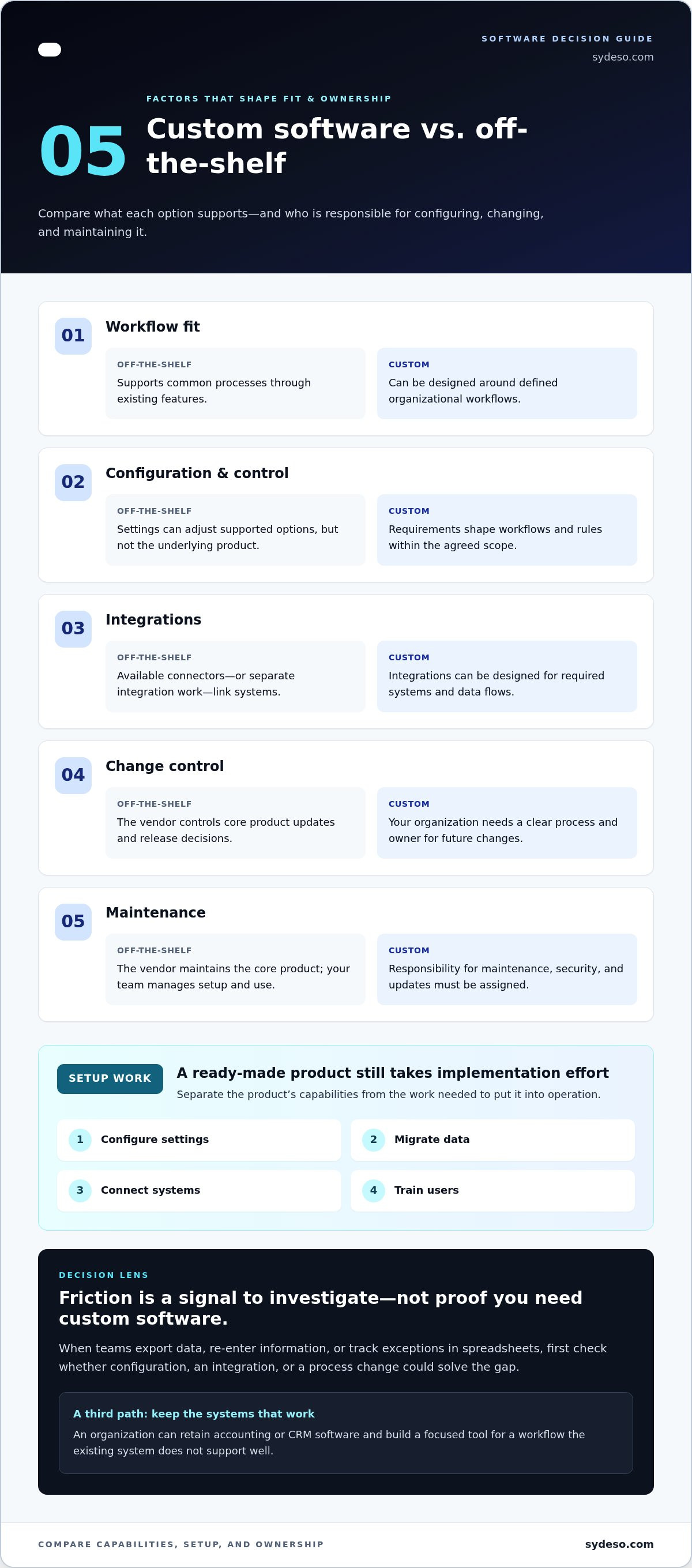
| Factor | Off-the-shelf | Custom software |
|---|---|---|
| Workflow fit | Supports common processes through existing features. | Can be designed around defined organizational workflows. |
| Configuration | Settings can adjust supported options, but not the underlying product. | Requirements shape workflows and rules within the agreed scope. |
| Integrations | Available connectors or separate integration work link the product to other systems. | Integrations can be designed for required systems and data flows. |
| Change control | The vendor controls core product updates and release decisions. | The organization needs a clear process and owner for future changes. |
| Maintenance | The vendor maintains the core product; the customer manages its setup and use. | Responsibility for maintenance, security, and updates must be assigned. |
This comparison describes typical responsibility boundaries, not every vendor or project arrangement. An off-the-shelf product still takes work to implement. Teams may need to configure settings, migrate records, connect systems, and train users. That work doesn’t mean the product itself can perform a function it wasn’t built to support.
Where standard products fit, and where workarounds begin
A standard product is often a practical fit when its core process resembles yours. For example, a CRM can manage customer records using its supported fields and stages. If staff repeatedly export data, re-enter information, or track exceptions in spreadsheets, investigate the cause. That friction doesn’t prove custom development is necessary. First determine whether configuration, an integration, or a process change could resolve it. If the product lacks a required capability, another system or a tailored tool may be needed.
Who owns changes, integrations, and maintenance?
Vendors control changes to their shared products. Your team controls how it uses the product and remains responsible for its implementation choices, including data flows between systems. With custom software, define who handles maintenance, security updates, testing, and future changes before work begins. Tailoring an application doesn’t remove those obligations. It makes ownership explicit.
The better fit depends on operational needs and who owns future change. A combined approach can also make sense: retain a standard product for common functions, then address a specific gap with an integration, automation, or focused application. Teams assessing that route can review custom software development as one way to address a defined operational need.
Compare total effort, delivery time, risk, and long-term value
A fair comparison accounts for more than a subscription price or development estimate. Include the work required to configure, implement, integrate, train users, and keep the solution running. Use the same evaluation period and expected usage for both options. Otherwise, a low initial commitment can look less costly simply because later effort is missing from the comparison.
How should a business assess total cost?
Build a simple ledger for each option. Include cash expenses and staff time, even when internal effort doesn’t appear on an invoice.
- Off-the-shelf: Record subscriptions, setup, configuration, data migration, integrations, training, administration, and any work required to adapt processes to the product.
- Custom: Record discovery and development, implementation, data migration, integrations, acceptance testing, training, maintenance, and future changes.
Estimate each item using your own usage and staffing assumptions. Include expected user counts, connected systems, and the people who will administer the solution. Note which estimates are firm and which depend on assumptions. Projected savings and avoided costs are possibilities, not guaranteed results.
A standard product may look inexpensive at purchase but still require substantial configuration or process changes. A custom build may require more effort before launch, then need ongoing time for maintenance and updates. Compare both across the same period, and show one-time costs separately from recurring work. This makes the trade-offs visible without assuming either approach will be cheaper.
How do speed and risk change the comparison?
A ready-made product can reduce the time needed to build core functionality. It still needs setup, data preparation, integration, and user adoption before it delivers a usable outcome. Custom development follows a different path: teams define scope, build and test the required functions, then confirm the application meets acceptance criteria before operational use.
Separate time to first usable outcome from time to meet every requirement. A product may support a basic workflow quickly while leaving complex needs unresolved. A focused custom release may address one priority first, while the full planned scope takes longer. Set the milestone that matters to operations, not just the date the software becomes available.
Review risk on both sides. A standard product can create dependency on the vendor’s product decisions, continued availability, and terms for accessing or exporting data. A custom application places more responsibility on the organization to plan maintenance, security, and future changes. For either route, document who owns integrations, where data moves, how continuity is handled, and what happens if requirements change.
The right comparison balances delivery effort with operational control. If a critical workflow needs a tailored application or integration, custom software development can be assessed against the same scope, ownership, and acceptance criteria as a product option.
Use this decision framework to choose build, buy, or combine
Make the decision in sequence. Start with the work, then test whether a standard product can support it before expanding the scope of a custom build. This keeps the custom software vs off the shelf comparison grounded in operational evidence rather than preference.
- Map the workflow. Record the steps, users, information, decision rules, and exceptions involved in the process. Include handoffs between teams and systems.
- Identify critical gaps. Rank requirements as essential, useful, or optional before reviewing products. Mark where the current process fails an essential need, not just where a feature would be convenient.
- Compare ownership. Note who controls product changes, integrations, data flows, maintenance, and security for each option. Include the internal time required to manage the solution.
- Test alternatives. Use representative tasks to check whether shortlisted products handle essential requirements. Record workarounds, process changes, and integration needs instead of relying on feature lists alone.
- Choose the smallest workable scope. Buy when a standard product meets essential needs. Build when a critical workflow remains poorly served. Combine approaches when existing tools work for most tasks but leave a specific gap.
When is buying a standard product the practical choice?
Evaluate ready-made software when the core workflow is common, requirements are stable, and the product’s supported functions match essential needs. It can also be practical when adoption speed and vendor-managed product updates matter. Record the limitations that remain, the integrations required, and any process changes users must make. This creates a clear basis for accepting those trade-offs.
When should a team consider custom or hybrid software?
Consider custom development when evidence shows that a business-critical workflow remains poorly served by available products. A hybrid can be more proportionate if standard tools cover most needs but a narrow operational gap still causes repeated friction. For example, keep an existing system for routine records and assess a focused application or integration for a specific exception process. Validate the gap with users and mapped workflows before expanding scope.
A decision record should state the selected route, the essential requirements it covers, the known constraints, and who owns future changes. Revisit it if the workflow or user needs change. Sydeso’s custom software development can be part of assessing a tailored option against these criteria.
Plan the next step: validate the choice before committing
A decision becomes useful when it can be tested against real work. Before purchasing a product or starting development, document the workflow, affected users, operating constraints, and conditions the solution must meet. This turns the custom software vs off the shelf choice into a set of checks rather than an assumption about which route should work.
What should a decision record contain?
Keep the record short enough to use, but specific enough to guide a test or first release. Include the problem, affected users, current process, essential requirements, and why the chosen option fits better than the alternatives. Capture assumptions about implementation effort, integrations, data access, and who will own ongoing maintenance and future changes.
- Workflow: Document the steps, handoffs, exceptions, and systems involved.
- Users and constraints: Identify who will use the solution and any operational limits it must respect.
- Acceptance criteria: State observable conditions that show the solution can support essential tasks.
- Decision basis: Record known limitations and why the selected route is proportionate to the problem.
For a product route, test the shortlisted option with representative users. Run real tasks using realistic information, then record where the product fits, where a workaround appears, and whether required integrations support the workflow. A feature list alone won’t show how the solution performs across actual handoffs.
For a custom route, define a bounded first release. Choose the smallest set of essential tasks it must support, identify what is out of scope, and agree how users will assess it. Acceptance criteria might describe a required workflow outcome, such as routing an exception to the right approval step with the necessary information. Keep the criteria observable and tied to the mapped process.
How Sydeso can support a custom or hybrid path
When validation shows a specific operational gap, Sydeso develops tailored software, internal tools, web applications, and customer portals. API development and integration can connect systems around a documented data flow. Workflow automation can address a defined manual handoff or repeated process step. Let the evidence shape the scope rather than expanding it simply because a custom option is available.
Before work starts, align the delivery team and business users on the workflow, scope, constraints, and acceptance criteria. After release, Sydeso provides launch and ongoing lifecycle support, with maintenance and change responsibilities defined for the work. The next step is to turn the decision record into a scoped plan for the chosen route.
Explore how Sydeso approaches custom software to discuss a tailored or hybrid path based on your documented operational needs.
Make the next decision testable
The next step doesn’t need to lock your organization into a full build or a long-term product commitment. Use the workflow and acceptance criteria you’ve documented to test the smallest practical step. A short validation can show whether a standard product supports the work, a focused custom application is justified, or the right path combines both.
That gives your team a clearer basis for deciding what to own, what to change, and what to leave as it is. The custom software vs off the shelf choice becomes more manageable when it’s grounded in observed tasks and agreed requirements, not assumptions about technology.
Sydeso builds and manages tailored software for business requirements, with API development, workflow automation, launch, and lifecycle support available as part of that work. If your validation points to a tailored path, discuss a tailored software solution with Sydeso. Start with a defined problem and a scope your team can assess.
Frequently Asked Questions
Is custom software always better than off-the-shelf software?
No. Custom software is useful when a specific requirement matters enough to justify building and maintaining a separate application. A standard product may be the better choice for a routine function, such as expense approvals, if it supports the process without creating operational difficulty. In the custom software vs off the shelf decision, judge the options by how well they handle actual work, not by the assumption that more customization is always an advantage.
Can a business use custom software and off-the-shelf software together?
Yes. A business can keep standard applications for familiar tasks and use a custom component for a specialized one. For example, a company might retain its accounting system while using a tailored customer portal to collect information in a format the accounting system can process. Before connecting them, define which system holds the authoritative record, what information moves between them, and who handles errors or changes to the connection.
How long does custom software development take?
There isn’t one reliable duration for every project. A focused internal tool with a clear workflow differs from a product with several user roles, integrations, and complex rules. Timing also depends on how quickly requirements are decided and users can review working versions. Ask for delivery stages, review points, and acceptance criteria. These make progress measurable without treating an early usable release as completion of the full scope.
Can custom software integrate with existing business applications?
Yes, custom software can be designed to exchange information with existing applications when the systems support a suitable connection method. Start by identifying which records must move, which system owns each record, and how often updates are needed. For example, a service portal may need to pass approved customer details to an internal system. Test permissions, incomplete records, and failed transfers before relying on the connection in daily work.
Who maintains custom software after it launches?
The organization should assign a clear owner for the application after launch. That owner coordinates maintenance, access, security updates, user feedback, and decisions about changes. A development partner may provide ongoing lifecycle support, but responsibilities should be documented so operational decisions don’t fall between teams. Define how issues are reported, who approves changes, and how technical documentation is kept current as staff or business processes change.
Can a business move from off-the-shelf software to custom software later?
Yes. A later transition is possible, but it needs planning for data export, field mapping, historical records, and the timing of the changeover. Start by identifying which information the new application must preserve and which processes can change. A limited parallel test can help users compare records and complete key tasks before the existing system is retired. Keep the original system available until the new process has been checked.
Is off-the-shelf software cheaper than custom software?
It can require less initial investment, but that doesn’t establish which option costs less over time. Compare subscription charges with implementation, integrations, staff training, administration, and the effort required to work around product limits. For custom software, include development, testing, maintenance, and future changes. Use the same time period and expected usage for both estimates, and label assumptions clearly. The result is more useful than comparing purchase prices alone.
Questions
- What counts as off-the-shelf software?
- Off-the-shelf software is a prebuilt product that a vendor develops and maintains for multiple organizations with similar needs. Accounting platforms, customer relationship management (CRM) systems, and project-management tools are common examples. They offer a shared set of features rather than a separate application for each customer. Configuration can adjust settings, fields, permissions, or workflow options that the product supports. It doesn’t usually change the underlying product. The distinction matters: a setting can adapt how a feature works, but it can’t add a capability the product doesn’t have.
- What makes software custom-built?
- Custom software is designed around a particular organization’s requirements. Those requirements shape the application’s workflows, rules, and integrations. The Custom software overview describes this purpose-built approach and its contrast with packaged software. In practical terms, the key difference is whether the application’s behavior is designed for your process or selected from a shared product’s existing options. Custom scope can be narrow or broad. It might cover one focused internal tool or a larger application with several user groups and connected systems. Configuring a subscription product remains configuration, even when the setup is extensive. Building a separate application around defined requirements is custom development. Example: A distribution team needs to review orders, check inventory in two systems, and route exceptions for approval. A project-management product might handle approvals if its existing workflow options fit. If staff must repeatedly move data between systems or apply rules the product doesn’t support, a purpose-built tool or integration could address that specific gap. This is why the choice isn’t always all-or-nothing. An organization might keep its accounting or CRM product and build a focused tool for one workflow the existing system doesn’t support well. That can preserve familiar systems while addressing a defined operational constraint. Before comparing options, describe the process in plain terms: who does each step, what information they use, which rules determine the next action, and where exceptions go. Then separate essential requirements from preferences. This gives you a concrete basis for deciding whether a shared product can support the work, configuration is enough, or custom development is justified. The main difference isn’t simply how much you can change the software. It’s also who decides what changes, who connects systems, and who keeps the solution working. In the custom software vs off the shelf decision, distinguish the product’s built-in capabilities from the work needed to set it up, move data, and connect it to other tools. This comparison describes typical responsibility boundaries, not every vendor or project arrangement. An off-the-shelf product still takes work to implement. Teams may need to configure settings, migrate records, connect systems, and train users. That work doesn’t mean the product itself can perform a function it wasn’t built to support.
- Who owns changes, integrations, and maintenance?
- Vendors control changes to their shared products. Your team controls how it uses the product and remains responsible for its implementation choices, including data flows between systems. With custom software, define who handles maintenance, security updates, testing, and future changes before work begins. Tailoring an application doesn’t remove those obligations. It makes ownership explicit. The better fit depends on operational needs and who owns future change. A combined approach can also make sense: retain a standard product for common functions, then address a specific gap with an integration, automation, or focused application. Teams assessing that route can review custom software development as one way to address a defined operational need. A fair comparison accounts for more than a subscription price or development estimate. Include the work required to configure, implement, integrate, train users, and keep the solution running. Use the same evaluation period and expected usage for both options. Otherwise, a low initial commitment can look less costly simply because later effort is missing from the comparison.
- How should a business assess total cost?
- Build a simple ledger for each option. Include cash expenses and staff time, even when internal effort doesn’t appear on an invoice. Estimate each item using your own usage and staffing assumptions. Include expected user counts, connected systems, and the people who will administer the solution. Note which estimates are firm and which depend on assumptions. Projected savings and avoided costs are possibilities, not guaranteed results. A standard product may look inexpensive at purchase but still require substantial configuration or process changes. A custom build may require more effort before launch, then need ongoing time for maintenance and updates. Compare both across the same period, and show one-time costs separately from recurring work. This makes the trade-offs visible without assuming either approach will be cheaper.
- How do speed and risk change the comparison?
- A ready-made product can reduce the time needed to build core functionality. It still needs setup, data preparation, integration, and user adoption before it delivers a usable outcome. Custom development follows a different path: teams define scope, build and test the required functions, then confirm the application meets acceptance criteria before operational use. Separate time to first usable outcome from time to meet every requirement. A product may support a basic workflow quickly while leaving complex needs unresolved. A focused custom release may address one priority first, while the full planned scope takes longer. Set the milestone that matters to operations, not just the date the software becomes available. Review risk on both sides. A standard product can create dependency on the vendor’s product decisions, continued availability, and terms for accessing or exporting data. A custom application places more responsibility on the organization to plan maintenance, security, and future changes. For either route, document who owns integrations, where data moves, how continuity is handled, and what happens if requirements change. The right comparison balances delivery effort with operational control. If a critical workflow needs a tailored application or integration, custom software development can be assessed against the same scope, ownership, and acceptance criteria as a product option. Make the decision in sequence. Start with the work, then test whether a standard product can support it before expanding the scope of a custom build. This keeps the custom software vs off the shelf comparison grounded in operational evidence rather than preference.
- When is buying a standard product the practical choice?
- Evaluate ready-made software when the core workflow is common, requirements are stable, and the product’s supported functions match essential needs. It can also be practical when adoption speed and vendor-managed product updates matter. Record the limitations that remain, the integrations required, and any process changes users must make. This creates a clear basis for accepting those trade-offs.
- When should a team consider custom or hybrid software?
- Consider custom development when evidence shows that a business-critical workflow remains poorly served by available products. A hybrid can be more proportionate if standard tools cover most needs but a narrow operational gap still causes repeated friction. For example, keep an existing system for routine records and assess a focused application or integration for a specific exception process. Validate the gap with users and mapped workflows before expanding scope. A decision record should state the selected route, the essential requirements it covers, the known constraints, and who owns future changes. Revisit it if the workflow or user needs change. Sydeso’s custom software development can be part of assessing a tailored option against these criteria. A decision becomes useful when it can be tested against real work. Before purchasing a product or starting development, document the workflow, affected users, operating constraints, and conditions the solution must meet. This turns the custom software vs off the shelf choice into a set of checks rather than an assumption about which route should work.
- What should a decision record contain?
- Keep the record short enough to use, but specific enough to guide a test or first release. Include the problem, affected users, current process, essential requirements, and why the chosen option fits better than the alternatives. Capture assumptions about implementation effort, integrations, data access, and who will own ongoing maintenance and future changes. For a product route, test the shortlisted option with representative users. Run real tasks using realistic information, then record where the product fits, where a workaround appears, and whether required integrations support the workflow. A feature list alone won’t show how the solution performs across actual handoffs. For a custom route, define a bounded first release. Choose the smallest set of essential tasks it must support, identify what is out of scope, and agree how users will assess it. Acceptance criteria might describe a required workflow outcome, such as routing an exception to the right approval step with the necessary information. Keep the criteria observable and tied to the mapped process.
- Is custom software always better than off-the-shelf software?
- No. Custom software is useful when a specific requirement matters enough to justify building and maintaining a separate application. A standard product may be the better choice for a routine function, such as expense approvals, if it supports the process without creating operational difficulty. In the custom software vs off the shelf decision, judge the options by how well they handle actual work, not by the assumption that more customization is always an advantage.
- Can a business use custom software and off-the-shelf software together?
- Yes. A business can keep standard applications for familiar tasks and use a custom component for a specialized one. For example, a company might retain its accounting system while using a tailored customer portal to collect information in a format the accounting system can process. Before connecting them, define which system holds the authoritative record, what information moves between them, and who handles errors or changes to the connection.
- How long does custom software development take?
- There isn’t one reliable duration for every project. A focused internal tool with a clear workflow differs from a product with several user roles, integrations, and complex rules. Timing also depends on how quickly requirements are decided and users can review working versions. Ask for delivery stages, review points, and acceptance criteria. These make progress measurable without treating an early usable release as completion of the full scope.
- Can custom software integrate with existing business applications?
- Yes, custom software can be designed to exchange information with existing applications when the systems support a suitable connection method. Start by identifying which records must move, which system owns each record, and how often updates are needed. For example, a service portal may need to pass approved customer details to an internal system. Test permissions, incomplete records, and failed transfers before relying on the connection in daily work.
- Who maintains custom software after it launches?
- The organization should assign a clear owner for the application after launch. That owner coordinates maintenance, access, security updates, user feedback, and decisions about changes. A development partner may provide ongoing lifecycle support, but responsibilities should be documented so operational decisions don’t fall between teams. Define how issues are reported, who approves changes, and how technical documentation is kept current as staff or business processes change.
- Can a business move from off-the-shelf software to custom software later?
- Yes. A later transition is possible, but it needs planning for data export, field mapping, historical records, and the timing of the changeover. Start by identifying which information the new application must preserve and which processes can change. A limited parallel test can help users compare records and complete key tasks before the existing system is retired. Keep the original system available until the new process has been checked.
- Is off-the-shelf software cheaper than custom software?
- It can require less initial investment, but that doesn’t establish which option costs less over time. Compare subscription charges with implementation, integrations, staff training, administration, and the effort required to work around product limits. For custom software, include development, testing, maintenance, and future changes. Use the same time period and expected usage for both estimates, and label assumptions clearly. The result is more useful than comparing purchase prices alone.