Custom software vs SaaS: compare costs, fees, and ownership
Our custom business software vs SaaS cost analysis compares upfront fees, long-term ownership, and hidden expenses to help you choose the best solution.

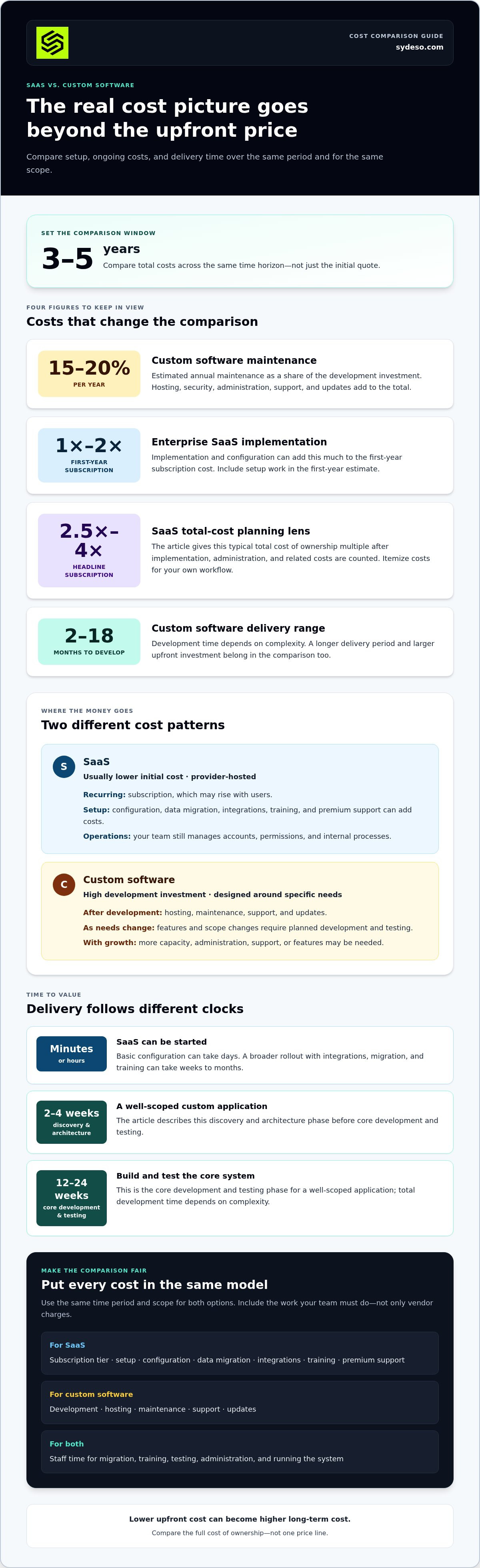
The lower upfront cost can become the higher long-term cost. A custom business software vs. SaaS cost analysis should compare total costs over 3-5 years: SaaS is hosted by a provider and accessed online, usually with a lower initial cost, while custom software requires a larger upfront investment and gives the business more control over the system.
SaaS fees can look straightforward, but subscriptions, per-user pricing, implementation, and integrations all affect the total cost. Custom development puts more cost upfront, followed by hosting, maintenance, and updates to keep the software aligned with business needs.
This comparison covers subscription and implementation fees, development and ongoing costs, ownership, and the impact of project scope changes. It also explains how to compare the options as your business grows, so you can see which costs are fixed, which may rise, and where each approach fits.
Key Takeaways
- Build a comparison that includes implementation, integrations, hosting, maintenance, and the staff time needed to run each option.
- Map how subscription fees change with users and usage so growth does not quietly reshape the budget.
- Define software, source-code, and data rights in writing to understand what you control and what depends on a vendor.
- Test how scope changes and delivery delays affect the custom build’s total cost, then compare that with the cost of keeping SaaS.
- Use project scope, integrations, and ongoing support needs to interpret development cost ranges rather than treating a single estimate as universal.
Table of Contents
- What is the difference between custom software and SaaS?
- SaaS subscription and implementation fees
- Software ownership, intellectual property, and data
- Cost sensitivity analysis and build overruns
- Custom software development cost ranges
- Sydeso: Custom software development
What is the difference between custom software and SaaS?
SaaS is hosted by a provider and accessed online. Custom software is designed around a business’s processes and operating requirements. Customization, user growth, and integrations all affect the cost comparison. A custom system also requires a budget for hosting, maintenance, support, and updates after development.
Custom-Software Build and Upkeep
Custom software requires a high initial investment, then ongoing work to run and maintain it. Annual maintenance is estimated at 15-20% of the development investment. Hosting, security, administration, support, and updates add to the total. The business has more control over its system, but it also needs clear ownership of the work required to keep that system reliable.
SaaS Subscriptions and Infrastructure
A SaaS provider hosts the application, so your business does not need to provision servers for it. The subscription is usually the main recurring cost, while setup, data migration, integrations, and training can add implementation costs. Your team still needs to manage accounts, permissions, and internal processes, even when the provider maintains the infrastructure.
Growth-Related Cost Changes
Per-user pricing can make SaaS costs rise with headcount. Custom software avoids that same per-seat structure, but growth can still require more capacity, administration, support, and features. Compare both options over 3-5 years.
Customization and Integration Costs
Custom software can match your requirements directly and connect internal applications around specific workflows. That flexibility also requires development and testing. Compare the value of each required feature with the cost of adapting SaaS or building a tailored system.
| Option | Initial cost | Ongoing cost | Growth and integration |
|---|---|---|---|
| SaaS | Usually lower | Subscription and implementation | Fees may rise with users; integrations can need extra work |
| Custom software | High development investment | Hosting, maintenance, support, and updates | Built for specific needs; changes require planned development |
| SaaS with custom integrations | Subscription plus integration work | Subscription and integration maintenance | Combines an existing application with tailored connections |
Choose SaaS when its existing features fit your workflow. Consider custom software when unique processes or integration needs justify the initial build and ongoing upkeep.
SaaS subscription and implementation fees
Budget for more than the subscription. SaaS setup, configuration, data migration, integrations, staff training, and premium support can all add costs. For enterprise SaaS, implementation and configuration typically cost 1x-2x the first-year subscription, so include them in the first-year estimate.
Recurring fees also need a longer view. SaaS total cost of ownership is typically 2.5x to 4x the headline subscription price once implementation, administration, and related costs are counted. Treat that multiple as a planning lens, then itemize the costs for your own workflow.
Build an Implementation Cost Checklist
List every cost before comparing options: subscription tier, setup, configuration, data migration, integrations, training, and premium support. Then assign responsibility for each task. A provider may configure the application, while your team prepares data, assigns access, tests workflows, and trains staff. These responsibilities affect both the budget and how soon the software becomes useful.
Compare Time to Value
SaaS can be started in minutes or hours, with basic configuration taking days. A broader rollout involving integrations, migration, and training can take weeks to months. Custom software takes 2-18 months to develop, depending on complexity. A well-scoped application can use 2-4 weeks for discovery and architecture, followed by 12-24 weeks for core development and testing.
That timeline changes the cost comparison. SaaS may put an existing tool into use sooner, but the team still needs time for setup and adoption. Custom software requires a larger upfront investment and a longer delivery period, while development proceeds through requirements, build, testing, and deployment. Clutch’s 2026 pricing data reports an average software project timeline of roughly 13 months, a reference point rather than a schedule for every build.
Use One Cost Model for Both Options
Compare both options over the same period and for the same scope. For SaaS, record subscription and implementation costs. For custom software, include development, hosting, maintenance, and support. Add staff time for migration, training, testing, and ongoing administration. This makes the tradeoff between time to value and total cost easier to assess.
If a configured platform forces workarounds across a core workflow, include those operational costs in the comparison. A tailored build may fit better when integration requirements or repeated manual steps create persistent friction. For that case, review custom software development as a route to a system shaped around the workflow.
Software ownership, intellectual property, and data
Ownership affects control after implementation, not just the upfront cost. Compare who controls the software and its data, and what it takes to move or protect them.
Software and Intellectual-Property Ownership
With SaaS, your business uses a vendor-operated platform under subscription terms. With custom software, ownership depends on the development agreement. Before work begins, define rights to source code, custom features, documentation, and third-party components. Those terms determine whether your team can maintain the system or bring in another team later.
Separate ownership from access. Your business may own its process documentation and data without owning the software that stores them. For a custom build, document which components are made specifically for your business and which rely on existing tools. This helps estimate future changes and avoid disputes about reuse, maintenance, and access.
Security and Compliance Responsibilities
A SaaS vendor manages the platform’s infrastructure, while your team manages account access, user permissions, and the information entered. For custom software, assign responsibility for hosting, security updates, incident response, and ongoing maintenance. Put these duties in the operating plan so no critical task is left unassigned.
Data-handling requirements depend on the information and the business process. For example, a healthcare business may need custom software to meet strict regulatory requirements. Map where data is collected, stored, accessed, and transferred. Then compare that flow with each option’s security controls and data-location terms, rather than relying on general security statements.
Data Portability and Vendor Dependency
Vendor dependency grows when a business relies on proprietary formats, platform-specific workflows, or integrations that are difficult to replace. A possible 40% vendor price increase is one scenario to include in a cost review. Also map the practical exit steps: export records, preserve their structure, reconnect applications, and keep critical workflows running during the transition.
For custom software, reduce lock-in risk by securing source-code access and using open standards. For SaaS, review export formats and the effort required to transfer data to another system. Test a sample export before relying on it. A usable export should preserve key fields and relationships, not simply produce a file your team cannot use.
Compare both options against the same process map. If proprietary SaaS features provide value that outweighs migration effort, relying on a vendor may be a reasonable tradeoff. If a unique workflow or data model gives your business an advantage, control over the code and data may matter more over the long term.
Cost sensitivity analysis and build overruns
A custom business software vs SaaS cost analysis should test assumptions, not just compare upfront costs. Model both options over 1, 3, and 5 years. Then adjust users, usage, subscription increases, implementation, development scope, maintenance, and business impact to see which inputs shift the result.
Use Seven Variables to Stress-Test the Decision
Keep the same seven inputs in both scenarios:
- Subscription: Include current fees and any planned annual increase.
- Headcount: Track how per-seat charges change as users grow.
- Usage: Account for transaction volume and usage-based charges.
- Implementation: Add configuration, migration, training, and integrations.
- Build scope: Separate required functions from optional features.
- Ongoing costs: Include hosting, maintenance, and administration.
- Business impact: Estimate the value of fewer workarounds or faster workflows.
Change one assumption at a time to see whether the decision depends mainly on staffing, SaaS price changes, or custom project scope.
Model Growth and Subscription Changes
A 12-person firm scenario assumes SaaS subscription prices increase by 5% annually. The initial build weighs heavily in this scenario.
A growing-company scenario produces a different result. In this model, the custom system’s cumulative cost drops below SaaS about nine months into year 4.
Account for Build Overruns
Scope changes can affect both the development estimate and delivery plan. Adding features, integrations, or revised requirements can increase the work before launch. Test this risk by comparing a defined core build with an expanded scope, then recalculate hosting and maintenance for each. Keep optional requests separate from essential requirements so the baseline stays clear.
Compare each option’s total cost with its operational value over the same period. SaaS may remain the better fit when its features support your existing workflow. Custom software may become more cost-effective as users and subscription costs grow, provided the system continues to meet a real business need. A custom business software vs SaaS cost analysis is most useful when it reveals which assumptions could change the decision and what to validate before committing budget.
Custom software development cost ranges
Upfront custom software costs can include discovery, design, development, testing, and deployment. The total depends on requirements, integrations, data, and operational complexity, so compare estimates by phase and scope.
Discovery and Design Costs
Discovery and design turn business needs into a build plan. A well-scoped custom application typically requires 2-4 weeks for discovery and architecture design. That phase defines workflows, system boundaries, data structures, and technical decisions before full development begins. A project with unclear requirements may need more definition before its scope can be estimated responsibly.
Review proposed outputs, not just timelines. Check that the design maps each required feature to a user or business process. Separate essential functions from optional improvements, and document integrations and data needs. This gives you a fairer basis for comparing proposals and reduces the risk of comparing estimates for different systems.
Testing and Deployment Costs
Testing checks whether the software works across its intended workflows before launch. A well-scoped application’s core functionality typically takes 12-24 weeks of phased development and testing. The effort depends on feature count, integration behavior, data migration, and how many operating cases need validation. Deployment also requires preparation, such as configuring the production environment and moving approved data.
Ask for testing and deployment to be listed as explicit project phases. For example, a system connecting internal records with an external application needs tests for successful transfers and failed requests. The project plan should also identify who approves results, prepares data, and handles launch tasks. These steps make the upfront scope more complete.
Custom software costs depend on what you are building, not just what you call it. A basic internal tool with a narrow workflow differs from enterprise software with multiple user roles, data sources, and integrations. Compare estimates using the same feature list and assumptions.
- Discovery: Document workflows, user roles, and operating requirements.
- Design: Define architecture, data structures, and integration boundaries.
- Development: Build the agreed features in planned phases.
- Testing: Validate core functions, data handling, and connected applications.
- Deployment: Prepare the production environment and launch process.
An MVP can narrow the initial scope to core functionality; custom software MVPs typically take 2-4 months. Clutch’s 2026 software development data reports an average project timeline of roughly 13 months, reflecting a broad set of projects rather than a schedule for every build. Compare each estimate’s included work before treating its total or timeline as equivalent.
For a project with distinct workflows or integrations, plan a custom software development project around a defined scope, phased delivery, and test criteria.
Sydeso: Custom software development
Sydeso develops custom software for businesses whose workflows or integration needs do not fit standard tools. Its services include internal tools and MVP development, as well as launch and support to put completed systems into operation.
Consider custom development when your comparison shows that a tailored system could address persistent process gaps, connect internal applications, or support a distinct business process. A clear scope defines what the software must do, which features can wait, and how you will assess success.
Bring your requirements and priorities into the next planning discussion. Contact Sydeso to discuss your software project.
Set the next step around your operating priorities
Use a custom business software vs. SaaS cost analysis to make a practical decision, not just a spreadsheet comparison. Identify the workflow to improve, who is responsible for it, and the constraints the solution must meet. This gives your team a sound basis for deciding whether to keep adapting existing software or plan a tailored system.
If custom development fits, Sydeso offers custom software development, internal tools development, and MVP development. The right starting point depends on what the software needs to do and how you want to validate it before expanding the scope.
Discuss your software options with Sydeso.
Turn the comparison into a practical next step: define the scope your team can assess and act on.
Frequently Asked Questions
What is SaaS?
SaaS, or software as a service, is software hosted by a provider and made available online. A business accesses it through a browser or dedicated app instead of installing and operating the application on its own servers. For example, a team can subscribe to a shared project-management application and manage user accounts without maintaining the platform’s infrastructure.
How long does custom take compared to standing up a SaaS tool?
A SaaS tool can often be started in minutes or hours, with basic configuration taking days. Custom development takes longer because the team must define requirements, design and build the system, test it, and prepare deployment. The full timeline depends on complexity and integrations. If you need a working system quickly, a mature SaaS tool may meet the immediate need while a custom build proceeds.
The Real Question: Cheaper Over What Time Horizon?
Compare costs over the period you expect to use the software, rather than judging by the first invoice. A shorter time horizon favors options with low setup costs; over a longer period, subscriptions, price changes, and custom upkeep matter more. Include implementation and staff effort for both options. Then test whether growth or workflow changes affect the result before deciding that one is cheaper.
What about maintenance, hosting, and support?
For custom software, assign responsibility for hosting, security updates, maintenance, technical support, and release testing. Annual maintenance is estimated at 15-20% of the development investment. SaaS providers host and maintain the platform, but your team still administers accounts, permissions, and user access. For either option, document who handles incidents, updates, data backups, and support requests so operational tasks have clear owners.
What is the true total cost of ownership for SaaS?
SaaS total cost of ownership is typically 2.5x to 4x its headline subscription price. The fuller calculation can include setup, configuration, data migration, integration work, training, administration, and premium support. For a fair estimate, list each charge and internal task over the same planning period. A subscription that looks inexpensive may require substantial work to fit existing processes.
What is the average cost of custom business software development in the US?
There isn’t one average that represents every custom project. Scope, discovery, design, testing, deployment, integrations, and data requirements all affect the amount of work. A small internal tool differs from an enterprise application with several user roles and connected systems. The price depends on the case and is given after a quote request; key cost factors include scope, complexity, integrations, and ongoing requirements.
What are typical SaaS subscription costs for businesses by user and plan?
There is no single typical subscription amount for US businesses. SaaS vendors commonly offer plans in three to four tiers, with pricing shaped by user count, included features, and sometimes usage. Check how a plan handles additional users, storage, and access to required functions. These terms show whether the starting subscription will still suit your team as its size and usage change.
How do custom software and SaaS compare in total cost of ownership over 3, 5, and 10 years?
Build a separate total for each option at each horizon. For SaaS, include subscriptions, price changes, implementation, and administration. For custom software, include the build, hosting, maintenance, support, and planned changes. A 10-year view should also account for replacement or major redevelopment if the system’s needs change. The comparison depends on user growth, subscription terms, system lifespan, and how much upkeep the business expects.
Questions
- What is SaaS?
- SaaS, or software as a service, is software hosted by a provider and made available online. A business accesses it through a browser or dedicated app instead of installing and operating the application on its own servers. For example, a team can subscribe to a shared project-management application and manage user accounts without maintaining the platform’s infrastructure.
- How long does custom take compared to standing up a SaaS tool?
- A SaaS tool can often be started in minutes or hours, with basic configuration taking days. Custom development takes longer because the team must define requirements, design and build the system, test it, and prepare deployment. The full timeline depends on complexity and integrations. If you need a working system quickly, a mature SaaS tool may meet the immediate need while a custom build proceeds.
- The Real Question: Cheaper Over What Time Horizon?
- Compare costs over the period you expect to use the software, rather than judging by the first invoice. A shorter time horizon favors options with low setup costs; over a longer period, subscriptions, price changes, and custom upkeep matter more. Include implementation and staff effort for both options. Then test whether growth or workflow changes affect the result before deciding that one is cheaper.
- What about maintenance, hosting, and support?
- For custom software, assign responsibility for hosting, security updates, maintenance, technical support, and release testing. Annual maintenance is estimated at 15–20% of the development investment. SaaS providers host and maintain the platform, but your team still administers accounts, permissions, and user access. For either option, document who handles incidents, updates, data backups, and support requests so operational tasks have clear owners.
- What is the true total cost of ownership for SaaS?
- SaaS total cost of ownership is typically 2.5x to 4x its headline subscription price. The fuller calculation can include setup, configuration, data migration, integration work, training, administration, and premium support. For a fair estimate, list each charge and internal task over the same planning period. A subscription that looks inexpensive may require substantial work to fit existing processes.
- What is the average cost of custom business software development in the US?
- There isn’t one average that represents every custom project. Scope, discovery, design, testing, deployment, integrations, and data requirements all affect the amount of work. A small internal tool differs from an enterprise application with several user roles and connected systems. The price depends on the case and is given after a quote request; key cost factors include scope, complexity, integrations, and ongoing requirements.
- What are typical SaaS subscription costs for businesses by user and plan?
- There is no single typical subscription amount for US businesses. SaaS vendors commonly offer plans in three to four tiers, with pricing shaped by user count, included features, and sometimes usage. Check how a plan handles additional users, storage, and access to required functions. These terms show whether the starting subscription will still suit your team as its size and usage change.
- How do custom software and SaaS compare in total cost of ownership over 3, 5, and 10 years?
- Build a separate total for each option at each horizon. For SaaS, include subscriptions, price changes, implementation, and administration. For custom software, include the build, hosting, maintenance, support, and planned changes. A 10-year view should also account for replacement or major redevelopment if the system’s needs change. The comparison depends on user growth, subscription terms, system lifespan, and how much upkeep the business expects.