How Custom Software Addresses Operational Business Problems
Discover common business problems solved by custom software, from disconnected systems to manual workflows. Learn how tailored tools streamline operations.

The business problems solved by custom software are practical: disconnected systems, repetitive manual work, spreadsheet-heavy processes, and rules that standard tools don’t support. Tailored software can connect information, automate routine steps, and reflect how a business operates. It works best when the problem is clearly defined and important enough to solve.
Software should reduce friction, not add another layer of work. A tool helps only when it fits the process, the people using it, and the systems it needs to connect. Start with the operational problem, not a list of features.
This article explains how custom software can automate approvals and reporting, connect business systems, and support specialized rules. It also covers how tailored tools can strengthen a distinctive business capability, and when a standard product may be a better fit. You’ll find practical ways to assess whether custom software can address the work slowing your business down.
Key Takeaways
- Map where information gets duplicated or delayed to identify which system connections would improve visibility without replacing existing tools.
- Look for repeatable tasks, such as approvals or reporting, that could follow clear rules instead of relying on manual handoffs.
- Choose custom development when your workflows or rules need a tailored fit; standard software can suit routine processes.
- Define the fields, permissions, statuses, and reports your specialized processes require before shaping the software around them.
- Identify the business capability that sets your operation apart, then consider how a purpose-built tool could support and improve it over time.
Table of Contents
- How Does Custom Software Solve Your Business Problems?
- Automating workflows and reducing operational inefficiencies
- What do custom software development companies actually do?
- Custom software for specialized operational rules
- Building a competitive advantage with custom tools
- Sydeso: Custom software development
How Does Custom Software Solve Your Business Problems?
Custom software can connect existing applications, organize shared data, and pass information between teams. It can ease operational friction without requiring a business to replace every tool it already uses.
Integrating Existing Business Systems
Integration links separate applications so they can exchange information while each system remains in use. For example, a sales team may manage customer records in a CRM while accounting tracks invoices elsewhere. A connection can pass approved customer and order details between the systems, reducing duplicate entry and mismatched records.
Connections can use APIs, shared interfaces, or automatic synchronization. An order recorded by sales can update logistics and financial administration, while each team continues using familiar applications. The right approach depends on which system owns each record, what information must move, and how often teams need it. This becomes especially important as a business grows and new applications risk creating extra handoffs.
Centralizing Data and Improving Visibility
A centralized platform brings information from separate systems into a shared operational view. It can connect CRM, ERP, accounting, HR, and business intelligence tools, helping managers compare related records before making decisions. For example, a manager could review sales activity alongside inventory information to see whether a delayed order reflects demand or stock availability.
Centralization doesn’t mean moving every record into one database. Integrations can synchronize selected fields while source applications retain their roles. Access controls and authentication help limit who can view or change information. Before designing connections, map data ownership, user permissions, and applicable privacy and compliance requirements.
Manufacturing, logistics, and businesses coordinating sales, customer management, and financial administration can all benefit from connected workflows. The best fit depends on specialized processes and disconnected applications, not the industry label alone.
Connecting Customer Journeys Across Systems
A connected customer journey carries relevant information across sales, service, logistics, and billing applications. If a customer updates delivery details, for instance, the change can flow to the order and shipping records. Staff are less likely to act on conflicting information, and customers can receive more consistent updates.
Small custom applications may take a few months to develop. Enterprise platforms can require several months or phased implementation, depending on scope and integration needs.
Security risks include unauthorized access, exposed personal data, and weak API protections. Businesses can address these risks with encryption, authentication, access controls, audit logging, and security updates. Before launch, test data transfers, permissions, and how applications handle failed or incorrect information.
Automating workflows and reducing operational inefficiencies
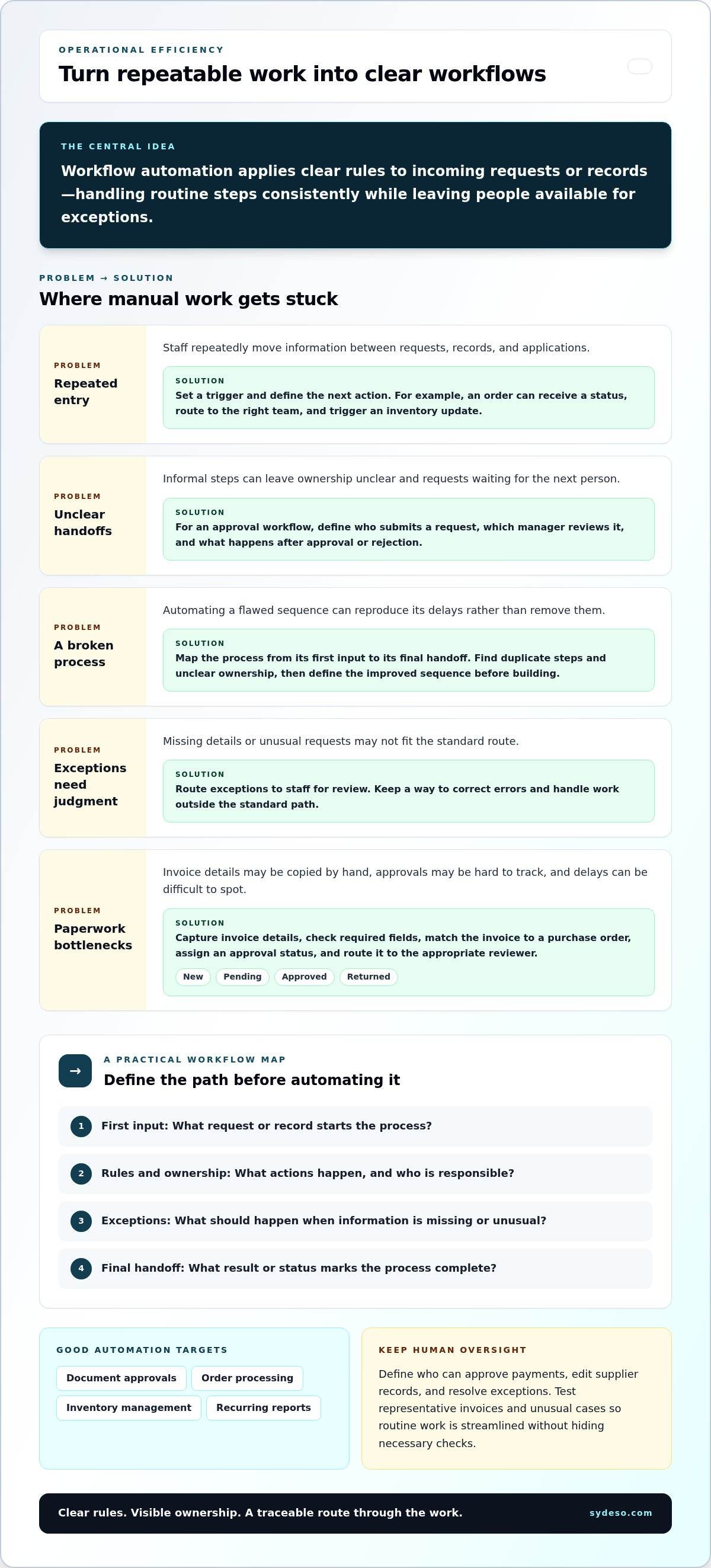
Manual processes consume staff time when they repeatedly move information, request approvals, or prepare routine reports. Workflow automation assigns clear actions to each event, so operations follow defined steps instead of informal handoffs.
Automating Repetitive Manual Work
Automation applies rules to each incoming request or record to handle repeatable tasks. For example, an order can receive a status, route to the right team, and trigger an inventory update. Staff can then focus on exceptions, such as a missing address or unusual order, instead of re-entering routine details.
Map a process from its first input to its final handoff. For an approval workflow, record who submits a request, which manager reviews it, and what happens after approval or rejection. This reveals duplicate steps and unclear ownership. Automating a broken process can reproduce its delays, so define the improved sequence before building it.
Useful automation targets include document approvals, order processing, inventory management, and recurring reports. Each has a clear trigger and expected result. A new order, for instance, can create a fulfillment task and update its status as it moves through operations. Staff still need a way to correct errors and handle work outside the standard path.
Processing Accounting Documents Automatically
Accounting document automation captures invoice details, checks required fields, and routes documents for review. An invoice can be matched to a purchase order, assigned an approval status, and sent to the appropriate reviewer. This reduces manual copying between documents and accounting records while keeping a visible record of each processing step.
Rules should reflect how the finance team handles exceptions. A missing purchase order, inconsistent supplier name, or unclear invoice amount can go to a person for review rather than move forward automatically. Clear status labels help staff distinguish new, pending, approved, and returned documents. Reports can then show where processing is delayed.
Before automating, identify where staff retype values, wait for approval, or reconcile records. Compare the current workflow with the intended one, then test representative invoices and unusual cases. Reviewing the process helps teams prioritize changes that remove repeated work without hiding necessary checks.
Good workflow automation preserves oversight while handling routine steps consistently. Define who can approve payments, edit supplier records, and resolve exceptions. The result is a process with clearer ownership, fewer manual handoffs, and a traceable route from document receipt to accounting entry.
What do custom software development companies actually do?
A development partner translates an operational need into defined requirements, working software, and a tested release. Planning begins with process mapping and business analysis before solution design.
Evaluating Custom Software and Off-the-Shelf Options
This comparison weighs software built for your requirements against products designed for common needs. Off-the-shelf SaaS can suit routine processes and support faster implementation, while custom code can address specific workflows, integrations, and rules. The choice matters: adapting a standard tool can leave gaps, while tailored software brings design and maintenance responsibilities.
Compare the actual work against the product’s supported features. A standard tool may include features your team won’t use, lack a needed function, or integrate poorly with an existing system. Licensing limits and vendor dependence also affect the choice. If a proven SaaS product meets 95% of a business requirement at a reasonable cost, custom engineering may not be worthwhile.
Custom development is a stronger fit when a remaining gap affects a core process, such as a specialized approval path or a customer workflow standard software cannot support. For an enterprise with routine requirements, an established product may be the clearer option. Compare process fit, integration needs, control over updates, and data ownership before choosing an approach.
Planning and Developing Custom Software
Planning and development turn a defined business problem into software through analysis, design, implementation, and testing. A clear scope gives the team and business stakeholders shared expectations before anyone writes code.
First, map the current process and identify what needs improvement. Document users, data, rules, exceptions, and connections to existing applications. For example, an order-management project should define how staff handle a missing address and which system owns the customer record.
Next, agree on requirements and design a solution around the necessary tasks. The development partner documents the scope, technical boundaries, and responsibilities; business staff confirm that the proposed workflow matches real operations. A small application may take a few months to develop. Enterprise platforms can require several months or phased implementation, depending on scope and integration needs.
Development then moves through implementation and testing. Teams check core functions, access controls, data handling, and unusual cases before launch. For an approval tool, tests should cover submissions, rejections, and requests with incomplete information. A phased release can let staff validate one defined workflow before adding the next.
Choose a partner based on the work required. Look for a documented process that links requirements to design, testing, and launch. The partner should define technical responsibilities; your team should contribute process knowledge and review whether each release supports the intended work. This keeps development accountable to operational needs, not an untested feature list.
Custom software for specialized operational rules
Specialized rules shape how a business accepts work, assigns responsibility, and records decisions. Custom software can encode those rules in fields, statuses, permissions, search functions, reports, and validation checks. That makes processes easier to follow as operations become harder to manage across teams or locations.
Consider a distributor that approves orders differently by product type, customer status, and delivery region. A standard application may not represent every condition clearly. Tailored software can define which fields staff complete, who can approve exceptions, and which status follows each decision. The result is a documented process, not separate spreadsheets and unwritten rules.
Permissions can reflect operational responsibilities. A sales representative might edit customer details but not change an approved credit limit. A manager could review exceptions, while finance staff see the records needed for reconciliation. Search and reporting rules can help each role find relevant information without exposing unrelated records. Match these controls to documented responsibilities and test them against real cases.
Growth makes these requirements more demanding. A business might expand from 10 employees, 100 customers, and 1 location to 100 employees, 10,000 customers, and multiple locations. At that scale, informal handoffs and locally maintained records can become difficult to manage. Software built around clear rules can apply the same process across locations while preserving role-specific access.
Scalable design also accounts for change. A company may add a location, product line, approval path, or reporting need. Custom software can grow through additional features, integrations, and automation as requirements change. Define which rules are fixed and which may need adjustment, so future changes don’t undermine existing workflows.
A useful design separates business rules from individual screens and one-off workarounds. For example, an order approval threshold can be documented as a rule and applied consistently wherever staff review orders. Clear documentation explains what happens when an order meets the rule and how exceptions are recorded. It gives developers a testable requirement instead of relying on memory.
Before development, map the cases the system must handle: standard requests, missing data, rejected submissions, and approved exceptions. Test each case with the staff who do the work. This practical review helps determine whether custom software suits a process with distinct rules or whether a standard tool already supports the required operations.
Building a competitive advantage with custom tools
A custom tool can help a business deliver a distinctive capability consistently. A specialty manufacturer, for example, could build its quoting process around the product options and review steps customers actually need. The value comes from building useful expertise into the workflow, not from adding software for its own sake.
Start by identifying what customers value and how staff deliver it. A distributor might stand out through accurate product recommendations, while a service firm may tailor each client’s onboarding. A purpose-built platform can support those specific interactions instead of forcing teams into a generic sequence. The practical test is whether the tool helps deliver a capability customers notice.
Spreadsheets can help a team manage early work, but separate files often make shared processes harder to maintain. Sales, for instance, may track requests in one spreadsheet while operations keep fulfillment details elsewhere. A custom internal tool can bring relevant tasks and records together, giving staff one defined process and a clear view of who owns each next step.
Reporting can connect daily activity to the capability a business wants to strengthen. A sales team could review quote turnaround, accepted proposals, and common reasons for lost opportunities. Those measures help managers identify where a process needs attention. A dashboard is useful when its information supports a clear decision, not simply because it displays more data.
Customer-facing software can shape the experience around real user needs. A tailored portal, for example, can let customers review their order details and submit information through a familiar process. Clear navigation and well-placed instructions can reduce confusion and avoid unnecessary support requests. Design should reflect how customers complete the task, including where they need help or confirmation.
Custom tools can evolve as a business learns. A company might first digitize a specialized sales process, then refine its intake fields after staff review real customer requests. Regular review keeps the tool aligned with the work instead of treating launch as the final stage. Make improvements in response to observed needs and agreed priorities.
Use a simple decision test: name the capability, identify the work that supports it, and define how staff will assess that work. If the process is distinctive and standard tools constrain it, plan a custom tool for your business around the capability you want to deliver.
Sydeso: Custom software development
Sydeso develops custom software for businesses whose operational requirements call for a tailored solution. Turn to its team when disconnected applications, specialized workflows, or internal processes require software built around defined business rules.
Custom software development addresses broader operational needs, while internal tools development focuses on the systems employees use to complete work. For a new product idea, MVP development can create a working version for evaluation. Sydeso also provides launch and support as part of its software work.
Start with a specific process, its users, and the outcome your business needs. Bring the current workflow and its main friction points to the discussion. Contact Sydeso to discuss a custom software project.
Turn an Operational Need Into a Clear Next Step
Before a project begins, define the result your team needs. Choose a process owner, describe the work to change, and agree on how staff will judge whether the new approach fits. This gives business and development teams a shared basis for decisions throughout the project.
Prioritize the business problems solved by custom software based on their effect on daily operations. Sydeso offers custom software development for tailored systems, internal tools development for employee workflows, and MVP development to test a product idea with a working version. The right starting point depends on the work your software needs to support.
Bring a defined process, its users, and the main obstacle into the first discussion. That keeps the conversation grounded in operational needs rather than a feature list. Contact Sydeso to discuss your software needs and take a practical next step toward a solution your team can assess.
Frequently Asked Questions
Is Custom Software Worth the Investment?
Custom software is worth considering when a recurring operational constraint affects important work and standard tools cannot address it cleanly. Compare the effort spent on workarounds, corrections, and separate processes with the work required to build and maintain a tailored system. For example, a service team could assess whether a shared internal application would reduce repeated case handoffs. A clearly defined problem and measurable operational objective make the decision more grounded.
What common business problems can custom software solve?
The business problems solved by custom software often involve processes that don’t fit standard tools. Examples include unclear ownership of requests, inconsistent records across departments, and operational rules that affect approvals. A company managing service cases across several teams might need one record showing responsibility, history, and current status. Tailored software can make those requirements explicit, helping staff follow a consistent process and managers track decisions.
What are examples of custom software improving business efficiency?
A staff onboarding application can coordinate equipment requests, account setup, and required approvals in one tracked process. A customer portal can let users submit requests and review their progress without repeatedly asking staff for updates. An internal planning tool can combine team assignments with deadlines, helping managers spot conflicting commitments. Assess efficiency through observable changes, such as fewer handoffs or less time spent locating records.
How can custom software automate repetitive business processes?
Start with a recurring task that has a clear trigger, such as receiving a completed service request. Define the required information, the next responsible role, and the conditions that need human review. Then test the workflow with complete, incomplete, and unusual submissions. Tracking exceptions after launch helps teams identify rules to revise. Automation should handle defined routine steps while keeping ownership and review visible to staff.
How does custom software integrate with existing business systems?
Integration usually connects systems through APIs or another agreed data-exchange method. First, define which application owns each record, such as a customer profile or inventory entry. Then map the fields, permissions, and direction of data movement. Test how the connection handles duplicate records, failed transfers, and later corrections. These details help prevent one system from overwriting another’s information and make troubleshooting clearer.
What is the typical ROI of custom business software?
Use a project-specific ROI calculation rather than relying on a generic percentage. Set a baseline for the process, then track outcomes such as staff time, rework, missed handoffs, or completed transactions. Compare those results with implementation and ongoing operating costs over the same period. For example, assess a case-management system by handling time and unresolved cases, alongside maintenance and staff training.
Which industries benefit most from custom business software?
Manufacturing, logistics, and businesses coordinating sales, customer management, and financial administration can benefit. The best fit depends on specialized processes and disconnected applications, not the industry label alone.
Questions
- Is Custom Software Worth the Investment?
- Custom software is worth considering when a recurring operational constraint affects important work and standard tools cannot address it cleanly. Compare the effort spent on workarounds, corrections, and separate processes with the work required to build and maintain a tailored system. For example, a service team could assess whether a shared internal application would reduce repeated case handoffs. A clearly defined problem and measurable operational objective make the decision more grounded.
- What common business problems can custom software solve?
- The business problems solved by custom software often involve processes that don’t fit standard tools. Examples include unclear ownership of requests, inconsistent records across departments, and operational rules that affect approvals. A company managing service cases across several teams might need one record showing responsibility, history, and current status. Tailored software can make those requirements explicit, helping staff follow a consistent process and managers track decisions.
- What are examples of custom software improving business efficiency?
- A staff onboarding application can coordinate equipment requests, account setup, and required approvals in one tracked process. A customer portal can let users submit requests and review their progress without repeatedly asking staff for updates. An internal planning tool can combine team assignments with deadlines, helping managers spot conflicting commitments. Assess efficiency through observable changes, such as fewer handoffs or less time spent locating records.
- How can custom software automate repetitive business processes?
- Start with a recurring task that has a clear trigger, such as receiving a completed service request. Define the required information, the next responsible role, and the conditions that need human review. Then test the workflow with complete, incomplete, and unusual submissions. Tracking exceptions after launch helps teams identify rules to revise. Automation should handle defined routine steps while keeping ownership and review visible to staff.
- How does custom software integrate with existing business systems?
- Integration usually connects systems through APIs or another agreed data-exchange method. First, define which application owns each record, such as a customer profile or inventory entry. Then map the fields, permissions, and direction of data movement. Test how the connection handles duplicate records, failed transfers, and later corrections. These details help prevent one system from overwriting another’s information and make troubleshooting clearer.
- What is the typical ROI of custom business software?
- Use a project-specific ROI calculation rather than relying on a generic percentage. Set a baseline for the process, then track outcomes such as staff time, rework, missed handoffs, or completed transactions. Compare those results with implementation and ongoing operating costs over the same period. For example, assess a case-management system by handling time and unresolved cases, alongside maintenance and staff training.
- Which industries benefit most from custom business software?
- Manufacturing, logistics, and businesses coordinating sales, customer management, and financial administration can benefit. The best fit depends on specialized processes and disconnected applications, not the industry label alone.