How to Automate Repetitive Business Tasks with Task Automation
Learn how to automate repetitive business tasks by mapping workflows, choosing rule-based steps, testing a pilot, and tracking time, errors, and results.

The best automation target is often a repeatable step, not an entire job. A task is a suitable candidate when it is manual, recurring, standardized, or triggered by a clear event, and its actions follow defined rules. Software can carry out those steps within an existing workflow, while people retain decisions that need judgment. To automate repetitive business tasks, start by identifying the process and the rules it follows.
Repetitive work takes attention away from other responsibilities, but automation helps only when it fits the way work gets done. Existing systems, handoffs, exceptions, and staff roles all affect how a tool should fit into a process.
This guide explains how task automation works and how to identify suitable tasks. You’ll learn how software connects with existing workflows, how to introduce and monitor automation, and how to assess its effect on time, errors, and day-to-day work. The steps begin with understanding the process, then move through testing and review.
Key Takeaways
- Start with a recurring task that follows clear rules, then assess whether automation fits the action and your existing systems.
- Map handoffs and exceptions before connecting software, and test the workflow with a focused pilot before expanding it.
- Track time, errors, and throughput so you can judge whether automation improves the work and where adjustments are needed.
- Use software to handle defined steps and triggers, while keeping people responsible for exceptions and decisions that need judgment.
Table of Contents
- What is task automation?
- Integrating automation with existing workflows
- Benefits of business task automation
- How task automation software works
- Sydeso: Custom software development
What is task automation?
Task automation uses software to perform defined actions in a business process. To automate repetitive business tasks, identify work with clear rules, then choose tools that fit the workflow.
-
Prioritize Frequent, Simple Tasks
List recurring work, such as copying approved details from a form into a record or sending a routine reminder. Compare each task’s frequency, number of steps, and exceptions. Start with a process that follows the same rules each time. Avoid automating tasks that change frequently or depend on judgment: unclear instructions can reproduce errors faster.
-
Identify No-Code Tasks
Choose actions that can be described as a trigger and a predictable response. Examples include routing a submitted form, notifying a team when a status changes, or moving data between compatible applications. Check that the tools support the required connections and approval steps. Keep human review for exceptions, sensitive decisions, or communication that requires individual judgment.
- Match software to the action, not just the task name. A data-entry tool, for example, must handle the source and destination formats, while a notification workflow must reach the right people. Compare compatibility, integrations, ease of use, features, and scalability. Choose AI tools when a task requires interpreting information; use rule-based automation for fixed steps.
- Assess your requirements and available resources before selecting a tool. Include the systems involved, who owns each step, and how staff will review exceptions. Business automation software costs depend on the tool, features, usage, and integrations. For custom workflow development, the price depends on project scope and is provided after a quote request.
Integrating automation with existing workflows
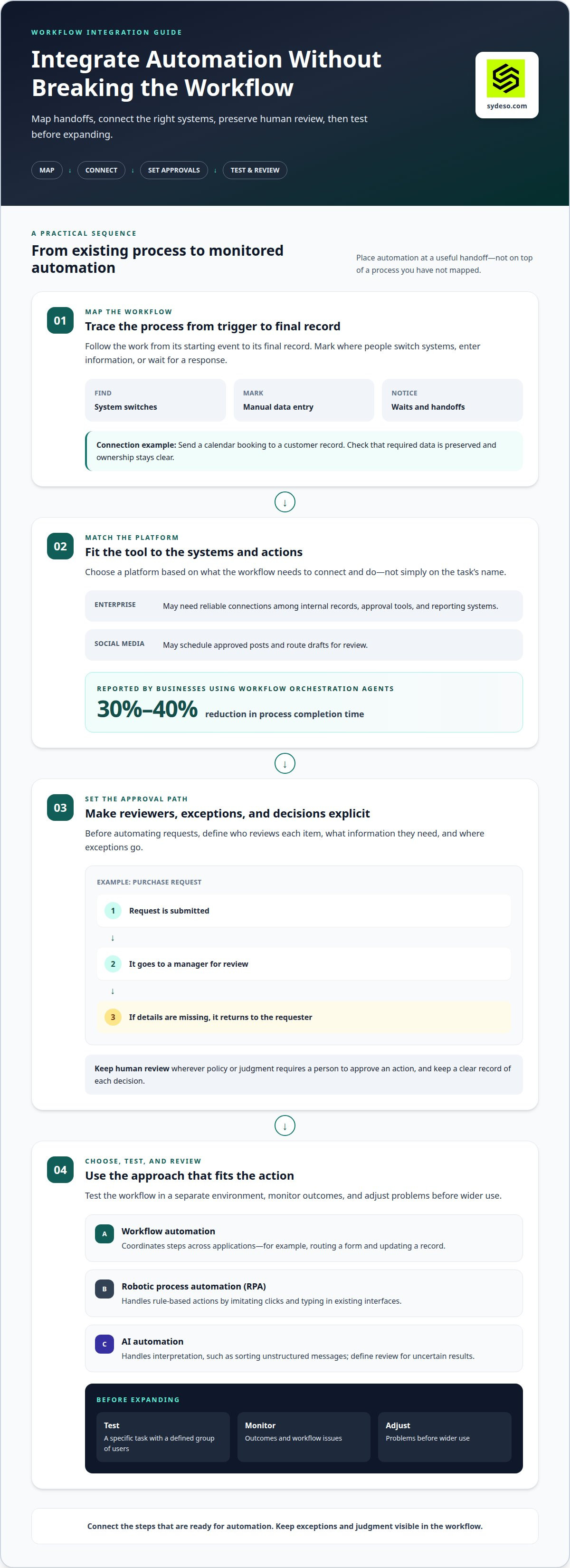
Automation should fit the handoffs and systems people already use. Map the workflow first, then test changes before expanding them.
-
Connect Tools to Existing Workflows
Trace a process from its starting event to its final record. Mark where staff switch systems, enter information, or wait for a response. Connect automation at those points, such as sending a calendar booking to a customer record. Check that the connection preserves required data and makes ownership clear. A well-placed action can reduce manual handoffs without forcing teams to change every step.
-
Choose Workflow and Integration Platforms
Match the platform’s capabilities to the systems and actions in your workflow. An enterprise process may need reliable connections between internal records, approval tools, and reporting systems. A social media workflow may instead schedule approved posts and route drafts for review. Test a specific task with a defined group of users before expanding it. Businesses using workflow orchestration agents report reducing process completion time by 30% to 40%.
-
Automate Approval Workflows
Set the approval path before automating requests. Define who reviews each item, what information they need, and where exceptions go. For example, a purchase request might go to a manager after submission, then return to the requester if details are missing. Keep a clear record of each decision. Preserve human review wherever policy or judgment requires a person to approve an action.
-
Compare Automation Approaches
Choose workflow automation to coordinate steps across applications, such as routing a form and updating a record. Use robotic process automation, or RPA, for rule-based actions that imitate clicks and typing in existing interfaces. AI automation handles tasks involving interpretation, such as sorting unstructured messages, but needs defined review for uncertain results. Test the workflow in a separate environment, monitor outcomes, and adjust problems before wider use. For cross-system workflows, workflow automation support can help connect the steps.
Benefits of business task automation
Automation can make routine work more consistent and give employees time for higher-value decisions. Measure the benefit alongside the limits and risks.
- Track which routine tasks consume employee time, then target steps that delay orders or repeat across records. The McKinsey Global Institute reports that 50% of current work activities are automatable with available technology. That does not mean every task should be automated. Prioritize work where a defined action can reduce manual effort without removing judgment from important decisions.
- Set a clear goal for each automation tool, such as faster processing or fewer data-entry errors. In a Salesforce survey, 74% of automation users said solutions help speed up their work. Automation can also create consistent handoffs, but it cannot correct unclear instructions or poor source data. Involve employees early, explain which steps will change, and gather feedback before wider adoption.
- Map the information each process handles and who can access it before launch. In the United States, compliance considerations depend on the data, industry, and applicable requirements; document access, retention, and review responsibilities. NIST notes that adopting Industry 4.0 technologies can expose companies to cybertheft, damage, or disruption. Limit access to needed systems, test failure paths, and keep a person responsible for exceptions.
- Measure results against a baseline recorded before deployment. Compare time spent, error rates, and throughput for the same task before and after automation. To assess ROI, account for time and cost savings, fewer errors, productivity gains, employee satisfaction, and movement to higher-value work. For example, compare time spent processing orders and correcting mistakes, then check whether the change supports the original business goal.
How task automation software works
To automate repetitive business tasks, define the trigger, action, and expected result. Then connect the software, test the process, and review how it handles errors.
- Document the task as it works today. For an accounting process, note when an invoice arrives, where staff enter its details, and who checks the record. Include manual handoffs and exceptions. This gives the automation clear instructions and shows where human review must remain.
- Choose a trigger that software can detect, such as a new email, a changed record, or a scheduled time. Set the next action, such as creating a task or transferring invoice fields. Clear trigger conditions prevent unrelated messages or incomplete records from starting the workflow.
- Specify the data and rules for each action. If an email contains an invoice, define which fields to capture and where to put them. Set a route for missing details. Clear input rules support accuracy; unclear formats can carry errors into later steps.
- Connect the systems involved and define how they exchange information. A scheduling workflow might read a calendar booking, update a customer record, and send a confirmation email. Confirm that each system receives the right fields and that duplicate records don’t trigger repeated actions.
- Test normal cases and exceptions before using the workflow for live administrative work. Submit a complete invoice, then test one with a missing field. Review logs and outputs for errors. Adjust the rule or route before the automation affects accounting records or customer communication.
- Monitor the process after launch and assign an owner to review failures. Software can monitor systems and processes, then take action when problems occur. Track whether the expected result appears and whether staff still need manual correction. For connected workflows, develop tailored workflow automation to fit the systems and rules involved.
Sydeso: Custom software development
Sydeso builds custom software for businesses whose automation needs don’t fit a standard workflow. Turn to the team when a process depends on internal systems, specific approval rules, or data handoffs that generic tools cannot handle cleanly.
Custom software development can shape a solution around the task and the systems it must connect with. Internal tools can support staff processes, while an MVP can help test a focused solution before further development. Sydeso also provides launch and support for the software it builds.
Bring a clear example of the task, its current steps, and the outcome you need. This gives the project a practical starting point. Contact Sydeso to discuss your automation needs, or visit sydeso.com.
Choose the Next Process to Improve
Make the next step a small operational commitment: name a process owner and define the change the workflow needs to support. That owner can gather examples, clarify who handles exceptions, and keep the work tied to a specific business need. A clear starting point makes it easier to decide whether to automate repetitive business tasks within existing systems or build around a process that needs more structure.
Sydeso offers custom software development, internal tools development, and MVP development for businesses shaping software around their operations. The right starting point depends on the process, the people involved, and how the software needs to fit existing work. Keep the scope practical, document the intended outcome, and give the team a clear way to review the result.
Discuss an automation project with Sydeso and take the next step toward a workflow that fits your business.
Frequently Asked Questions
Why automate tasks?
Automation gives employees more time for work that needs judgment, customer context, or problem-solving. For example, a team can use a workflow to prepare routine records, then have a person review unusual cases. Automation can also make handoffs easier to trace. Choose a task with a clear business purpose, such as reducing repeated corrections or shortening delays between departments.
Do I need technical skills or a developer to start automating?
You can start without coding if an existing tool supports the trigger, action, and systems you need. A simple workflow might send a notification after a status changes. Bring in a developer when the process needs custom data handling, several system connections, or detailed exception rules. Document the desired result first to give the technical work a clear scope.
What are the most common reasons automation fails or breaks down?
Automations often fail when a connected system changes its fields, access permissions, or interface. They can also create duplicate work if the same trigger fires repeatedly. Assign an owner to review failures, add alerts for incomplete runs, and record the expected input and output. For example, a process should flag a missing customer identifier rather than silently create an incomplete record.
What's the difference between integration and automation, and do I need both?
Integration moves or exposes information between systems; automation uses a trigger and rules to perform an action. A single application can automate an internal task without connecting to another system. If a completed sale must update inventory and accounting records, integration connects those systems, while automation determines when and how updates occur. Use both when a process crosses applications and requires actions.
What repetitive business tasks can be automated?
Suitable examples include renaming and filing documents, sending onboarding checklists, distributing completed reports, and categorizing expense receipts for review. Each process needs a predictable input and a clear destination. Keep a person involved when a receipt lacks required details or an onboarding request needs an access decision. Start with one task, then review where staff still need to intervene.
What are the best business process automation tools for small businesses?
The best fit depends on the systems already in use and the process being automated. Start with built-in features if they handle the required action. Consider an integration platform when information must pass between applications. A custom workflow may suit processes with specific data rules or exceptions. Compare setup effort, maintenance, access controls, and how easily staff can inspect failed runs.
Questions
- Why automate tasks?
- Automation gives employees more time for work that needs judgment, customer context, or problem-solving. For example, a team can use a workflow to prepare routine records, then have a person review unusual cases. Automation can also make handoffs easier to trace. Choose a task with a clear business purpose, such as reducing repeated corrections or shortening delays between departments.
- Do I need technical skills or a developer to start automating?
- You can start without coding if an existing tool supports the trigger, action, and systems you need. A simple workflow might send a notification after a status changes. Bring in a developer when the process needs custom data handling, several system connections, or detailed exception rules. Document the desired result first to give the technical work a clear scope.
- What are the most common reasons automation fails or breaks down?
- Automations often fail when a connected system changes its fields, access permissions, or interface. They can also create duplicate work if the same trigger fires repeatedly. Assign an owner to review failures, add alerts for incomplete runs, and record the expected input and output. For example, a process should flag a missing customer identifier rather than silently create an incomplete record.
- What's the difference between integration and automation, and do I need both?
- Integration moves or exposes information between systems; automation uses a trigger and rules to perform an action. A single application can automate an internal task without connecting to another system. If a completed sale must update inventory and accounting records, integration connects those systems, while automation determines when and how updates occur. Use both when a process crosses applications and requires actions.
- What repetitive business tasks can be automated?
- Suitable examples include renaming and filing documents, sending onboarding checklists, distributing completed reports, and categorizing expense receipts for review. Each process needs a predictable input and a clear destination. Keep a person involved when a receipt lacks required details or an onboarding request needs an access decision. Start with one task, then review where staff still need to intervene.
- What are the best business process automation tools for small businesses?
- The best fit depends on the systems already in use and the process being automated. Start with built-in features if they handle the required action. Consider an integration platform when information must pass between applications. A custom workflow may suit processes with specific data rules or exceptions. Compare setup effort, maintenance, access controls, and how easily staff can inspect failed runs.