How to Build a Business Case for Internal Tools by Defining the Need
Learn how building a business case for internal tools starts with a clear problem, compares options, and defines costs, risks, ownership, and success measures.

A tool request is not yet a business case. Building a business case for internal tools means showing which business problem needs solving, what may happen if it remains unresolved, and why a proposed tool is a sound response. A strong case clarifies the decision by setting out expected benefits, costs, risks, ownership, and measures of success.
Start with the work itself, not a preferred feature or technology. Repeated manual tasks, avoidable errors, and unclear handoffs can point to a real need, but a tool is only one possible response. This article explains what a business case includes and how it differs from a business plan, executive summary, or project charter. It also shows how employees who understand the workflow and developers who assess possible solutions can contribute, from defining the problem to testing a focused first version.
Key Takeaways
- Separate the decision case from the documents that describe the broader plan, summarize it, or authorize delivery.
- Set clear ownership for an internal tool’s function, access, and changes as business needs evolve.
- Compare custom development with process changes and existing solutions before choosing a build or buy path.
- Bring employees who perform the work and developers who assess the solution into workflow mapping and early testing.
Table of Contents
- Business cases compared with business plans, executive summaries, and project charters
- What are internal tools?
- What’s a business case?
- Employee and developer roles in tool development
- Sydeso: Internal tools development
Business cases compared with business plans, executive summaries, and project charters
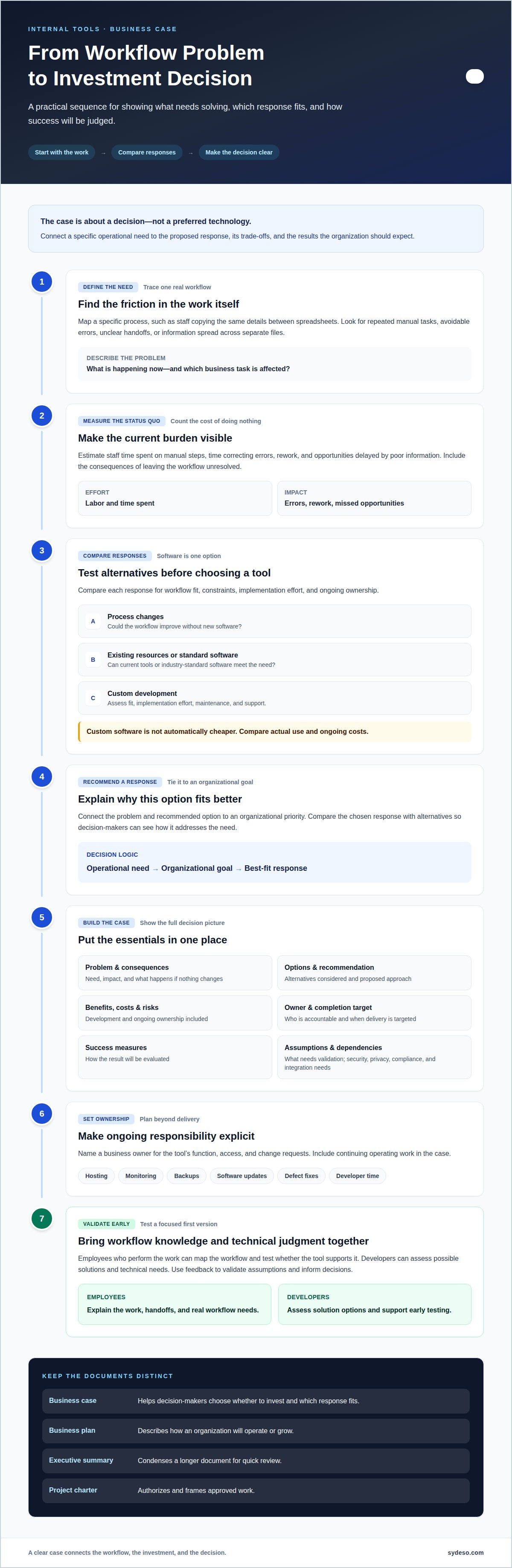
Identify the problem by tracing a specific workflow, such as staff copying the same details between spreadsheets. Record the labor involved, time spent correcting errors, rework, and opportunities delayed by poor information. Compare those costs with the proposed tool’s development and ongoing ownership costs.
To present the proposal to executives, connect the problem and recommended option to an organizational goal. Summarize the benefits, costs, risks, success measures, owners, and decision required. An executive sponsor can align the proposal with organizational priorities and build early support.
- Separate the documents by purpose. A business case helps decision-makers choose whether to invest and which response fits. A business plan describes how an organization will operate or grow. An executive summary condenses a longer document for quick review. A project charter authorizes and frames approved work. Use each document for its decision, not as a substitute for the others.
- Compare solutions before choosing software. Start with process changes, industry-standard software, approaches used by competitors, and better use of existing resources. Then assess custom development. For each option, document fit, constraints, implementation effort, and ongoing ownership. This structure shows why the chosen solution addresses the problem better than alternatives.
- Measure the status quo as well as tool costs. Estimate staff time spent on manual steps, then account for errors, rework, and missed opportunities caused by poor information. Compare those costs with the proposed tool’s development, maintenance, and support needs. Evaluate off-the-shelf software against its licensing and fit with the workflow. Custom software is not automatically cheaper; the comparison must reflect actual use.
- Connect the case to growth. Percolate grew from 50 to 150 people between one year and the next, and its CEO attributed part of that growth to tools that supported onboarding and process consistency. Use this example to test whether a proposed tool can handle added users and help new employees follow established workflows.
What are internal tools?
- Define the tool and the need. An internal tool is software employees use to perform business tasks, such as tracking requests or preparing forecasts. Build one when a recurring workflow needs capabilities existing processes or software don’t provide. For example, a team may need one shared view of work spread across separate files.
- Choose a stack the team can maintain. Select technologies that fit the tool’s required functions and the technical skills available to support it. Keep the code readable, document key decisions, and automate tests for critical paths. These practices help another developer understand how a change to request approvals affects the rest of the system.
- Assign a business owner. Name one person responsible for the tool’s function, access, and change requests. The owner can review requests when a department changes its approval process or adds a new workflow. Developers handle technical changes; the business owner sets priorities and confirms the tool still supports the work.
- Include ongoing operating work. A maintenance plan should account for hosting, monitoring, backups, software updates, defect fixes, and developer time. These are continuing responsibilities, not one-time delivery tasks. For a tool that supports daily scheduling, define who responds when it becomes unavailable and how employees continue essential work.
- Review the tool as processes change. Set a regular review around actual change triggers, such as a revised handoff or new data source. Log tool changes, remove access when employees leave, and update documentation when behavior changes. If another system must connect, plan the integration early and use a proper interface rather than screen scraping or manual exports.
- Plan for operational demands. Identify whether a tool supports 24/7 operations, then account for that need in its hosting and maintenance plan. Test critical paths after changes, such as whether a submitted request reaches the right approver. As user roles or workflows expand, review permissions and ownership before release.
What’s a business case?
A business case gives decision-makers a structured basis for approving, changing, or declining an investment. For internal software, it connects the operational need to the organization’s mission, proposed approach, costs, risks, and measures of success. Building a business case for internal tools starts with a clear decision, not a preferred technology.
-
Separate the Business Case from the Business Plan
Define the decision the business case must support, and keep it distinct from the business plan. The case tests whether a specific internal tool is justified; the plan describes how the wider organization will operate or grow. Don’t treat a broad growth narrative as evidence that a particular software project solves a real need. Tie the proposal to a concrete workflow and organizational priority.
-
Set Out Business Case Contents
List the problem, consequences of doing nothing, options, recommended approach, benefits, costs, risks, owner, completion target, and success measures. State which assumptions need validation and how feedback will inform decisions. Address security, privacy, applicable compliance needs, and integration dependencies directly. For example, a tool handling staff information needs defined access controls and a clear data flow; a connection to another system needs an agreed interface and an owner.
- Compare build and buy. Assess whether existing software fits the workflow, required integrations, access model, and expected changes. Include configuration effort, ongoing maintenance, and limitations that may require workarounds. Custom engineering may suit specialized processes, but it also creates responsibility for updates and support. Building a business case for internal tools means comparing that full responsibility with the demands of available alternatives.
- Make the recommendation testable. Set success measures tied to the problem, such as fewer manual handoffs or more reliable records. Assign a business owner to confirm the workflow and a technical owner to assess feasibility. Present the recommendation, alternatives, and key risks concisely, then request a clear approval decision and agreed next step.
Employee and developer roles in tool development
- Map the work with employees. Ask the people who perform a process to show each step, handoff, and exception. A shift-handoff app intended for 900 nurses, for example, needs input from nurses who exchange shift details. Their examples reveal where a standard workflow breaks down.
- Turn work needs into testable requirements. Employees describe the task and its edge cases; developers assess the technical approach, data, and integrations. Build a functional version and test it with two or three real users before polishing the interface. Their feedback can expose confusing fields or missing steps early.
- Prioritize one painful process. Keep the first version focused on a single workflow, such as recording shift handoffs. Pilot it with one team and gather feedback for a week before expanding. A small pilot gives employees room to test the tool against real work without changing every team’s process at once.
- Train around actual tasks. Show employees how the platform supports the steps they already perform. For a handoff tool, walk through entering a note, finding the next shift’s information, and correcting an entry. Provide simple instructions and a way to report problems, then use those reports to improve onboarding.
- Avoid building ahead of evidence. Don’t treat every feature request as a launch requirement or reproduce an entire manual process immediately. Extra scope can obscure the core task. Developers should keep the design focused, while employees confirm that the first version handles essential steps and known exceptions.
- Use pilot results to guide expansion. Track whether the tool supports the intended workflow, where employees need help, and which issues recur. Pilot projects can show impact within months. Expand only after the team’s feedback identifies what works and what needs correction. Plan an internal tool pilot around one defined process.
Sydeso: Internal tools development
Sydeso develops internal tools for businesses whose workflows need software tailored to their operations. Turn to Sydeso when a clear business case identifies a process that existing tools or process changes cannot address effectively.
The work can start with a defined workflow and a focused first version, then continue through launch and support. Sydeso also provides custom software development and MVP development when the proposed tool needs a tailored solution or an initial version to test. Your team brings knowledge of its work and sets priorities; the development process turns those needs into software.
If your case is ready to move from approval to implementation, contact Sydeso to discuss the internal tool you have defined.
Turn approval into a clear next step
Once stakeholders approve a tool, keep the decision connected to the work it is meant to improve. Use the business case as a reference during delivery, helping the team spot when new requests go beyond the original need. Record significant changes and review whether the tool still supports the intended outcome as workflows evolve.
Building a business case for internal tools is most useful when it leads to a decision people can act on. If the case supports development, agree on who owns business priorities, who handles technical decisions, and how the team will assess the result after launch. If it does not support development, document why and revisit the decision when the underlying conditions change.
A defined problem and a decision-ready case give the next conversation a practical starting point. Contact Sydeso to discuss your tools and the business need behind them. A clear next step can turn a considered decision into focused work.
Frequently Asked Questions
What is an internal tool?
An internal tool is software employees use to complete or coordinate work within an organization. Examples include an approval queue, a staff scheduling interface, or a dashboard that combines operational information. Unlike a customer-facing product, its users are typically team members carrying out business processes. A tool can connect existing systems, replace repeated manual steps, or give employees a consistent way to record and find information.
How do you estimate the costs of building, maintaining, and supporting an internal tool?
Estimate costs by separating delivery work from ongoing operation. Include workflow discovery, design, engineering, testing, data migration, and integration in the build estimate. Then account for hosting, monitoring, maintenance, defect fixes, updates, and support after launch. Include employee time for reviews and testing, too. For example, a tool connected to several data sources may require more integration and maintenance work than a standalone request form.
How do you calculate ROI, payback period, and total cost of ownership for internal tools?
Compare measurable benefits with the full cost of building and operating the tool. ROI expresses net benefits relative to costs; payback estimates when cumulative benefits offset the initial investment. Total cost of ownership includes delivery, operation, maintenance, and eventual replacement or retirement. For a request workflow, estimate staff time saved and correction work reduced, then use the same time period and assumptions for costs and benefits.
What metrics can measure the productivity and business impact of an internal tool?
Choose metrics that reflect the problem the tool addresses. For a request queue, track completion time, overdue requests, handoff delays, and correction rates. For an inventory interface, measure record accuracy and time spent reconciling discrepancies. Establish a baseline before launch and compare it with results after employees begin using the tool. Pair operational measures with employee feedback to identify friction that performance data alone may miss.
How do you compare building an internal tool with buying SaaS or using low-code software?
Compare each option against the same workflow requirements, data needs, integrations, access controls, and expected changes. SaaS may cover standard processes, while low-code platforms can support configuration within their limits. Custom development may suit workflows that need more tailored behavior. Include setup, integration, licensing, maintenance, and the work needed to manage constraints. The best fit depends on total operating effort, not just the initial build decision.
How do you estimate adoption, rollout, training, and change-management costs?
Map rollout tasks before launch: preparing user guidance, training employees, answering early questions, and updating process documentation. Estimate staff time for each task and identify which teams need different instructions. A scheduling tool, for example, may require separate walkthroughs for people entering shifts and managers approving changes. A limited pilot can reveal confusing steps and support needs before the tool reaches more teams.
Questions
- What is an internal tool?
- An internal tool is software employees use to complete or coordinate work within an organization. Examples include an approval queue, a staff scheduling interface, or a dashboard that combines operational information. Unlike a customer-facing product, its users are typically team members carrying out business processes. A tool can connect existing systems, replace repeated manual steps, or give employees a consistent way to record and find information.
- How do you estimate the costs of building, maintaining, and supporting an internal tool?
- Estimate costs by separating delivery work from ongoing operation. Include workflow discovery, design, engineering, testing, data migration, and integration in the build estimate. Then account for hosting, monitoring, maintenance, defect fixes, updates, and support after launch. Include employee time for reviews and testing, too. For example, a tool connected to several data sources may require more integration and maintenance work than a standalone request form.
- How do you calculate ROI, payback period, and total cost of ownership for internal tools?
- Compare measurable benefits with the full cost of building and operating the tool. ROI expresses net benefits relative to costs; payback estimates when cumulative benefits offset the initial investment. Total cost of ownership includes delivery, operation, maintenance, and eventual replacement or retirement. For a request workflow, estimate staff time saved and correction work reduced, then use the same time period and assumptions for costs and benefits.
- What metrics can measure the productivity and business impact of an internal tool?
- Choose metrics that reflect the problem the tool addresses. For a request queue, track completion time, overdue requests, handoff delays, and correction rates. For an inventory interface, measure record accuracy and time spent reconciling discrepancies. Establish a baseline before launch and compare it with results after employees begin using the tool. Pair operational measures with employee feedback to identify friction that performance data alone may miss.
- How do you compare building an internal tool with buying SaaS or using low-code software?
- Compare each option against the same workflow requirements, data needs, integrations, access controls, and expected changes. SaaS may cover standard processes, while low-code platforms can support configuration within their limits. Custom development may suit workflows that need more tailored behavior. Include setup, integration, licensing, maintenance, and the work needed to manage constraints. The best fit depends on total operating effort, not just the initial build decision.
- How do you estimate adoption, rollout, training, and change-management costs?
- Map rollout tasks before launch: preparing user guidance, training employees, answering early questions, and updating process documentation. Estimate staff time for each task and identify which teams need different instructions. A scheduling tool, for example, may require separate walkthroughs for people entering shifts and managers approving changes. A limited pilot can reveal confusing steps and support needs before the tool reaches more teams.