Internal tools development: build or buy for your business
Explore internal tools development to decide whether to build or buy software for your business workflows, maintenance, and long-term operational success.

Buying a tool isn’t always the fastest way to fix a business workflow. An internal tool builder designs and develops software employees use, such as dashboards, approval flows, reporting tools, and systems that connect existing applications. Internal tools development can involve creating a tailored solution or adapting a builder platform to fit how a team works.
It makes sense to consider an off-the-shelf product first, since it may meet the need with less custom work. But if teams rely on spreadsheets, repeat manual steps, or work around software that doesn’t fit, a tailored tool may be a better match. The choice depends on the workflow, the limits of available products, and who will maintain the tool.
This article explains what internal tool builders do, which needs these tools address, and how to compare buying with building. It also covers the ongoing work involved in security, updates, and support, so you can assess total ownership rather than just the initial setup.
Key Takeaways
- Identify the employee workflow a tool needs to support, then distinguish its requirements from those of customer-facing software.
- Map operational, support, and marketing tasks to the systems employees use, including customer service, payment records, and reporting.
- Set access permissions and review security risks as part of the tool’s design, not as a final step.
- Compare buying and building by weighing workflow fit, implementation effort, integration needs, and long-term ownership.
- Plan for updates, maintenance, and scaling before launch so the tool remains usable as business needs change.
Table of Contents
- What is an internal tool builder?
- Internal tool use cases for operations, support, and marketing
- What are Internal Tools?
- Build-versus-buy decisions and total cost of ownership
- Maintenance, scaling, and operations costs
- Sydeso: Custom software development
What is an internal tool builder?
An internal tool builder creates or configures software employees use to complete business tasks. For example, a purchase approval screen helps staff route requests rather than serve external customers.
Internal tools support employee workflows, such as handling records, reviewing requests, or coordinating work between teams. Customer-facing software serves people outside the organization, so it must support tasks like account access, product discovery, and transactions. The distinction is the intended user and purpose, not the technology: both types may use the same software components.
Some tools start as internal solutions and later inform broader products. Amazon Web Services began as an internal tool before becoming a major revenue source for Amazon. Ruby on Rails and React were also developed for internal use. These examples show that a tool’s initial audience doesn’t define its future, but commercializing it requires assessing broader market demand.
Custom, Low-Code, No-Code, and AI-Assisted Development
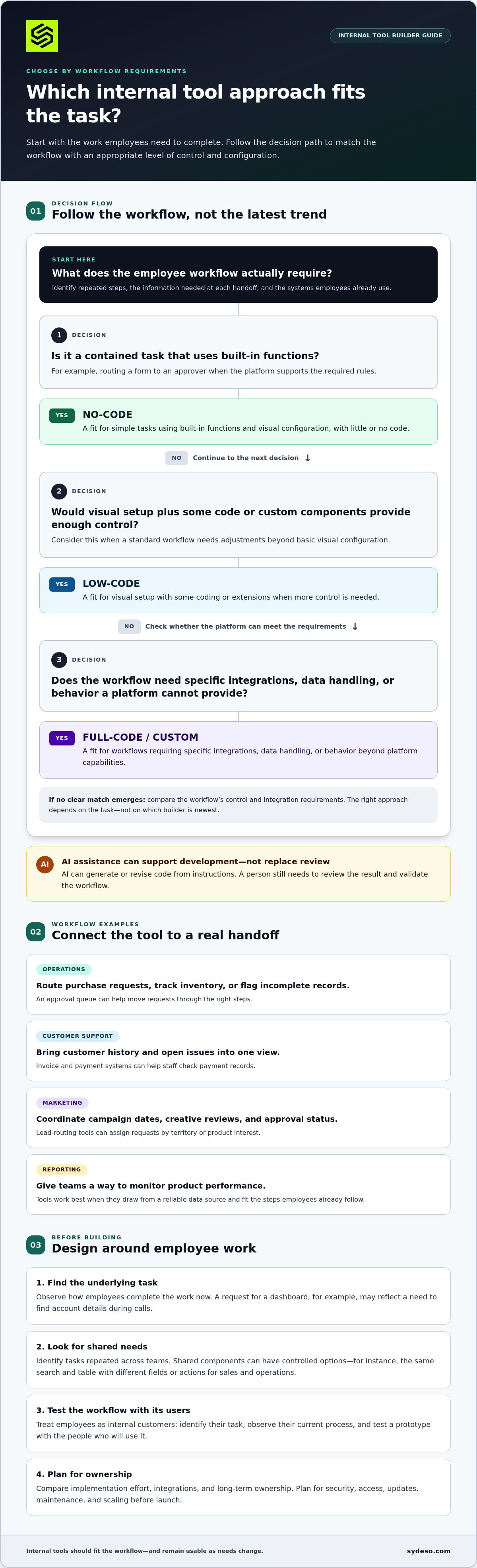
Custom development gives engineers control over software behavior, data handling, and integrations. Low-code platforms use visual components alongside some coding, while no-code tools let users configure workflows with little or no code. AI assistance can generate or revise code from instructions, but a person still needs to review the result. Gartner projected that 70% of new enterprise applications would use low-code or no-code technologies by 2025; this was a forecast, not a measured adoption figure.
Shared Needs and Customization Hooks
Building internal tools for shared needs starts with identifying tasks repeated across teams, then creating common components with controlled options. For example, sales and operations teams might use the same search and table component but see different fields or actions. A customization hook is a defined setting, permission, or integration point. It accommodates local workflow differences without requiring separate software for every department.
Internal Tools as Products
Treat employees as internal customers: identify their task, observe how they complete it now, and test a prototype with the people who will use it. A sales team’s request for a new dashboard may reflect a deeper need to find account details during calls. Product thinking starts with that job, then checks whether the tool makes the workflow clearer and more reliable.
Compare the approaches by control, configuration effort, and fit with the workflow:
| Approach | Control | Configuration | Best fit |
|---|---|---|---|
| Custom | Direct control over behavior | Engineers build requirements | Distinct workflows or integrations |
| Low-code | Platform-defined with extensions | Visual setup and some code | Standard workflows needing adjustments |
| No-code | Limited to platform features | Visual configuration | Simple tasks using built-in functions |
| AI-assisted | Depends on reviewed generated code | Instructions plus engineering review | Accelerating defined development tasks |
Choose the approach that meets the workflow’s control and integration requirements without adding unnecessary complexity.
Internal tool use cases for operations, support, and marketing
Internal tools help employees manage work that would otherwise move between spreadsheets, inboxes, and separate systems. Start by locating repeated steps in a specific workflow, then identify what information employees need at each handoff.
Where teams use internal tools
Operations teams can use approval queues to route purchase requests, track inventory, or flag incomplete records. A customer service tool can bring customer history and open issues into one view. Invoice and payment systems help staff check payment records, while reporting tools let teams monitor product performance.
Marketing teams can use campaign calendars to coordinate launch dates, review creative, and record approval status. A lead-routing tool can assign incoming requests by territory or product interest. These tools work best when they draw from a reliable data source and fit the steps employees already follow.
Choosing a builder approach
No-code platforms let business users assemble workflows using visual controls. They suit contained tasks, such as routing a form to an approver, when the platform supports the required rules. Low-code builders add code or custom components for more control. Full-code development suits workflows that need specific integrations, data handling, or behavior a platform cannot provide.
The right approach depends on the task, not on which builder is newest. A basic campaign approval flow may fit a no-code platform. A tool that combines customer records with several internal systems may need low-code extensions or full-code development. AI-assisted development can help produce or revise code, but teams still need to review the results and validate the workflow.
Investing within team capacity
Limited engineering capacity calls for prioritization, not duplicated tools. First, compare proposed workflows and consolidate overlapping needs. Then focus on critical areas such as security and access, rather than building every requested feature at once. A small, clearly scoped tool can address a recurring bottleneck without creating another system employees must maintain.
Internal builders are gaining attention because teams can shape software around their own handoffs and reduce repetitive work. A platform can make a contained tool easier to assemble, while custom development can address needs standard components cannot meet. The tradeoff is ownership: every new workflow needs a responsible person, clear rules, and a plan for changes.
Build and launch in practical steps
- Document the current process, its users, data sources, and points of delay.
- Choose one workflow and define what a successful task looks like.
- Select a builder that fits its integrations, permissions, and required level of control.
- Test a working version with three to five regular users, then record where they hesitate or need extra steps.
- Revise the tool, assign ownership, and introduce it to the wider team with clear instructions.
For a workflow that crosses departments or systems, map the full handoff process before settling on a builder. That step helps reveal whether the main need is a small form, a connected tool, or a change to the underlying workflow.
What are Internal Tools?
Employee tools can expose sensitive records and connected systems, even when customers never use them. Set security requirements alongside workflow requirements, then test access, integrations, and infrastructure before release.
Permissions and Governance
Permissions define which employees can view, change, export, or approve information. For example, a finance employee may edit payment records, while a department manager can approve requests but cannot alter account details. Assign access by role, document who owns each role, and remove permissions when responsibilities change.
Governance adds the operating rules around those permissions. Name an owner for each tool, record its data sources and integrations, and set a process for reviewing access and approving changes. For SOC 2 alignment, documented controls and evidence matter: teams should be able to show how access is granted, reviewed, and removed. The tool’s version history can help connect changes to approved work.
Security for Employee Tools
Internal access doesn’t make software safe by default. The National Institute of Standards and Technology’s secure software framework recommends reviewing human-readable code for vulnerabilities and security requirements. Apply that review to employee tools, especially those connected to customer records, payment systems, or shared infrastructure.
Authentication confirms who is signing in; authorization determines what that person can do. The Open Worldwide Application Security Project’s Citizen Development Top 10 identifies risks including authentication and secure-communication failures, authorization misuse, sensitive-data leakage, and asset-management failures. Test each role with both permitted and blocked actions.
Dependencies and integrations also need oversight. A third-party component can introduce vulnerabilities or handle information differently than expected. Track the components and versions in use, update them through a controlled process, and test the tool after changes. The National Institute of Standards and Technology’s Generative AI Profile identifies data privacy, information security, confabulation, and non-transparent component integration as risks. These concerns apply when an employee tool includes AI features or connects to AI services.
Security gaps can have direct consequences. A high-profile-account hacking scandal at Twitter reportedly involved failures in employee tools. IBM’s 2025 breach analysis covered 600 breached organizations; one in five reported a shadow-AI breach, and 37% had policies to manage AI or detect shadow AI. Those findings make governance relevant to internal tools that use AI, not just customer-facing applications.
- Map employee roles to specific actions and records.
- Review code, dependencies, and integrations before release.
- Test both allowed and denied access paths.
- Record owners, approvals, and access reviews for SOC 2 evidence.
Build-versus-buy decisions and total cost of ownership
Compare custom tools, low-code platforms, and off-the-shelf software by workflow fit, integration needs, control, and ownership effort. Include the ongoing work of testing, updates, and support, not just the initial build or subscription.
Building Versus Buying
Buying can make sense when a product already handles the workflow and connects cleanly to the existing tech stack. Building gives a team more control over processes, data handling, and integrations, but also makes it responsible for maintenance. The National Institute of Standards and Technology (NIST) frames in-house development as appropriate for common internal software needs that third-party components cannot better meet.
Custom Tools, Low-Code Platforms, and Off-the-Shelf Software
Custom software fits specific rules or native connections that packaged products don’t support. Low-code platforms provide configurable components and may need less engineering for standard workflows, while off-the-shelf software offers established features with less control over changes. Compare each option against the same real task, such as routing an approval through finance and operations.
Estimate total ownership by listing implementation, integrations, user administration, testing, upgrades, and internal time. A platform subscription may simplify setup, but workflow gaps can lead to manual workarounds. A custom tool can close those gaps, but maintenance becomes part of the ownership plan. Record both direct expenses and staff effort for each option.
Benefits and Fit of Building
Building is a stronger fit when a workflow is critical, differs from standard products, or depends on several systems working together. A custom tool can preserve the company’s process and connect existing data sources. That benefit matters less if requirements keep changing or no team can own support. In that case, a configurable product may better match available capacity.
Compare the options against consistent criteria:
| Option | Workflow fit | Control | Ongoing ownership |
|---|---|---|---|
| Off-the-shelf software | Best for standard tasks | Vendor-defined features | Subscription and configuration |
| Low-code platform | Good for adaptable workflows | Platform limits with configuration | Platform and workflow upkeep |
| Custom tool | Best for distinct requirements | Direct control over behavior | Team maintains code and integrations |
For example, a password manager illustrates how needs and ownership affect the decision. A Hacker News commenter estimated that developing an internal password manager took 4-6 person-months. The same commenter estimated that a subscription for a 5,000-seat business would cost more than six months of salary for that development effort. Treat this as a single commenter’s estimate, not a general cost benchmark.
Use this decision guide: buy when an existing product covers the process; choose low-code when configuration closes the gap; build when unmet requirements justify the engineering and ongoing ownership. For a custom tool, document who supports it, how integrations are tested, and how changes are reviewed before committing.
Maintenance, scaling, and operations costs
Launching an internal tool creates ongoing work for engineering and the teams that rely on it. Engineering teams spend 40% of their time building and maintaining internal tools, so ownership and upkeep belong in the operating plan from the start.
Assign a named owner to handle releases, reported issues, access changes, and decisions about new features. For example, finance can own approval rules for a purchase approval tool, while engineering manages code changes and deployment. Some organizations dedicate a product team to internal admin tools. That structure provides clear ownership, but it also makes internal-tool work a sustained team responsibility.
Production Operations and Ownership
Production operations start with a tested release process. Keep development and production environments separate, document how to deploy a release, and record how the team will respond when an integration fails. A customer-service dashboard, for example, needs an owner who can distinguish an application fault from a delayed data source.
Scaling also means managing change as teams and workflows grow. Review performance, access patterns, and integration limits when new departments adopt the tool. Keep a record of important decisions so engineers who join later can understand why the system handles a workflow in a particular way.
Admin and Operational Features
Useful admin features reduce routine support work and make ownership visible. Include role-based access controls, audit logs, error reporting, and clear records of configuration changes. A manager should be able to see who approved a request, while an administrator can trace a failed handoff without editing the underlying data.
Plan dependency updates as recurring work. Define a monthly process for updating dependencies in internal tools, then test key workflows after each change. For a tool that connects payment records to a reporting view, verify both the data transfer and the displayed results before release.
Track operating effort alongside feature requests. A short review can group work into defects, access requests, dependency updates, and improvements. If a request affects several departments, assess its impact on shared workflows before changing the tool. This keeps local fixes from creating extra work elsewhere in the organization.
Scale based on observed use, not assumptions. Review support tickets, failed tasks, and requests from actual users to identify the next bottleneck. If staff repeatedly export data to complete a report, improve that workflow before adding unrelated features. This keeps engineering time focused on changes employees can use.
Set clear ownership for ongoing internal tool development and support so releases, maintenance, and operational changes have accountable owners.
Sydeso: Custom software development
Sydeso builds custom software and internal tools for businesses whose workflows need a tailored fit. Turn to Sydeso when existing products leave important steps manual, teams rely on disconnected systems, or a defined process needs a dedicated tool. The work can include shaping requirements, developing an MVP to test a focused solution, and planning launch and support. The right scope depends on the workflow, integrations, users, and ongoing ownership needs.
Bring a clear example of the task employees need to complete, the systems involved, and where the current process breaks down. This gives development a practical starting point and helps define what the tool must handle. Contact Sydeso to discuss your internal tool requirements.
Set the Next Step for Your Tool
Start with a short working brief. Name the employee task, the person accountable for the process, the systems involved, and the outcome the tool must support. This gives internal tools development a clear boundary and helps prevent a useful fix from growing into an undefined platform project.
Then decide what to validate first. If the workflow is still changing, an MVP can help test a focused version with its intended users. If the requirements are established, custom software development or a tailored internal tool can address the process directly. Sydeso offers custom software development, internal tools development, and MVP development for these needs.
Bring the workflow and its constraints into the first conversation. Contact Sydeso to discuss internal tools and define a practical starting point. A clear brief helps both sides make sound decisions, and gives your team a grounded path from an operational problem to a tool employees can use.
Frequently Asked Questions
What is internal tools development?
Internal tools development is the work of designing software employees use to complete business tasks. A tool might help a hiring team track applicants, let managers review staffing requests, or give analysts a controlled way to correct records. The development process connects user needs with data, permissions, and operational rules. Success depends on whether employees can complete their work clearly and consistently.
What types of internal tools do businesses commonly build?
Businesses build tools for functions that need shared records or repeatable processes. Examples include employee onboarding checklists, equipment reservation systems, inventory exception queues, and contract review trackers. A tool can also help a department prepare routine reports or route internal requests to the right owner. Start with the work itself: identify a recurring task, its participants, and the information needed to complete it.
What are the benefits and drawbacks of building internal tools in-house?
Building in-house gives a business direct control over features, data handling, and release priorities. Internal engineers can also draw on their knowledge of existing systems and operating constraints. The tradeoff is ongoing responsibility: the organization must allocate engineering time for defects, changes, documentation, and staff transitions. If one developer holds most of the system knowledge, document deployment and decision processes so another engineer can maintain it.
How do you plan and scope an internal tools development project?
Start by observing the work rather than collecting feature requests alone. Document who performs each task, what information they use, which exceptions arise, and what counts as completion. Then define the smallest useful scope, such as handling one request type before adding other departments. Name the process owner, data owner, and decision-maker for changes. A written boundary prevents unrelated requests from expanding the project before its first release.
What technologies and frameworks are commonly used to build internal tools?
Internal tools typically combine a user interface, application logic, data storage, and connections to other systems. A team might use React for interface components, a server-side framework for business rules, a relational database for structured records, and APIs to exchange data between systems. The right stack depends on existing engineering skills, hosting practices, access controls, and maintenance needs. Choose components the team can test, document, and support.
How much does it cost to develop and maintain internal software tools in the United States?
There is no single cost for an internal tool. The price depends on scope, integrations, data complexity, security needs, testing, deployment, and ongoing maintenance. A simple workflow with few connections requires different effort from a tool that changes several systems. For a project, the price depends on the case and is provided after a quote request, with scope, integrations, and support needs shaping the estimate.
How do you integrate internal tools with existing systems and APIs?
Begin by mapping the systems involved and the records each one owns. Define which application can create or update each field, then specify how data moves through the API. For example, a scheduling tool might read employee availability from a workforce system while sending approved shifts back. Test authentication, invalid responses, duplicate updates, and recovery from interrupted transfers before production use.
Questions
- What is internal tools development?
- Internal tools development is the work of designing software employees use to complete business tasks. A tool might help a hiring team track applicants, let managers review staffing requests, or give analysts a controlled way to correct records. The development process connects user needs with data, permissions, and operational rules. Success depends on whether employees can complete their work clearly and consistently.
- What types of internal tools do businesses commonly build?
- Businesses build tools for functions that need shared records or repeatable processes. Examples include employee onboarding checklists, equipment reservation systems, inventory exception queues, and contract review trackers. A tool can also help a department prepare routine reports or route internal requests to the right owner. Start with the work itself: identify a recurring task, its participants, and the information needed to complete it.
- What are the benefits and drawbacks of building internal tools in-house?
- Building in-house gives a business direct control over features, data handling, and release priorities. Internal engineers can also draw on their knowledge of existing systems and operating constraints. The tradeoff is ongoing responsibility: the organization must allocate engineering time for defects, changes, documentation, and staff transitions. If one developer holds most of the system knowledge, document deployment and decision processes so another engineer can maintain it.
- How do you plan and scope an internal tools development project?
- Start by observing the work rather than collecting feature requests alone. Document who performs each task, what information they use, which exceptions arise, and what counts as completion. Then define the smallest useful scope, such as handling one request type before adding other departments. Name the process owner, data owner, and decision-maker for changes. A written boundary prevents unrelated requests from expanding the project before its first release.
- What technologies and frameworks are commonly used to build internal tools?
- Internal tools typically combine a user interface, application logic, data storage, and connections to other systems. A team might use React for interface components, a server-side framework for business rules, a relational database for structured records, and APIs to exchange data between systems. The right stack depends on existing engineering skills, hosting practices, access controls, and maintenance needs. Choose components the team can test, document, and support.
- How much does it cost to develop and maintain internal software tools in the United States?
- There is no single cost for an internal tool. The price depends on scope, integrations, data complexity, security needs, testing, deployment, and ongoing maintenance. A simple workflow with few connections requires different effort from a tool that changes several systems. For a project, the price depends on the case and is provided after a quote request, with scope, integrations, and support needs shaping the estimate.
- How do you integrate internal tools with existing systems and APIs?
- Begin by mapping the systems involved and the records each one owns. Define which application can create or update each field, then specify how data moves through the API. For example, a scheduling tool might read employee availability from a workforce system while sending approved shifts back. Test authentication, invalid responses, duplicate updates, and recovery from interrupted transfers before production use.