Replace Manual Business Processes by Mapping Workflow Gaps
Learn how to replace manual business processes by mapping workflow gaps. Eliminate bottlenecks, cut errors, and streamline handoffs effectively. Read more now!

The biggest automation mistake is starting with software instead of the workflow. To replace manual business processes effectively, first map how work moves between people and systems, then identify repetitive steps, delays, and errors that automation can address. A sales representative who spends 15 minutes entering meeting details into a CRM can lose five hours by the end of the week.
That time adds up, but removing a task without understanding its handoffs can create new gaps. A clear workflow map shows what happens, who owns each step, which applications are involved, and where human judgment still matters.
This article explains how to map existing processes, assess efficiency opportunities, and prepare teams for change. It also shows how to reduce application switching and choose an initial automation opportunity based on the work itself, not the appeal of a new tool.
You’ll learn to measure results with practical indicators such as cycle time, error rates, and time saved. The aim is controlled improvement: automate suitable tasks, keep people involved where decisions require judgment, and refine the process as you learn.
Key Takeaways
- Map each handoff, decision, and system involved before choosing what to automate.
- Prioritize repetitive, high-volume, or error-prone work, and keep human oversight where judgment matters.
- Prepare employees with clear role changes, practical training, and a way to share feedback.
- Reduce duplicate entry by connecting workflows with the finance, HR, or customer systems teams already use.
- Compare cycle time, error rates, and time saved to decide whether a pilot is ready to expand.
Table of Contents
- What Does It Mean to Automate Manual Processes?
- Change management and team readiness
- Application switching and workflow fragmentation
- Efficiency and employee productivity
- Mapping and measuring business processes
- Sydeso: Custom software development
What Does It Mean to Automate Manual Processes?
Automation uses software, algorithms, or machines to complete defined tasks with less manual handling. To replace manual business processes, first identify where work stalls, repeats, or produces errors.
Automation’s Business Impact
Automation changes how quickly operations handle routine work, from customer replies to production handoffs. A sales representative who spends 15 minutes entering meeting details into a CRM can spend five hours by the end of the week on that task. Automating the entry can shorten follow-up delays and leave more time for customer conversations.
In production, routing a completed order directly to the next team can reduce waiting between stages. In finance, invoice review and approval workflows can flag exceptions before payment. These changes may support revenue through faster responses and more consistent delivery, while reducing repetitive labor and rework. Track cycle time from request to completion, then compare throughput, or completed work per period.
Pricing depends on the project and is provided through a quote. Key factors include workflow complexity, integrations, data cleanup, and support needs.
Automating Sales, Payroll, Logistics, and Inventory
Automation applies repeatable rules to work across departments. In sales, a workflow can capture enquiry details, update a customer record, prepare a response, and schedule follow-up. Payroll workflows can collect approved time records and route exceptions for review, while a person remains responsible for corrections and final checks.
Logistics workflows can pass order status between systems and alert staff when a shipment needs attention. Inventory automation can update quantities as orders move, reducing reliance on separate spreadsheet edits. Tools for replacing manual processes include rule-based workflow software, robotic process automation, API integrations, and AI for unstructured inputs. The U.S. Bureau of Labor Statistics describes automation as replacing human-performed tasks with tools such as computers, algorithms, or machines.
Redesigning Workflows Before Choosing Tools
Workflow redesign clarifies the work before software encodes it. Document each step in a flowchart or Business Process Model and Notation diagram. Include the person responsible, the information needed, the system used, approval points, and exceptions. For example, map how an invoice arrives, matches a purchase order, reaches an approver, and returns for correction.
Then remove duplicate entry and unnecessary approvals before choosing tools. Prioritize work that is repetitive, high-volume, error-prone, or compliance-critical. This prevents software from reproducing a poor process at greater speed. Keep judgment-based decisions visible, and specify which cases must go to a person rather than proceed automatically.
Replacing a Manual Process Step by Step
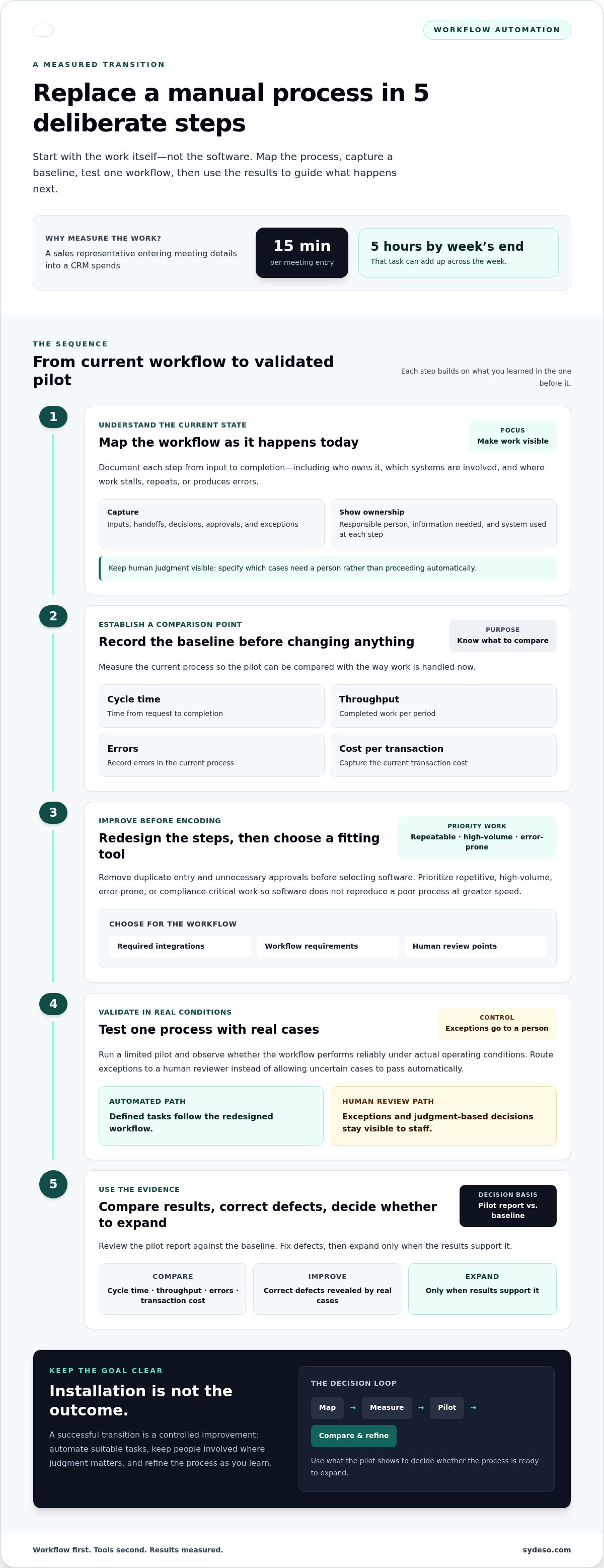
A measured transition follows a clear sequence, from recording the current method to validating a limited automation pilot. Use these steps:
- Map the current workflow, including inputs, handoffs, decisions, and exceptions.
- Record a baseline for cycle time, throughput, errors, and cost per transaction.
- Redesign unnecessary steps, then select a tool that fits the workflow and required integrations.
- Test one process with real cases, while routing exceptions to a human reviewer.
- Compare the pilot report with the baseline, correct defects, and expand only when results support it.
This sequence shows how to automate a manual process without treating installation as the outcome. A pilot reveals whether the workflow performs reliably under actual operating conditions.
Change management and team readiness
Automation changes task ownership, handoffs, and the information employees enter. Before changing a workflow, identify who performs each step and who handles exceptions. For example, if software routes a customer request automatically, decide which team owns unresolved cases and how staff will view the request history.
Businesses should train employees to use automation systems effectively and provide ongoing training. A short practice session can show staff how to review an automated record, correct a data-entry error, and escalate a case. Explain what changes, what remains their responsibility, and how feedback will inform later adjustments.
Use human-centered change management
Involve the people who do the work when documenting the current process. A payroll coordinator may spot an exception managers miss, such as a time entry needing approval before it reaches payroll. Record that exception in the workflow design rather than treating it as an automation failure.
During a pilot, give employees a clear way to report incorrect routing, confusing screens, or missing information. Assign an owner to review each report and communicate changes. This keeps decisions visible and helps teams understand how workflow automation affects their daily responsibilities.
Coordinate service management across teams
Cross-company service management depends on clear ownership across departments. For an employee onboarding request, human resources may collect details, IT may provision access, and a manager may approve role-specific permissions. A shared workflow should show the status, next responsible team, and information required at each handoff.
Define how teams handle delayed or incomplete requests before automating handoffs. For example, route a missing start date back to the request owner instead of leaving it in an IT queue. This structure supports growth by making accountability and service dependencies visible across operations.
Manage AI token use deliberately
AI token use depends on the text sent to a model and the response it produces. A workflow that repeatedly includes long records or irrelevant history can use more tokens than a focused task requires. Identify where AI adds value, such as sorting varied customer messages, and keep fixed calculations or approvals in rule-based steps.
Track usage by workflow and review sample inputs and outputs. Remove unnecessary context, set limits for generated responses, and route uncertain cases to an employee. These controls help teams understand usage patterns while preserving human review for decisions that affect customers or records.
For workflows that cross departments or need tailored controls, workflow automation can connect the process to practical team requirements.
Application switching and workflow fragmentation
Integrate automation with existing finance, HR, or customer relationship systems to reduce duplicate work and keep data flows consistent. Define which system owns each record, then test how updates move between applications.
Workflow Fragmentation from App Switching
Workflow fragmentation occurs when employees move between applications to complete one task. A study instrumenting employees across 20 teams found roughly 1,200 switches between applications and websites per day. It estimated just under four hours per week spent reorienting, about 9% of working time. That time can break concentration and delay the next handoff.
Consider a sales representative who copies a call note from a meeting tool into a CRM, then opens a separate system to schedule follow-up. Each transfer creates another chance for missing or inconsistent details. Repetitive copying also makes it harder to view the full customer history in one place. A connected workflow has a practical purpose: information follows the task instead of relying on an employee to carry it between screens.
To find fragmentation, trace one common request from start to finish. Record each application, manual transfer, approval, and repeated data entry. For example, map a customer enquiry from its arrival in an inbox through CRM updates and the support team’s response. Mark where employees re-enter the same name, order number, or status. These handoffs show where integration may reduce unnecessary switching.
Integrating Automation with Existing Systems
Integration connects automation to the systems employees already use, such as finance, HR, and CRM software. It matters because a workflow can pass data forward without requiring staff to retype each field. The U.S. Department of Labor describes RPA bots as tools that can move data between applications, fill in information, generate reports, and copy and paste.
Start by defining the data exchanged and the system that remains authoritative. For an approved expense, the workflow might send the employee, amount, and approval status from a request form to finance software. Test missing fields, duplicate submissions, and rejected approvals before expanding the connection. These cases show whether the handoff preserves accurate records and supports compliance controls.
Integration design should also account for access and exception handling. For example, an HR workflow can send an employee’s approved details to an account setup system while restricting sensitive fields to authorized staff. Route incomplete records to a named owner instead of silently dropping them. This keeps exceptions visible and assigns responsibility for resolving them.
Assess results by checking for fewer repeated entries, shorter handoffs, and clearer reports. Compare the old and connected processes using the same request type and review window. If employees still open several systems for one strategic decision, the workflow may need redesign. Significant savings come from removing unnecessary transfers, not merely connecting every application.
Efficiency and employee productivity
Automation improves productivity when it removes repetitive work without adding steps. For example, a support workflow can classify incoming tickets and assign them to the right team. Employees then spend less time sorting requests and more time resolving issues that need judgment. Faster handling matters most when a backlog delays customer responses or blocks downstream work.
The scale of routine work can be substantial. Managers spend at least eight hours a week on manual data tasks. Asana’s 2023 survey of global knowledge workers found that 62% of the workday was lost to repetitive, mundane tasks. Those figures point to a practical opportunity: identify recurring tasks, then determine whether automation can reduce effort without weakening accuracy.
Consider a growing company onboarding more than 50 employees per quarter. An automated workflow can create user accounts, assign training modules, and schedule orientation tasks. The team still checks role details and handles exceptions, but it avoids coordinating every handoff manually. In a support team, automation can also help increase processing from 200 to 350 tickets per week with the same team, when the workflow and ticket types support that change.
Implementing automation should start with a defined task and an observable result. Choose one process, such as routing support requests, and record its current cycle time, volume, and error rate. Set a target for faster processing or fewer corrections. Run a pilot, review real cases with employees, and adjust routing rules when the system sends a ticket to the wrong team. A measured trial distinguishes genuine productivity gains from work that has simply shifted elsewhere.
Keep human review for exceptions and decisions that affect customers or operations. An AI agent can classify support tickets, but an employee may need to assess a complaint involving several products or conflicting records. Set clear escalation rules so staff know which cases need attention. This keeps routine processing moving while preserving human judgment where the workflow requires it.
Track more than completed volume. Compare cycle time, throughput, error rates, and employee time spent correcting automated outputs. If ticket volume rises but rework also increases, adjust the workflow before wider use. Review results with the employees who handle the process; their examples can reveal steps or exceptions that system reports miss. Automation supports productivity when it gives people capacity for customer service, product development, and other value-adding work.
Mapping and measuring business processes
A useful process map shows where work starts, who handles it, and what moves it forward. Flowcharts or Business Process Model and Notation (BPMN) diagrams make handoffs, decisions, delays, and errors visible before automation changes the workflow.
Map one process from its first request to its final outcome. For a purchase order, record who submits it, which details are required, who approves it, and how finance receives the result. Include exceptions, such as missing information or a rejected request. Those paths often reveal more about a process than its routine steps.
Record each activity with practical detail:
- Trigger: What event starts the work, such as a customer enquiry arriving?
- Owner: Which role takes responsibility at each handoff?
- Input and output: What information is needed, and what record or decision does the step produce?
- Delay and correction: Where does work wait, and what causes errors or repeated entry?
- Decision rule: Which cases follow fixed rules, and which require employee judgment?
Use the map to distinguish a slow process from a poorly designed one. If staff enter the same supplier details into two systems, remove the duplicate step before automating it. If approval waits because no owner is assigned, clarify responsibility first. Process automation should support the workflow’s intended purpose, not preserve every historical step.
Set a baseline before changing the process. Measure cycle time from the initial request to completion, throughput by completed transactions, error rates, and cost per transaction. For an invoice workflow, compare approval times and how often invoices return for correction. These measures show whether a change improves the work rather than simply shifting it elsewhere.
A prioritization score can help compare candidate processes. Processes scoring 8 or above are strong automation candidates; processes scoring 4 or below should probably be left alone or deleted. Use the score alongside evidence of repetitive work, volume, errors, and compliance needs. A high score does not replace operational judgment, but it gives decision-makers a consistent way to rank opportunities.
After a pilot, compare the same measures against the baseline and review actual cases. If throughput rises but errors increase, inspect the affected decision rules before expanding. Keep a process owner responsible for reviewing performance data and updating rules as work changes. This feedback helps the organization improve automation without losing control of the process.
Use your mapped workflow and baseline measures to plan workflow automation around documented operational needs.
Sydeso: Custom software development
Sydeso helps businesses address manual work with software shaped around documented workflows. When standard tools leave gaps between teams or require repeated data entry, Sydeso’s custom software development and internal tools can support processes built for those operational needs.
For a business testing a new workflow before broader implementation, MVP development can create a focused version for evaluation. Launch and support can help move that work into operation. Start with a clear process map, known handoffs, and measures such as cycle time or error rates. That evidence gives the project a practical scope and a way to assess performance.
Contact Sydeso to discuss a workflow that could benefit from a tailored software solution.
Turn the Workflow Map Into a Clear Next Step
A mapped process gives your team a practical basis for deciding what to change and what to leave alone. Use it to define the task, assign ownership, and set the measure that will show whether a revised workflow helps. This keeps the next move tied to operational needs rather than assumptions about technology.
If existing tools cannot support the workflow, Sydeso offers custom software development and internal tools development for business needs. MVP development can provide a focused way to test a defined solution before broader implementation. Start with the process gap your team has documented, along with the people and systems it affects.
To replace manual business processes, treat automation as an operational change, not just a software decision. Your team brings process knowledge and priorities; the development work turns those needs into a usable tool.
Discuss your workflow priorities with Sydeso and identify a practical next step.
Frequently Asked Questions
BPA vs RPA: What’s the Difference?
Business process automation (BPA) coordinates a broader business workflow, while robotic process automation (RPA) uses software bots to perform specific actions through application interfaces. For example, BPA can manage an expense process from submission through approval and payment. An RPA bot may copy an approved expense record between systems when a direct integration isn’t available. A workflow can use both approaches for different tasks.
Manual processes: Why do they pose risks for businesses?
Manual processes can create inconsistent records, missed handoffs, and reliance on one employee’s memory. For example, if a staff member updates an order spreadsheet but not the inventory system, another team may act on outdated information. Manual handling can also make it harder to trace who changed a record or approved a request. Risks grow when work lacks clear ownership, documented rules, or a reliable process for exceptions.
What Does a Manual Process Actually Cost per Year?
Estimate annual cost by multiplying the time spent on each transaction by its yearly volume and labor cost. Then account for correction time, delays, and work caused by errors. For example, measure how long staff spend correcting incomplete purchase requests, not just processing them. This gives a more useful estimate than counting the visible task alone and helps compare improvement opportunities.
What are the Use Cases for Business Process Automation?
Business process automation suits repeatable tasks with clear inputs and rules. Examples include routing purchase requests, reminding teams about overdue approvals, syncing customer details between systems, and generating routine status reports. A service team could also automate assignment of incoming requests by category, while sending unclear cases to a person. The strongest use cases remove a defined operational bottleneck without hiding decisions employees need to review.
What should you never automate?
Don’t fully automate decisions that depend on context, competing priorities, or serious consequences for a person. A system can sort a customer complaint, for example, but an employee should review a case involving conflicting records or unusual circumstances. Avoid automating a process whose rules are unclear or change frequently. First define decision boundaries, an exception route, and an accountable owner; then automate only the parts that follow stable rules.
Which Processes Do Most Organizations Automate Last?
Processes with frequent exceptions, unclear ownership, or changing rules are poor candidates for early automation. For instance, a custom contract review may require judgment about wording and business context that a fixed workflow can’t capture. Organizations may also defer automating a process used rarely, because maintaining the automation could outweigh its practical value. Review the work first, then decide whether a human-led process supported by software is a better fit.
What manual business processes should companies automate first?
Start with work that happens often, follows stable rules, and creates measurable rework or delay. A team might begin by routing standard service requests before automating unusual complaints. Compare candidate tasks by transaction volume, employee effort, error impact, and the clarity of decision rules. Prioritize a process that can be tested without disrupting dependent teams. A contained first project makes it easier to learn before expanding changes.
How do you identify and map manual business processes?
Follow a real transaction from its starting point to its final record, and ask each person involved to describe their actual steps. Note system changes, approvals, waiting periods, repeated information, and exceptions. Compare several completed cases to find differences between documented procedures and daily practice. A simple map should show the trigger, responsible role, decision, output, and next handoff, giving the team a shared view to review.
Questions
- BPA vs RPA: What’s the Difference?
- Business process automation (BPA) coordinates a broader business workflow, while robotic process automation (RPA) uses software bots to perform specific actions through application interfaces. For example, BPA can manage an expense process from submission through approval and payment. An RPA bot may copy an approved expense record between systems when a direct integration isn’t available. A workflow can use both approaches for different tasks.
- Manual processes: Why do they pose risks for businesses?
- Manual processes can create inconsistent records, missed handoffs, and reliance on one employee’s memory. For example, if a staff member updates an order spreadsheet but not the inventory system, another team may act on outdated information. Manual handling can also make it harder to trace who changed a record or approved a request. Risks grow when work lacks clear ownership, documented rules, or a reliable process for exceptions.
- What Does a Manual Process Actually Cost per Year?
- Estimate annual cost by multiplying the time spent on each transaction by its yearly volume and labor cost. Then account for correction time, delays, and work caused by errors. For example, measure how long staff spend correcting incomplete purchase requests, not just processing them. This gives a more useful estimate than counting the visible task alone and helps compare improvement opportunities.
- What are the Use Cases for Business Process Automation?
- Business process automation suits repeatable tasks with clear inputs and rules. Examples include routing purchase requests, reminding teams about overdue approvals, syncing customer details between systems, and generating routine status reports. A service team could also automate assignment of incoming requests by category, while sending unclear cases to a person. The strongest use cases remove a defined operational bottleneck without hiding decisions employees need to review.
- What should you never automate?
- Don’t fully automate decisions that depend on context, competing priorities, or serious consequences for a person. A system can sort a customer complaint, for example, but an employee should review a case involving conflicting records or unusual circumstances. Avoid automating a process whose rules are unclear or change frequently. First define decision boundaries, an exception route, and an accountable owner; then automate only the parts that follow stable rules.
- Which Processes Do Most Organizations Automate Last?
- Processes with frequent exceptions, unclear ownership, or changing rules are poor candidates for early automation. For instance, a custom contract review may require judgment about wording and business context that a fixed workflow can’t capture. Organizations may also defer automating a process used rarely, because maintaining the automation could outweigh its practical value. Review the work first, then decide whether a human-led process supported by software is a better fit.
- What manual business processes should companies automate first?
- Start with work that happens often, follows stable rules, and creates measurable rework or delay. A team might begin by routing standard service requests before automating unusual complaints. Compare candidate tasks by transaction volume, employee effort, error impact, and the clarity of decision rules. Prioritize a process that can be tested without disrupting dependent teams. A contained first project makes it easier to learn before expanding changes.
- How do you identify and map manual business processes?
- Follow a real transaction from its starting point to its final record, and ask each person involved to describe their actual steps. Note system changes, approvals, waiting periods, repeated information, and exceptions. Compare several completed cases to find differences between documented procedures and daily practice. A simple map should show the trigger, responsible role, decision, output, and next handoff, giving the team a shared view to review.