Signs Your Business Has Outgrown Its Software: A Practical Checklist
Discover the key signs your business has outgrown its software. Use our practical checklist to spot workflow bottlenecks and choose the right upgrade path.

A software replacement can create as much disruption as the problem it’s meant to solve. The signs your business has outgrown its software often appear as extra spreadsheets, repeated data entry, and reports that take longer to trust. But friction doesn’t always mean the software is at fault. A process may need clearer ownership, or an existing system may need better configuration or integration.
It’s reasonable to hesitate before replacing a system your team depends on. The practical test is whether recurring workarounds are consuming staff time, creating errors, or slowing decisions, and whether the cause sits in the process, the software, or the connections between systems.
This checklist will help you identify observable signs of poor software fit and separate symptoms from causes. You’ll compare next steps, from adjusting workflows or improving integrations to developing a tailored tool or modernizing a legacy system. The aim is to define a controlled path forward, not to rush into replacement.
Key Takeaways
- Spot the signs your business has outgrown its software by looking for recurring re-entry, duplicate records, workarounds, and reporting delays.
- Track how often problems occur, the time they take, and the rework or decisions they affect before assigning the cause.
- Separate software limits from unclear ownership, inconsistent processes, and incomplete data.
- Compare process changes, configuration, integrations, and replacement against the specific operational gap each option must address.
- Document critical workflows, system dependencies, and owners to set priorities and define a practical path forward.
Table of Contents
- Signs Your Business Has Outgrown Its Software: What to Look For
- Measure the Operational Impact Before Blaming the Software
- Compare Your Options: Improve, Integrate, or Replace the Software
- Checklist to Decide if the Business Is Ready to Act
- How Sydeso Can Help Turn Software Friction into a Practical Plan
Signs Your Business Has Outgrown Its Software: What to Look For
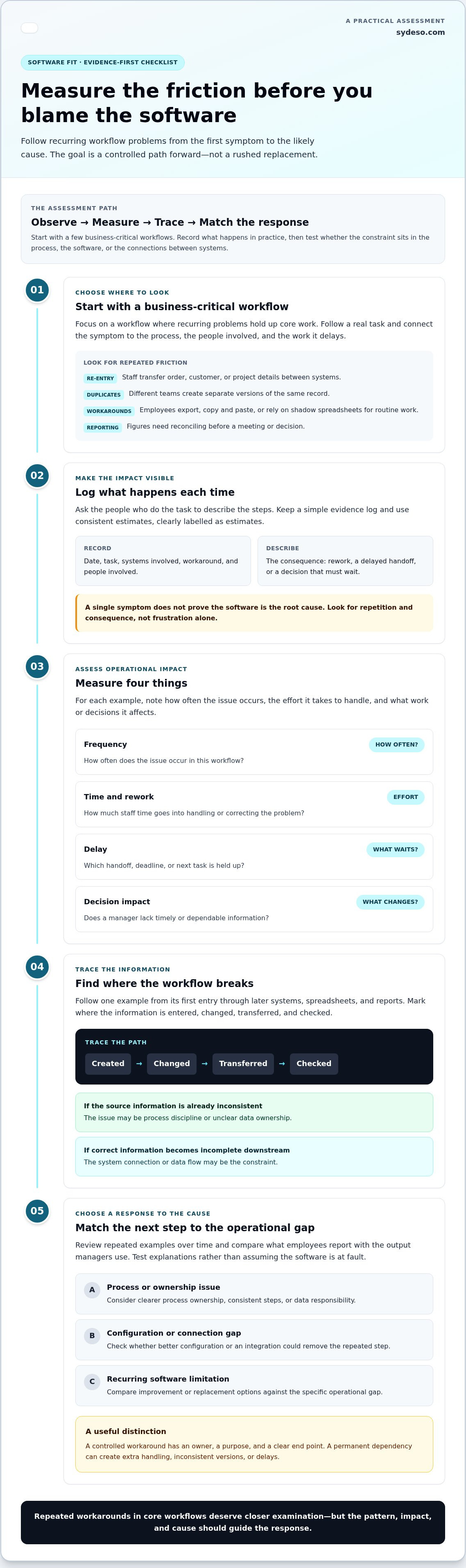
An occasional extra step is an inconvenience. A recurring barrier to core work is a pattern: staff repeatedly leave the system, rebuild information, or delay a task because the software cannot support the workflow. The signs your business has outgrown its software are easier to assess when you connect each one to a process, the people involved, and the work it holds up.
Use this checklist to capture what happens in practice. A single symptom doesn’t prove the software is the root cause. The same issue may come from unclear ownership, inconsistent data entry, or a process that teams handle differently.
- Manual re-entry: Staff transfer order, customer, or project details between systems. Note which teams repeat the entry, what information they re-enter, and whether the extra step delays fulfilment, service, or invoicing.
- Duplicate records: Different teams create separate versions of the same customer, item, or transaction. Record where the copies appear and which record staff use for follow-up.
- Workarounds: Employees export data, copy and paste it, or maintain shadow spreadsheets to complete routine work. Identify the task the workaround enables, who depends on it, and what can go wrong if the file is out of date.
- Reporting delays: Staff spend time reconciling figures before a meeting or decision. Note which report is delayed, who needs it, and what decision must wait.
Look for repetition and consequence, not just frustration. A system may be awkward in one isolated case but still support the process reliably. If the same workaround appears in a core workflow each week, or only one employee knows how to maintain it, that dependency deserves closer examination. The pattern may reflect digital obsolescence, but the label alone won’t identify the cause.
When spreadsheets and workarounds become part of the process
A spreadsheet can be a sensible temporary bridge during a defined transition or for a one-off analysis. It becomes a concern when staff repeatedly export the same data, paste updates into another file, and treat that file as required for routine work. Record how often the steps occur, which roles perform them, and the workflow they support. Note who owns the file and what happens when that person is unavailable.
This distinction matters. A controlled workaround has an owner, a purpose, and a clear end point. A permanent dependency can introduce extra handling, inconsistent versions, or delays. Check whether configuration or clearer process ownership could remove the step before assuming the system itself needs replacing.
When teams cannot rely on shared data
Conflicting records create friction across handoffs. A service team may see one customer detail while finance works from another, or a manager may hesitate because two reports show different totals. Routine decisions then wait for someone to compare files and establish which information is current.
Trace one example from its first entry through every later system, spreadsheet, and report. Record where the value changes, fails to transfer, or gets entered again. If the information is already inconsistent at its source, the issue may be process discipline or ownership. If it is correct at entry but becomes incomplete downstream, the system connection or data flow may be the constraint.
Measure the Operational Impact Before Blaming the Software
Frustration is a useful signal, but it isn’t enough to justify a system change. To assess the signs your business has outgrown its software, measure what recurring problems cost in time, rework, delays, and decisions. Start with a few business-critical workflows rather than collecting every complaint. A focused evidence base is easier to verify and compare.
For each example, record the task, how often the issue occurs, the staff time involved, and what it delays or changes. Include rework, such as correcting an order after information fails to transfer, and identify the decision affected, such as approving work or closing a job. Use estimates consistently and label them as estimates.
- Frequency: How often does the issue occur in the workflow?
- Time and rework: How much staff effort goes into handling or correcting it?
- Delay: Which handoff, deadline, or next task waits?
- Decision impact: Does a manager lack timely or dependable information?
Build an evidence log around recurring workflow failures
Keep a simple log with the date, task, systems involved, workaround, people involved, and consequence. Ask employees who perform the task to describe the steps, then compare their account with managers who use its output. Review entries over time. Repeated instances in the same workflow point to a pattern; one isolated incident may need correction, not a software project.
Trace the cause across software, process, and integrations
Follow the information from creation to review. Note where it is entered, changed, transferred, and checked. If staff manually carry a value between systems, examine whether an API or another integration could address the gap. Also check for unclear ownership, inconsistent steps, or incomplete source data. Those causes may be resolved through process changes or clearer data responsibility.
Use the log to test explanations, not confirm a preferred answer. If an issue disappears when staff follow one agreed process, the main constraint may be process consistency. If accurate information repeatedly fails to reach the next system, investigate the connection or software capability. More than one cause can contribute to the same delay.
Handle security, reliability, or compliance concerns through the appropriate internal review. Record the affected system, workflow, and observed risk, then involve the people responsible for those areas. Don’t treat a general concern as proof that replacement is necessary; assess it on its own evidence and urgency.
Once the evidence is organized, software planning and development can help translate documented workflow gaps into a defined scope. The next step is to compare process changes, integration work, and software changes against the specific cause you found.
Compare Your Options: Improve, Integrate, or Replace the Software
Once you understand the cause of a workflow problem, match the response to it. The signs your business has outgrown its software don’t automatically point to replacement. A process change may be enough, an integration may close a data gap, or tailored development may be needed for a requirement existing systems cannot support.
| Response | Best fit when | Potential benefit | Trade-off to consider |
|---|---|---|---|
| Improve the process or configure the system | The software can support the task, but steps or settings create avoidable friction. | Addresses the issue without changing the core platform. | Requires clear ownership and consistent use; it won’t resolve a functional limit. |
| Integrate existing systems | Each system supports its part of the work, but information doesn’t move reliably between them. | Can reduce manual transfers and keep connected workflows aligned. | Depends on compatible systems, defined data rules, and ongoing oversight. |
| Build or modernize software | A recurring business requirement cannot be met by existing workflows, or legacy architecture constrains necessary changes. | Can address a specific operational gap or support changes to an existing system. | Requires defined scope, implementation planning, and support after launch. |
When process changes or configuration may be enough
Start here if the system already handles the task but employees follow different steps, use inconsistent fields, or repeat checks because roles are unclear. Document the intended workflow, assign ownership, and test whether available configuration can remove unnecessary steps. For example, a team may be able to standardize how it records a request before changing the software.
This route is proportionate when the system can support the agreed process. If the same requirement remains impossible after process and configuration changes, treat that as evidence of a functional or architectural limit. Don’t keep adding procedures around a constraint the system cannot resolve.
When integration, custom software, or modernization fits
Choose integration when separate applications are capable but fail to exchange required information. Map what must pass between them, when it should move, and which system owns each value. An API or other integration may address the handoff; the design still needs clear rules for handling exceptions and maintaining consistent records.
Custom software or an internal tool may fit when a repeated business requirement falls outside the workflows existing systems can support. Keep the scope tied to that requirement rather than rebuilding unrelated functions. Modernization may be appropriate when a legacy system’s architecture restricts maintenance, security work, or planned changes. Those constraints depend on the system and need project-specific assessment.
Compare options against the same criteria: whether the cause is confirmed, how much of the workflow is affected, what dependencies a change introduces, and who will own the result. Select the smallest response that addresses the verified constraint without adding avoidable operational burden.
Checklist to Decide if the Business Is Ready to Act
Readiness doesn’t mean every question has an answer. It means the team can describe the problem, identify who and what it affects, and explain how a proposed change will be tested. Use the signs your business has outgrown its software as a starting point, then work through these steps before committing to a broad transition.
- Define the problem. Name the business-critical workflow and the point where work breaks down. Document the users, systems, data, integrations, and reporting outcomes involved. Separate essential requirements from preferred improvements. For example, accurate transfer of an order may be essential; a redesigned dashboard may be useful but not necessary to resolve the documented issue.
- Gather evidence. Bring together examples from the people who perform the work and those who depend on its output. Note frequency, delays, rework, and consequences. Identify dependencies, such as a spreadsheet, system connection, or individual who keeps a process moving. Keep the record specific enough to compare options against the same operational need.
- Assess options. Compare process changes, configuration, integration, custom development, or modernization against the requirement. Record what each option would address, what it would leave unresolved, and what new dependencies it could create. Include maintainability and business risk in the comparison, not just whether an option appears to remove the immediate workaround.
- Set priorities. Rank issues by business impact, frequency, and the ongoing burden of workarounds. Don’t rely on an invented threshold. A recurring problem affecting a critical handoff may deserve attention before a frequent but low-impact inconvenience. Assign an owner to each priority and establish review points to confirm progress against the original evidence.
Define requirements and protect continuity
Before work begins, map the current workflow and the required outcome. Include the users, information handled, connected systems, and reports the process must produce. Mark each requirement as essential or preferred so that scope stays tied to the problem. Plan for data handling, user testing, training, and continuity of daily operations. A staged scope gives the team a chance to validate a change before extending it to more users or workflows.
Set decision criteria before choosing a solution
Agree on the criteria before comparing proposals: fit with documented requirements, integration needs, maintainability, and business risk. Name the people accountable for the decision, operational validation, and adoption. Set review points, such as confirming that a test workflow produces the required output and that users can complete their tasks. If the change misses the original requirement, revise the scope before expanding it.
If your team has documented the bottlenecks and needs help defining a practical software or modernization scope, Sydeso’s tailored software planning and development can turn those needs into a defined project.
How Sydeso Can Help Turn Software Friction into a Practical Plan
Documented friction gives a project a practical starting point. Sydeso uses affected workflows, dependencies, and business priorities to define a software or modernization scope. The signs your business has outgrown its software may point to a targeted fix, not a full replacement. The right response depends on the gap the team has verified and the systems that must remain in place.
Match the remedy to the documented business need
For a recurring workflow that existing systems cannot support, Sydeso builds custom software or internal tools around the specific task. If capable systems don’t exchange information reliably, its API development and integration work can address the handoff. Workflow automation can reduce repeated manual steps where the process is clear and suitable for automation.
Legacy modernization may fit when older architecture restricts required maintenance or operational changes. That decision depends on the system and its constraints. The goal is to connect each proposed piece of work to an observed need, rather than expand scope based on assumptions.
Move from assessment to a defined software project
A practical project begins with the evidence: which workflow is affected, what users need to do, what data moves through the process, and what systems depend on it. Sydeso uses that information to set boundaries, identify priorities, and define how the work will be validated. This keeps the project tied to operational requirements instead of a broad request to “fix the software.”
Scope should distinguish the first required capability from later improvements. For example, a team may first need a reliable handoff between two systems, while a consolidated reporting view can remain a separate priority. Clear stages make it easier to review decisions, test the work against real tasks, and manage dependencies before expanding the change.
Validation should reflect actual use. Identify representative users and business-critical cases, then check that the proposed solution supports the required workflow and produces the expected outputs. If a test exposes a gap, adjust the scope before deployment. This gives the organization a controlled way to assess the change without treating implementation as an all-at-once transition.
Planning also includes what happens after development. Sydeso supports deployment, launch, ongoing support, and software lifecycle management. Those activities help define how the new or modernized system will be put into operation and maintained as business needs change. The details should follow the project’s requirements and operational ownership.
When you’re ready to turn documented bottlenecks into a defined project, discuss a practical software plan with Sydeso.
Make the Next Step Deliberate
The signs your business has outgrown its software are a reason to plan, not a reason to rush. Choose one recurring workflow and use it to define a contained next step. A clear scope gives your team something concrete to assess before extending a change to other parts of the business.
Sydeso can shape a project around the documented need, whether that calls for custom software, an internal tool, API work, or workflow automation. Planning also accounts for launch and ongoing software lifecycle management, so the work has a path beyond development.
Use your workflow evidence to set priorities, define what success looks like, and decide which systems must remain connected. That gives the next project a practical starting point and a basis for evaluating the result.
Frequently Asked Questions
How do I know if my business has outgrown its software?
Look for recurring friction that affects core work, not a single awkward task. The signs your business has outgrown its software are stronger when separate teams encounter the same limitation or when the issue grows as work volume increases. Compare how a workflow operates now with how it operated before. If staff must regularly adjust the process to fit the system, investigate the cause and its effect on customers, deadlines, or decisions.
Can process changes solve software problems without replacing the system?
Yes, if the system can support the required task and the difficulty comes from inconsistent practices. For example, a team may enter requests in different formats, making later review harder. Agree on one intake method, assign responsibility for required fields, and test the revised steps on real work. If staff still need to bypass a system limitation after following the agreed process, the issue may require configuration, integration, or a software change.
What happens if a business keeps using software that no longer fits?
Workarounds can become routine operating costs. Staff may spend more time checking or correcting information, while managers make decisions from delayed or incomplete records. A process that depends on one employee’s spreadsheet knowledge can also become difficult to transfer when responsibilities change. The impact varies by workflow, so track where errors, delays, or extra handling occur and whether they affect customer commitments, financial review, or internal planning.
Is custom software always the right choice for a growing business?
No. Custom software makes sense only when a defined business need cannot be handled proportionately through process changes, configuration, or integration. A tailored internal tool may suit a recurring task that falls outside existing workflows, but it also needs an owner and a plan for maintenance as requirements change. Compare the specific gap with the work required to build and manage a solution before deciding to develop something new.
How can a business tell whether it needs software integration or replacement?
Check whether each system can perform its assigned task and whether the problem occurs at the point where information moves between them. If both systems meet their needs but staff manually transfer the same data, integration may be appropriate. If a system cannot support a required function even when used as intended, replacement or modernization may warrant assessment. Trace a representative transaction end to end to locate the actual constraint.
How much disruption does a software modernization project cause?
Disruption depends on the systems involved, the workflows being changed, and how data and users move to the updated environment. A change limited to one function affects different work than a broad system transition. Before work begins, identify critical operating periods, connected applications, data that must remain usable, and the users who need preparation. Testing a defined scope before wider rollout can expose issues while the change is still contained.
What information should I gather before planning a software replacement?
Gather current workflow documents, system and integration inventories, data owners, user roles, and the reports teams rely on. Include examples of work that the current system cannot handle, plus known data-quality or access constraints. Note which functions are essential and which can wait. This gives the project team a usable starting point for defining scope, planning data handling, and setting acceptance criteria tied to day-to-day work.
Questions
- How do I know if my business has outgrown its software?
- Look for recurring friction that affects core work, not a single awkward task. The signs your business has outgrown its software are stronger when separate teams encounter the same limitation or when the issue grows as work volume increases. Compare how a workflow operates now with how it operated before. If staff must regularly adjust the process to fit the system, investigate the cause and its effect on customers, deadlines, or decisions.
- Can process changes solve software problems without replacing the system?
- Yes, if the system can support the required task and the difficulty comes from inconsistent practices. For example, a team may enter requests in different formats, making later review harder. Agree on one intake method, assign responsibility for required fields, and test the revised steps on real work. If staff still need to bypass a system limitation after following the agreed process, the issue may require configuration, integration, or a software change.
- What happens if a business keeps using software that no longer fits?
- Workarounds can become routine operating costs. Staff may spend more time checking or correcting information, while managers make decisions from delayed or incomplete records. A process that depends on one employee’s spreadsheet knowledge can also become difficult to transfer when responsibilities change. The impact varies by workflow, so track where errors, delays, or extra handling occur and whether they affect customer commitments, financial review, or internal planning.
- Is custom software always the right choice for a growing business?
- No. Custom software makes sense only when a defined business need cannot be handled proportionately through process changes, configuration, or integration. A tailored internal tool may suit a recurring task that falls outside existing workflows, but it also needs an owner and a plan for maintenance as requirements change. Compare the specific gap with the work required to build and manage a solution before deciding to develop something new.
- How can a business tell whether it needs software integration or replacement?
- Check whether each system can perform its assigned task and whether the problem occurs at the point where information moves between them. If both systems meet their needs but staff manually transfer the same data, integration may be appropriate. If a system cannot support a required function even when used as intended, replacement or modernization may warrant assessment. Trace a representative transaction end to end to locate the actual constraint.
- How much disruption does a software modernization project cause?
- Disruption depends on the systems involved, the workflows being changed, and how data and users move to the updated environment. A change limited to one function affects different work than a broad system transition. Before work begins, identify critical operating periods, connected applications, data that must remain usable, and the users who need preparation. Testing a defined scope before wider rollout can expose issues while the change is still contained.
- What information should I gather before planning a software replacement?
- Gather current workflow documents, system and integration inventories, data owners, user roles, and the reports teams rely on. Include examples of work that the current system cannot handle, plus known data-quality or access constraints. Note which functions are essential and which can wait. This gives the project team a usable starting point for defining scope, planning data handling, and setting acceptance criteria tied to day-to-day work.