Workflow Automation: How It Prevents Errors and Reduces Risk
Reduce errors with workflow automation through data validation, approval gates, and exception handling. Learn how to prevent mistakes and operational risk.

Workflow automation reduces preventable errors by applying consistent rules to routine tasks, validating information, and routing exceptions for review. Businesses can reduce errors with workflow automation when the process is clearly defined and the system checks data before work moves forward. It can limit missed steps and inconsistent handling, but rules and inputs still need careful attention.
Manual processes often rely on people remembering instructions, transferring information, and coordinating handoffs. Rushed work, unclear ownership, or incomplete records can cause mistakes that spread to later tasks and take time to correct. This article explains how workflow automation works, where manual processes tend to fail, and how validation, approval steps, and exception handling can reduce operational risk and data errors. It also explains why flawed data or poorly designed rules can carry errors forward instead of preventing them.
Key Takeaways
- Map and simplify a process before automating it so the system doesn’t make an inefficient workflow run faster.
- Clean existing records before transferring data between CRM and ERP systems to avoid carrying mistakes into connected workflows.
- Plan how automated workflows will exchange information with other systems, including how they handle missing or inconsistent data.
- Use validation, approval gates, and exception handling to keep work moving while directing issues that need judgment to people.
Table of Contents
- Why Are Manual Processes Prone to Failure?
- What Is the True Cost of a Single Data Error?
- Breaking Down the Basics: What Does Workflow Automation Entail?
- How workflow automation reduces errors and risks
- Sydeso: Workflow automation
Why Are Manual Processes Prone to Failure?
Manual processes rely on people to remember instructions, enter data, and complete handoffs consistently. Fatigue, rushed work, unclear ownership, and uneven training can lead to missed steps or misclassified information. In McKinsey’s State of Organizations research, two-thirds of executives consider their organizations overly complex and inefficient. A structured workflow makes each task, owner, required input, and next step visible.
Start by mapping the current process from its first trigger to its final outcome. Record who handles each task, what information they need, where approvals occur, and how exceptions are resolved. For example, a purchase request map might show an employee’s submission, a manager’s approval, and finance’s payment step. Mapping can reveal duplicate entry, unnecessary handoffs, and unclear decisions. Simplify the process before automating it; otherwise, automation may make a weak process run faster without fixing its design.
Frequent, predictable, rules-based, time-consuming processes are usually better automation candidates than work requiring judgment. Repetitive manual tasks consume staff time, while automation needs design, testing, maintenance, and oversight. Compare those ongoing costs with the time spent correcting mistakes and completing routine tasks. A stable invoice-routing process may suit automation; a sensitive decision requiring context may not.
In the US, security, privacy, and compliance controls should reflect the information a workflow handles and who is authorized to access it. Define access roles, required approvals, evidence records, and retention handling as process requirements. Automated rules can enforce assigned ownership and required fields, but poorly designed logic can introduce new errors.
Successful implementation starts by mapping and simplifying the workflow, then defining rules, owners, and exception paths before building and testing the automation. Clean existing data first so incorrect records do not flow through the new process. The strongest candidates have measurable completion criteria and stable rules. To assess ROI and error rates, establish a baseline, then track rework, error frequency, and first-pass yield, the share of items completed without correction. Review cycle-time variation as well as average speed to see whether the process is becoming more consistent.
What Is the True Cost of a Single Data Error?
A data error rarely stays in one field. A mistyped customer address can affect order fulfillment, invoices, support records, and reporting. Data errors cost US companies more than $3 trillion a year, according to the research fact provided. That total reflects more than correction time: inaccurate records can delay operations, trigger duplicate work, and weaken decisions based on faulty reports.
Entry mistakes take several forms. An employee might transpose digits in an account number, select the wrong customer, omit a required field, or use the wrong format. A duplicate record can split a customer’s history across two profiles. Each error makes it harder for later teams to act on a complete, consistent record.
The consequences can be substantial. A bank teller accidentally transferred $293 million of the employer’s money to a private account. That example shows how an incorrect transaction can become a financial and control issue, not just an administrative correction. In routine business operations, a wrong quantity or price can also lead to an incorrect order, payment dispute, or inaccurate inventory report.
Automated data transfer between a customer relationship management (CRM) system and an enterprise resource planning (ERP) system can reduce rekeying between sales and finance. The workflow maps fields such as customer ID, order number, and item quantity, then validates required values before passing the record onward. A mismatch can pause processing for review instead of allowing incorrect information to spread.
Clean existing data before connecting systems. Remove duplicate records, correct invalid formats, and resolve conflicting customer details; otherwise, automation can reproduce the same defects at scale. A sound transfer also needs clear ownership for exceptions and a record of what moved, when, and from which system. Well-designed automated data workflows can make those handoffs easier to trace, while review remains essential for flagged records.
Breaking Down the Basics: What Does Workflow Automation Entail?
Workflow automation uses defined rules to move tasks and information through business processes. For example, a completed intake form can trigger record creation, validation, and routing to the right team.
Workflow Integration with Other Systems
Integration connects an automated workflow with the systems that store or use its information. A workflow can pass a customer update from a form to a business database, then route the record for review. This reduces repeated entry and helps connected teams work from consistent information. Each connection needs clear field mappings, validation rules, and an exception path for missing or conflicting values.
In healthcare, automation can handle repetitive administrative tasks without taking over clinical judgment. It can capture vital signs and sync the data securely with connected electronic health record systems. Structured patient intake also supports reliable records: consistent fields for contact details and symptoms help staff find information and avoid unnecessary delays.
Data Integrity and Accurate Filing
Data integrity means keeping information complete, consistent, and accurate as it moves between systems. Accurate filing applies agreed categories and naming rules so employees can retrieve the right record. For example, a workflow can require a document type before saving an uploaded file. Validation can stop incomplete information from advancing, while clear exception routing sends unusual records for human review.
Before a workflow creates a new record, it should check required fields and match information to the correct source. A patient intake process, for instance, can flag a missing date of birth instead of filing an incomplete entry. These checks help prevent mistakes from entering later steps, where they could affect reporting, follow-up, or service delivery.
System connections also need clear ownership. Teams should specify which system is authoritative for each field, how updates move, and what happens when values conflict. If an EHR and an intake system hold different contact details, a documented rule can route the mismatch for review rather than silently overwrite a record. Clear rules make automated handoffs easier to trace and maintain.
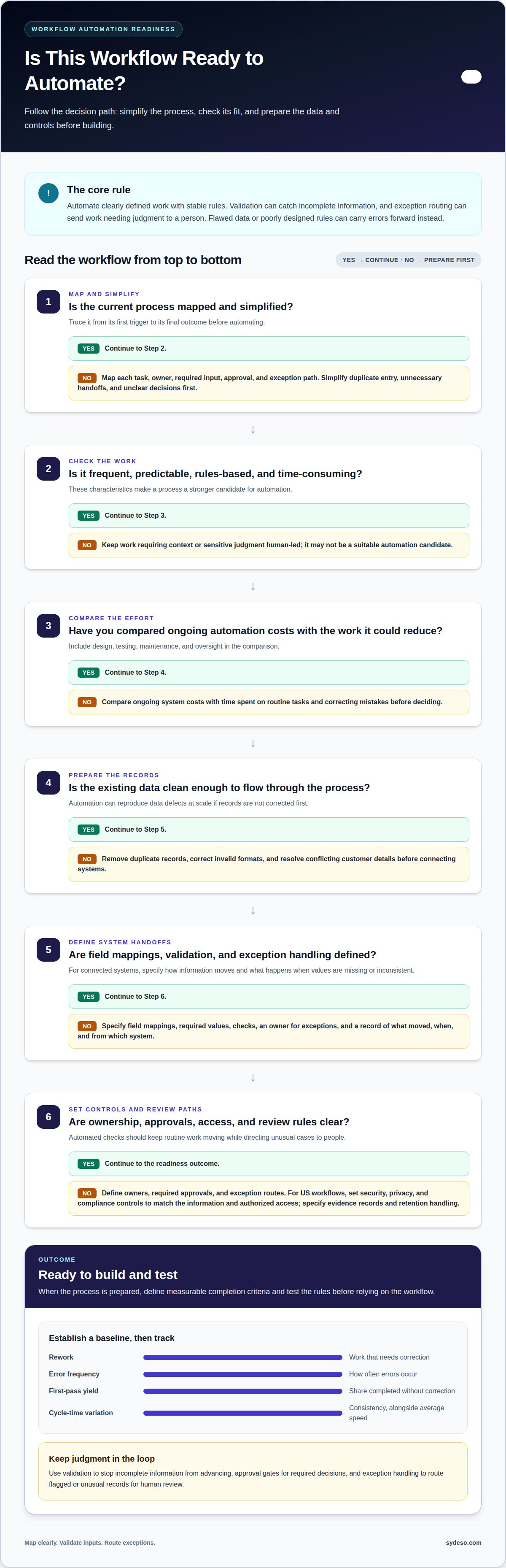
How workflow automation reduces errors and risks
Workflow automation reduces human error by applying defined rules at each handoff. A sales order, for example, can be checked for required fields before approval routing begins. The workflow can stop an incomplete order instead of sending it to fulfillment. This improves efficiency by preventing avoidable corrections from reaching later steps. Teams can reduce errors with workflow automation when every rule reflects an agreed business process.
There is no single error-reduction figure that applies to every workflow. Results depend on the starting error rate, data quality, validation rules, and exception handling. Establish a baseline, then compare error frequency and rework after deployment. Track first-pass yield, the share of items completed without correction, alongside cycle-time variation.
Controls should match the task. A workflow can validate customer IDs, enforce policy thresholds, require supporting evidence, and route approvals to authorized roles. It can also pause when a SKU is missing or an amount conflicts with a defined rule. These checks prevent an invalid record from advancing unchecked.
Automation still carries risks. Incorrect logic can apply the wrong rule consistently, while poor source data can spread mistakes across connected systems. Missing data, conflicting rules, and failed validation need clear exception paths. The workflow should capture context, pause safely, and send the issue to a person with authority to resolve it. Decisions requiring empathy, experience, or contextual judgment should remain with people.
For higher-risk processes, use human approval gates, confidence thresholds, and complete audit trails. Record each transfer’s source and timestamp so teams can trace changes and investigate failures. Review alerts and exception patterns after launch, then adjust rules when recurring issues reveal a gap. A practical way to reduce errors with workflow automation is to make these reviews part of ongoing process ownership. Automation can reduce preventable mistakes, but it cannot replace sound process design or oversight.
Define the controls, review points, and exception paths your process needs with workflow automation development.
Sydeso: Workflow automation
Sydeso builds workflow automation for businesses that need consistent rules, clear handoffs, and fewer manual data transfers. It can help when routine tasks move across teams or systems but errors persist because checks, ownership, or exception paths are unclear. The work starts with the process: Sydeso defines its steps and requirements, then builds automation around the agreed workflow. Internal tools or custom software can provide a tailored operational interface. Your team defines the business rules and review responsibilities; Sydeso builds software to apply them. Contact Sydeso to discuss automating a process.
Make the Next Process Easier to Trust
The next step is to choose a process where clearer ownership and consistent execution would make a practical difference. Define what a completed task looks like, who handles exceptions, and which decisions need human review. Those boundaries give the work a clear purpose before development begins.
A measured first release can help a team put those rules into operation and learn from real use. Sydeso offers custom software development, internal tools development, and MVP development for businesses shaping software around their workflows. The right approach depends on the process, the systems involved, and the people responsible for its outcomes.
Use those criteria to turn the goal to reduce errors with workflow automation into a defined project, with clear responsibilities for both the software and its users. Contact Sydeso to discuss workflow automation and the process you want to improve. A clear starting point makes the next decision easier.
Frequently Asked Questions
Can automation fix bad data?
No. Automation can flag records that fail defined checks, but it can’t determine the correct value without a reliable source. For example, a format check may identify an invalid email address, but it can’t establish the customer’s current address. Teams need to correct inaccurate source records, decide which system owns each field, and set rules for handling duplicates before automated updates begin.
How Does Automation Guarantee Reliability?
Automation can’t guarantee reliability. Teams can make workflows more dependable by testing expected cases and exceptions before release, then reviewing performance in use. For example, test a complete request, a missing attachment, and a conflicting approval before routing live work. Document the expected result for each case. Revisit those tests when process rules or connected systems change.
How Does Workflow Automation Reduce Costly Human Errors?
Automation reduces opportunities for routine slips by applying the same checks every time. For example, an expense workflow can verify that a receipt is attached and return incomplete submissions before approval. Staff spend less time correcting avoidable omissions, while reviewers can focus on decisions that need context. The value comes from preventing errors early, before they affect payment or financial reporting.
Is automation expensive?
There isn’t one cost that applies to every automation project. The effort depends on the process’s complexity, the systems it must connect, the number of exceptions, and the testing and maintenance required. A single, stable approval flow has different demands from a workflow spanning several departments. Compare implementation and upkeep with the current labor, rework, and delays tied to the process.
What is exception handling in automation?
Exception handling defines what happens when a workflow can’t safely follow its normal path. A missing purchase order field, conflicting approval, or failed validation can trigger a pause rather than silent processing. The workflow should preserve relevant details, route the issue to an assigned reviewer, and record the resolution. That record helps teams identify recurring causes and refine process rules.
How does workflow automation reduce human errors?
Automation moves repetitive, rule-based actions out of manual execution, where attention and consistency can vary. A document workflow, for example, can classify files using agreed naming rules and direct uncertain items to a person. This keeps routine sorting consistent without assigning the system decisions that require judgment. Clear roles also help staff know which tasks need their attention and authority.
Questions
- Can automation fix bad data?
- No. Automation can flag records that fail defined checks, but it can’t determine the correct value without a reliable source. For example, a format check may identify an invalid email address, but it can’t establish the customer’s current address. Teams need to correct inaccurate source records, decide which system owns each field, and set rules for handling duplicates before automated updates begin.
- How Does Automation Guarantee Reliability?
- Automation can’t guarantee reliability. Teams can make workflows more dependable by testing expected cases and exceptions before release, then reviewing performance in use. For example, test a complete request, a missing attachment, and a conflicting approval before routing live work. Document the expected result for each case. Revisit those tests when process rules or connected systems change.
- How Does Workflow Automation Reduce Costly Human Errors?
- Automation reduces opportunities for routine slips by applying the same checks every time. For example, an expense workflow can verify that a receipt is attached and return incomplete submissions before approval. Staff spend less time correcting avoidable omissions, while reviewers can focus on decisions that need context. The value comes from preventing errors early, before they affect payment or financial reporting.
- Is automation expensive?
- There isn’t one cost that applies to every automation project. The effort depends on the process’s complexity, the systems it must connect, the number of exceptions, and the testing and maintenance required. A single, stable approval flow has different demands from a workflow spanning several departments. Compare implementation and upkeep with the current labor, rework, and delays tied to the process.
- What is exception handling in automation?
- Exception handling defines what happens when a workflow can’t safely follow its normal path. A missing purchase order field, conflicting approval, or failed validation can trigger a pause rather than silent processing. The workflow should preserve relevant details, route the issue to an assigned reviewer, and record the resolution. That record helps teams identify recurring causes and refine process rules.
- How does workflow automation reduce human errors?
- Automation moves repetitive, rule-based actions out of manual execution, where attention and consistency can vary. A document workflow, for example, can classify files using agreed naming rules and direct uncertain items to a person. This keeps routine sorting consistent without assigning the system decisions that require judgment. Clear roles also help staff know which tasks need their attention and authority.