Workflow Automation or Manual Processes: Compare the Risks
Compare workflow automation vs manual processes to assess visibility, error risk, and scalability, map handoffs, and decide which tasks need human judgment.
Automation is not automatically the safer choice. In a workflow automation vs manual processes comparison, automation means software carries out defined steps, while manual work relies on people to complete them. The better fit depends on how often tasks repeat, how clearly each step must be tracked, and how exceptions are handled.
Manual work allows direct human judgment, but repeated handoffs and data entry can make progress harder to track. Automation can make routine steps more consistent and visible, but it still needs clear rules and oversight. Neither approach removes the need for accountable decisions.
This comparison explains what automated processes are and how the two approaches differ in visibility, error risk, and scalability. You’ll also learn how to map a workflow, identify tasks that should remain manual, and decide when a tailored system can support the work while keeping responsibility clear.
Key Takeaways
- Map each handoff before choosing a tool. A process flowchart can expose duplicate data transfers and show which decisions need human judgment.
- Prioritize repetitive, rule-based tasks for automation, while keeping exceptions and judgment-heavy work under clear human oversight.
- Compare the two approaches by how well they expose progress, prevent recurring errors, and handle heavier workloads.
- When simple tools cannot support the full process, tailored software or internal tools can connect steps around the way your team works.
Table of Contents
- What is an automated process?
- Manual process visibility, error risk, and scalability
- Moving from simple workflows to complete processes
- Automation versus manual processes
- Sydeso: Custom software development
What is an automated process?
To compare workflow automation vs manual processes, first identify who performs each step. Software follows defined rules; employees carry out manual steps themselves.
Workflow and Process Automation
Workflow automation uses software to move tasks through a defined sequence. For example, a completed form can trigger an approval and notify the reviewer. Process automation connects broader operations, often across several workflows or systems. In both cases, software executes steps, while employees maintain the rules and review exceptions. Clear records help teams trace each stage.
Digital Process Automation
Digital process automation coordinates an end-to-end operation across people, systems, and data. A customer request might move from intake to review, then update a business record. Unlike automating a single task, it connects multiple stages and handoffs. This broader scope can improve visibility, but it also requires clear ownership and reliable system integration.
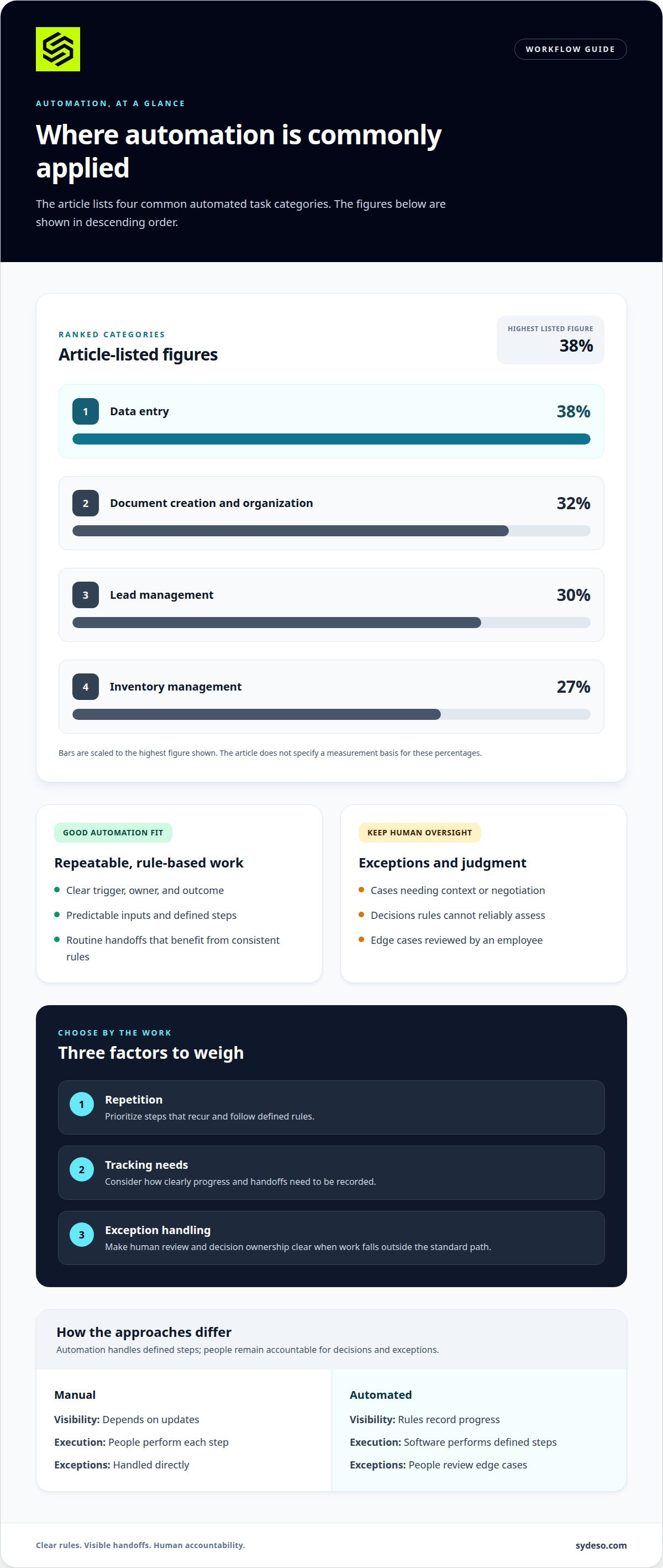
A manual process relies on people to perform each action, such as entering an order into a spreadsheet. An automated process uses software for defined actions and leaves exceptions for employee review. Common automated task categories include data entry at 38%, document creation and organization at 32%, lead management at 30%, and inventory management at 27%.
For a small business, software cost depends on workflow complexity, integrations, users, and support needs; pricing follows a quote request.
Calculate ROI by comparing the value gained with implementation and operating costs. Include time saved, errors or rework avoided, and ongoing maintenance.
Map a process by recording its trigger, steps, owners, systems, handoffs, decisions, and exceptions. This makes it easier to see where automation could help.
U.S. businesses commonly use CRM, project-management, accounting, and inventory platforms, alongside API connectors. Choose tools according to the process they need to support.
| Option | Visibility | Execution | Exceptions |
|---|---|---|---|
| Manual | Depends on updates | People perform each step | Handled directly |
| Automated | Rules record progress | Software performs defined steps | People review edge cases |
When deciding between workflow automation vs manual processes, weigh repetition, tracking needs, and exception handling.
Manual process visibility, error risk, and scalability
A paper checklist can make handoffs visible, but only if employees keep it updated. Repeated manual steps also create more opportunities for missed entries and delays.
Standardization and Error Reduction
Standardization gives employees the same steps, fields, and review points. For example, an order checklist can require a customer record, item count, and approval before fulfillment, making incomplete work easier to spot. Automation can apply those rules consistently and reduce errors from repeated copying. People still need to maintain the instructions and handle exceptions outside the standard path.
Manual Errors and Process Delays
Manual processes depend on people to notice, enter, and pass along information. A staff member might copy an address incorrectly or leave an approval request in an inbox. The next employee may then wait or work from inaccurate details. The U.S. Environmental Protection Agency notes that route planning is complex and prone to human error. A defined review step can catch mistakes before they affect later tasks.
Visibility depends on how each task is recorded. A shared spreadsheet can show an order’s owner and status, but a missed update can hide its actual progress. Improve the record by assigning an owner to every handoff and noting when work starts, pauses, or finishes. This helps managers find bottlenecks without relying on memory or scattered messages.
Manual capacity depends on employees having time to complete each step. As requests increase, staff must process more entries, approvals, and follow-ups. Queues can grow, and consistent execution can become harder. A route planner, for instance, must account for several constraints; the U.S. Environmental Protection Agency identifies route planning as suited to automation because of its complexity and error risk.
If repeated handoffs are difficult to track, a mapped workflow can show where automation may help. Workflow automation can apply defined rules to routine steps while leaving exceptions for employee review.
Moving from simple workflows to complete processes
A single approval can be automated on its own. End-to-end business processes also connect departments, systems, data, and exceptions.
Tasks That Should Remain Manual
Keep tasks manual when they require context, judgment, or negotiation. For example, an employee should review an unusual customer complaint before approving a remedy. A process flowchart can reveal duplicate data transfers and identify steps that should remain manual, according to the CDC. This makes human ownership visible within the wider process.
Keep a step manual when the right action depends on facts that rules cannot reliably assess. Make the decision owner clear, and record how the decision affects the next handoff.
Business Processes Suited for Automation
Processes with repeatable rules and predictable inputs are stronger candidates for automation. Examples include routing a completed form, creating a standard record, or sending an approval to the assigned reviewer. Automating these steps can improve efficiency while employees retain control of exceptions. Automation is less suitable when each case requires a different decision or negotiation.
Start with a task that has a clear trigger, owner, and outcome. Then assess whether its repeated steps connect smoothly to other business processes.
To move beyond one workflow, map the full process from its starting event to its final record. Mark each system, handoff, decision, and exception. The CDC notes that a flowchart can expose duplicate entries, helping teams remove unnecessary transfers before connecting stages. The map also gives everyone a shared view of the process.
Complexity increases when a process crosses departments or relies on separate records. A request, for example, may pass through intake, review, approval, and account updates. Each connection needs an owner and a clear rule for incomplete information. A flexible process should handle exceptions without obscuring the standard route, so teams can monitor both.
Build data security into the design rather than adding it at the end. The European Union identifies GDPR as an example of a data privacy regulation that businesses must comply with when handling sensitive data. Define which records each stage uses, who can access them, and where updates are stored. These decisions shape the process scope and system integration.
Automation versus manual processes
Neither approach eliminates operational risk. Compare how each handles repeatable work, exceptions, oversight, and rising demand.
Automated Processes
Software follows defined rules, allowing teams to streamline repetitive tasks across consistent cases. A submitted request might create a record, assign an owner, and start an approval. Automation can handle routine steps without fatigue, but unclear rules can repeat mistakes at scale. Employees still need to monitor exceptions and update the process as requirements change.
In a Salesforce survey, 90% of workers surveyed said automation increased their productivity. A Zapier report says 66% of SMB employees say automation lets them focus on more creative tasks and projects. These findings describe reported benefits, not a reason to automate every task.
Manual Processes
People complete each step directly and can adapt their decisions to context that software rules may not capture. A staff member can pause an unusual request, examine the details, and choose a response. That flexibility supports judgment, but repeated copying and handoffs require attention. A missed update can also make progress harder to see.
A Zapier report says 44% of SMB employees say they are not highly efficient or productive at work. The same report says one in five SMB employees say automation has increased their work accuracy. Together, these figures suggest reviewing where repetitive work consumes attention, rather than treating automation as a universal replacement.
Use automation when inputs, rules, and expected outcomes are consistent. Keep human review for exceptions, sensitive decisions, and work requiring interpretation. A blended process can automate routine stages while employees control decisions that affect customers or records. Track where a task starts, who reviews it, and how errors are corrected.
Choose a small, repetitive process first. Record its current handoffs, error points, and review responsibilities. Then compare the automated version against those same criteria. If the process becomes harder to understand or correct, retain manual control at that stage. If clear rules remove avoidable repetition, explore workflow automation for the defined steps.
Sydeso: Custom software development
Sydeso builds custom software for businesses whose processes need a better fit than disconnected tools provide. If automation spans teams, depends on internal records, or needs clear human review points, custom software can be designed around those requirements.
Internal tools give employees a focused way to manage tasks and information. For a new product or process, MVP development can create a working version before further development. Sydeso also provides launch and support to put tailored software into operation, with ongoing monitoring, fixes, and new features available as a separately billed service.
Bring a process map, its handoffs, and the decisions employees need to make. That gives the conversation a clear starting point. Contact Sydeso to discuss your workflow, or visit sydeso.com.
Turn the comparison into a practical next step
Make the decision using a real process, not an abstract policy. Choose a workflow with repeated handoffs or unclear ownership. Record its starting point, required decisions, and final outcome. Then decide which steps need consistent rules and which depend on employee judgment.
The workflow automation vs manual processes decision can change as the work evolves. Assign someone to review the process, correct its rules, and handle exceptions. This gives your team a way to adapt without treating automation as permanent or manual work as a failure.
When existing tools cannot support the process, Sydeso offers custom software, internal tools, and MVP development. These services can shape a system around defined operational needs. Bring a process map and the areas your team wants to improve.
Contact Sydeso to discuss automation. A clear next step can help your team move forward with purpose.
Frequently Asked Questions
How does workflow automation reduce human error?
Workflow automation can reduce errors by applying the same checks each time information moves. For example, a form can require an account number before a request proceeds. Controlled data transfers can also prevent details being retyped between systems. Teams still need to verify the rules and review exceptions. Incorrect instructions can repeat the same mistake across every transaction that follows.
What are common challenges in switching from manual to automated workflows?
Common challenges include unclear ownership, inconsistent records, and exceptions missing from the original process. A team moving approvals from email into software must decide which request details are required and who can approve each case. Employees also need to learn the new steps. Testing with realistic scenarios helps uncover gaps before the automated workflow becomes part of daily operations.
How does workflow automation improve business efficiency?
Automation can reduce the time employees spend transferring information or checking routine task status. A service team, for example, could route incoming requests to the right queue and record each assignment. Managers can then see where requests are waiting and adjust responsibilities. Measure the process before and after changes, including rework and stalled handoffs, so efficiency means more than simply completing tasks faster.
What industries benefit the most from automation?
Industries with repeatable records and frequent handoffs can offer useful automation opportunities. A distributor might route stock requests, a professional services firm might process client intake, and a support team might classify incoming cases. The deciding factor is the task, not the industry label. Work with stable inputs and clear rules is easier to automate than work requiring case-by-case judgment.
What is a manual process?
A manual process is completed through people’s actions rather than software performing the steps. For example, an employee might receive a request by email, copy its details into a spreadsheet, and send it to a manager for approval. To document the process, record who performs each action and what information they pass to the next person.
What is the difference between workflow automation and manual processes?
The main difference is who carries out the defined steps. With automation, software performs actions set by rules; with manual work, employees carry them out directly. A blended process might use software to sort incoming requests while a staff member decides how to handle unusual cases. Compare the approaches by looking at ownership, exception handling, record accuracy, and how easily teams can trace a decision.
Questions
- How does workflow automation reduce human error?
- Workflow automation can reduce errors by applying the same checks each time information moves. For example, a form can require an account number before a request proceeds. Controlled data transfers can also prevent details being retyped between systems. Teams still need to verify the rules and review exceptions. Incorrect instructions can repeat the same mistake across every transaction that follows.
- What are common challenges in switching from manual to automated workflows?
- Common challenges include unclear ownership, inconsistent records, and exceptions missing from the original process. A team moving approvals from email into software must decide which request details are required and who can approve each case. Employees also need to learn the new steps. Testing with realistic scenarios helps uncover gaps before the automated workflow becomes part of daily operations.
- How does workflow automation improve business efficiency?
- Automation can reduce the time employees spend transferring information or checking routine task status. A service team, for example, could route incoming requests to the right queue and record each assignment. Managers can then see where requests are waiting and adjust responsibilities. Measure the process before and after changes, including rework and stalled handoffs, so efficiency means more than simply completing tasks faster.
- What industries benefit the most from automation?
- Industries with repeatable records and frequent handoffs can offer useful automation opportunities. A distributor might route stock requests, a professional services firm might process client intake, and a support team might classify incoming cases. The deciding factor is the task, not the industry label. Work with stable inputs and clear rules is easier to automate than work requiring case-by-case judgment.
- What is a manual process?
- A manual process is completed through people’s actions rather than software performing the steps. For example, an employee might receive a request by email, copy its details into a spreadsheet, and send it to a manager for approval. To document the process, record who performs each action and what information they pass to the next person.
- What is the difference between workflow automation and manual processes?
- The main difference is who carries out the defined steps. With automation, software performs actions set by rules; with manual work, employees carry them out directly. A blended process might use software to sort incoming requests while a staff member decides how to handle unusual cases. Compare the approaches by looking at ownership, exception handling, record accuracy, and how easily teams can trace a decision.